

As AI adoption accelerates and digital estates continue to grow, organizations need greater visibility, stronger governance, and more resilient protection for their data, applications, and agents. This month’s updates deliver new capabilities across the AvePoint Confidence Platform designed to strengthen cyber resilience, improve AI governance, simplify lifecycle management, and reduce administrative overhead.
Explore the latest innovations across the AvePoint Confidence Platform below, or jump directly to the updates most relevant to your organization.
- Command Centers
- Adoption Analytics
- Backup and Recovery
- Data Governance
- Data Migration
- Information Lifecycle Management
- Access and Workflow Management
- Policies and Insights
Register now for our November 5 webinar to see the latest AvePoint Confidence Platform innovations for cyber resilience, AI governance, and simplified administration across Microsoft 365 and beyond.
Command Centers
What’s New in AgentPulse?
As organizations expand their use of AI agents, understanding who owns them, who can access them, and how they are being used becomes increasingly important. This month’s updates strengthen visibility and control across the agent lifecycle while expanding support for additional AI platforms.
Support for Amazon and Anthropic Claude agents extends reporting and governance visibility beyond Microsoft-based agents, helping organizations manage a broader AI ecosystem from a centralized experience. The new Origin column in agent inventory makes it easier to identify whether an agent was published by a first-party, third-party, or other publishers.
New access and management capabilities provide greater visibility into agent deployment, availability, and ownership across the organization. Administrators can now enable or disable Microsoft agents directly from the Agent details page, helping quickly revoke access and manage agent availability when needed. Organizations can also better understand who has access to agents, manage agent availability, and identify appropriate owners using machine learning-based recommendations based on activity and usage patterns, helping improve accountability and strengthen governance as AI adoption continues to grow.
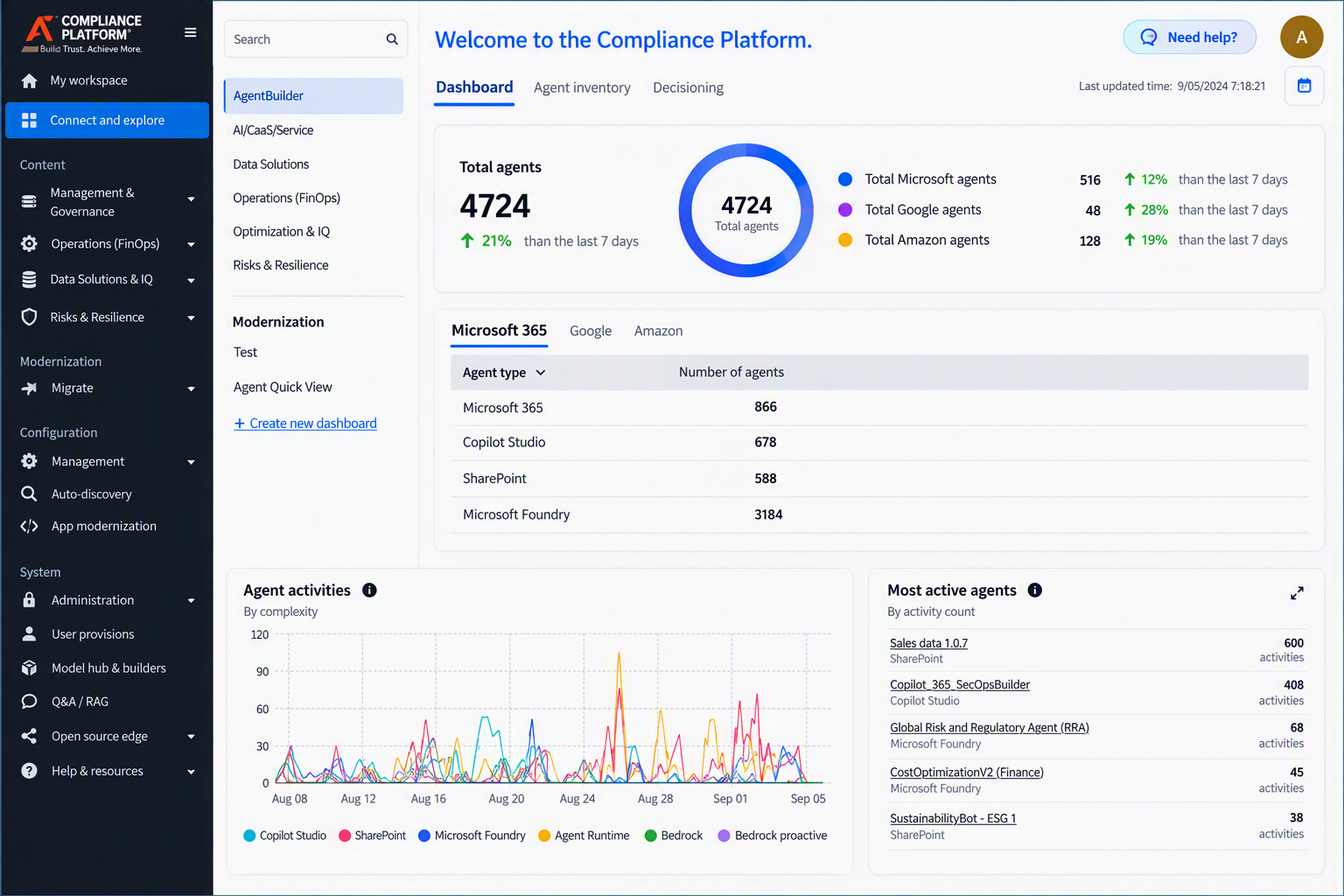
AgentPulse dashboard provides centralized visibility into agent inventory, activity, and usage across Microsoft, Google, and Amazon AI platforms.
Adoption Analytics
What’s New in AvePoint tyGraph?
Understanding whether content is being found and used effectively has become just as important as understanding how much content exists. New user journey maps help visualize how users discover and navigate content across SharePoint, Teams, Viva Engage, Copilot, and other Microsoft 365 experiences. Rather than looking at page views in isolation, organizations can see the paths users take to reach content, identify navigation bottlenecks, and better understand how information architecture, governance decisions, and communications efforts influence adoption and engagement. This deeper visibility helps improve content discoverability, measure business impact, and make more informed decisions about how information is organized and delivered.
Managing analytics exports is also easier with the new Export Center, which provides a centralized location to monitor export jobs and download completed files. System Auditor exports have also been enhanced to include all records that match current search and filter criteria, making it easier to analyze complete datasets and maintain visibility into export activity.
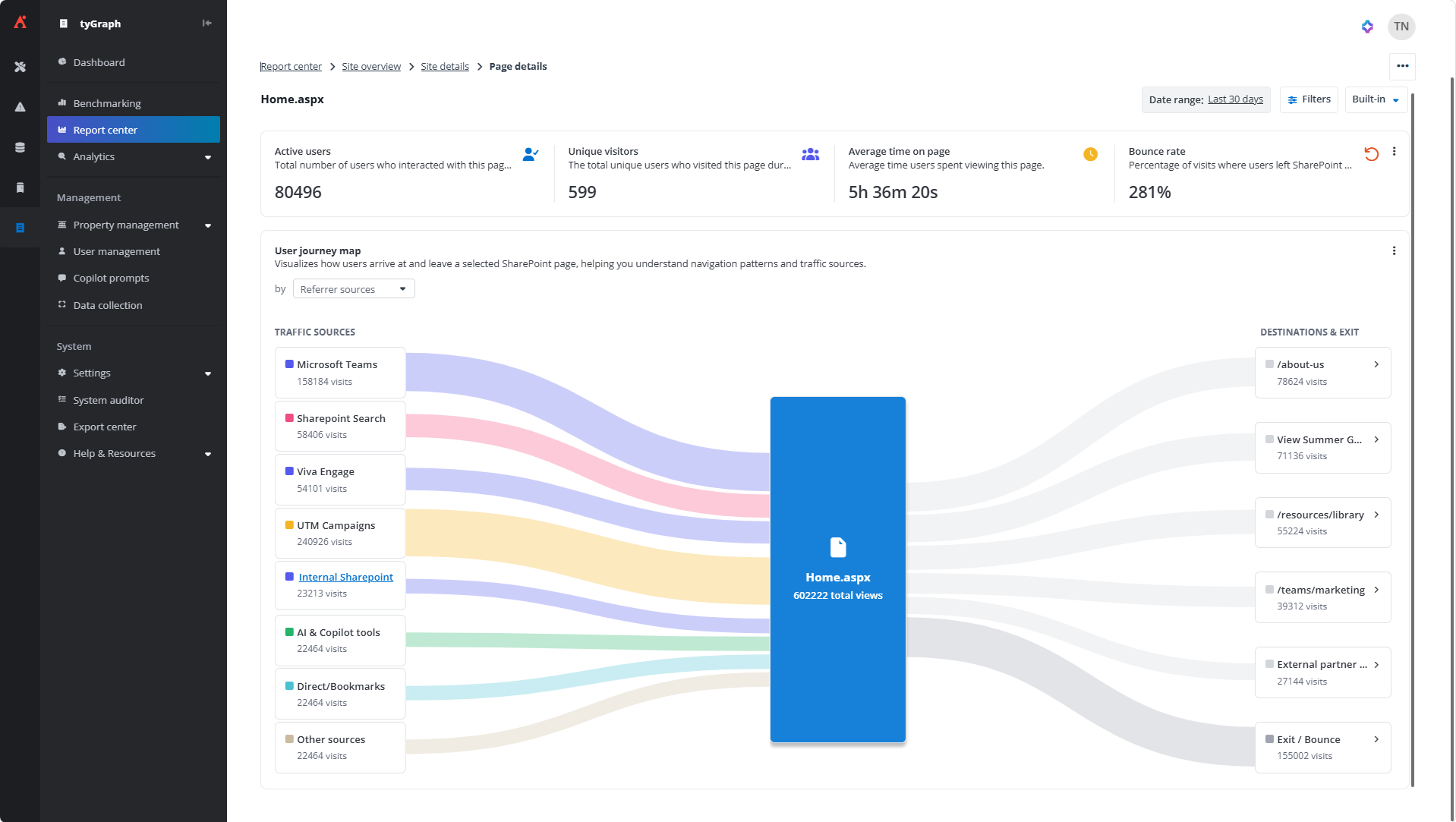
Understand how users discover, navigate to, and exit SharePoint content with User Journey Maps.
Backup and Recovery
The latest Cloud Backup updates expand protection across Microsoft 365, cloud infrastructure, and SaaS applications while providing more flexible and targeted recovery options.
What’s New in Cloud Backup for Microsoft 365?
Copilot Studio Agent Backup is now generally available, enabling organizations to protect and recover agent configurations, including prompts, topics, orchestration logic, and workflows. Search and restore experiences now display Environment Name and Tenant information, making it easier to distinguish between agents with the same name across development, test, and production environments. When an agent needs to be recovered, administrators can quickly identify and restore the correct version rather than sorting through multiple "Customer Service Bot" instances across different environments.
Granular Exchange Online Recovery in Cloud Backup Express allows administrators to restore individual emails instead of recovering an entire mailbox. Since most recovery requests involve a single deleted message rather than a complete mailbox, users can recover exactly what they need while avoiding the disruption and effort associated with broader mailbox restores.
Meeting transcripts can now be included in backup and recovery operations through Teams Transcript Protection. By preserving transcripts alongside recordings, teams retain both the searchable conversation history and the recording itself, making it easier to support accessibility, eDiscovery, compliance, and knowledge-sharing requirements.
Additional compliance and investigation enhancements are also available. Organizations using Backup Data eDiscovery can now export entire result sets with the new Export All Results capability. Instead of manually selecting hundreds or thousands of records, users can export all matching results at once, making large-scale investigations, compliance requests, and audit activities easier to manage. With Exchange retention policies based on sent date, retention decisions can now be aligned to when an email was actually sent rather than when it was backed up or deleted, helping teams better meet regulatory and business requirements.
Additionally, Microsoft Graph is now the default API for mailbox backup and restore operations, supporting Microsoft's transition away from Exchange Web Services (EWS) and aligning mailbox protection with Microsoft's long-term platform direction.
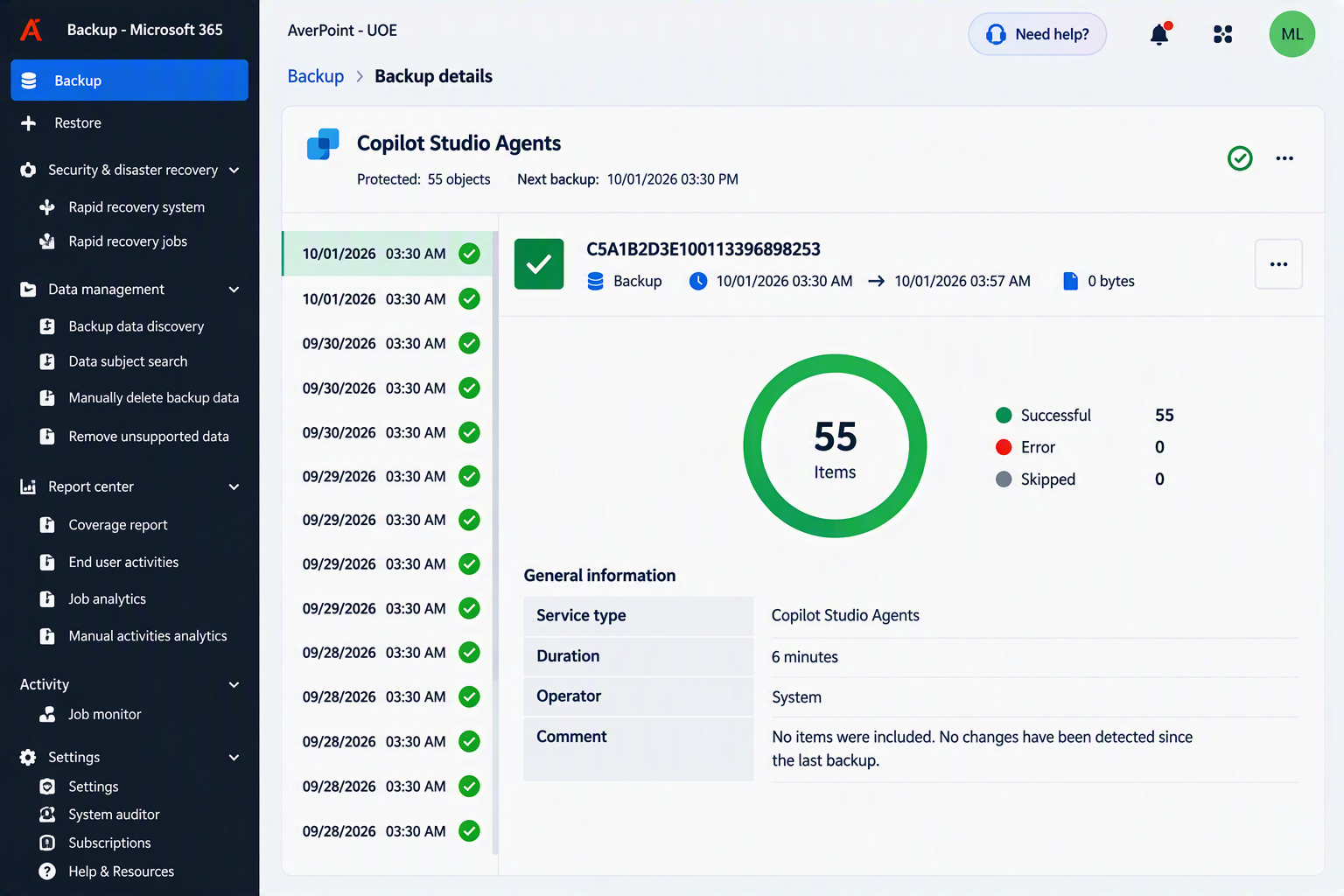
Protect and monitor Copilot Studio Agent backups, including backup history, status, and recovery readiness.
What’s New in Cloud Backup for Salesforce?
Geo-Redundant Backup Storage (GRS) is now available for Salesforce backups. It automatically replicates backup data to a secondary geographic region. By maintaining a copy of backup data in another region, organizations can improve recovery readiness and help ensure critical backup data remains available during regional outages or infrastructure disruptions.
What’s New in Cloud Backup for IaaS + PaaS?
Cloud Backup for infrastructure as a service (IaaS) and platform as a service (PaaS) expands protection across Amazon Web Services (AWS) workloads and adds more flexible Azure DevOps restore options.
Customers using AWS can now protect Amazon Elastic File System (EFS) workloads with automated daily backups and flexible recovery options. Whether recovering an entire file system, a folder, or an individual file, teams can quickly restore critical data after accidental deletion, corruption, or other data loss events while maintaining compliance requirements.
Backup and recovery support is also now available for Amazon Relational Database Service (RDS) and Aurora, bringing protection to some of the most widely used database services in AWS. Automated backups help safeguard critical application data, reduce risk, and provide a reliable way to recover databases when outages or unexpected data loss occur. Together with Amazon EFS support, these additions provide broader protection across AWS storage and database workloads from a single platform.
For Azure DevOps users, Cross-Project Restore introduces greater flexibility when recovering Repos, Pipelines, and Boards. Data can now be restored to a different project within the same organization, making it easier to support testing, disaster recovery, and recovery planning scenarios. Administrators can also choose how conflicts are handled using Merge, Skip, or Overwrite options, helping ensure restored content fits seamlessly into the destination project.
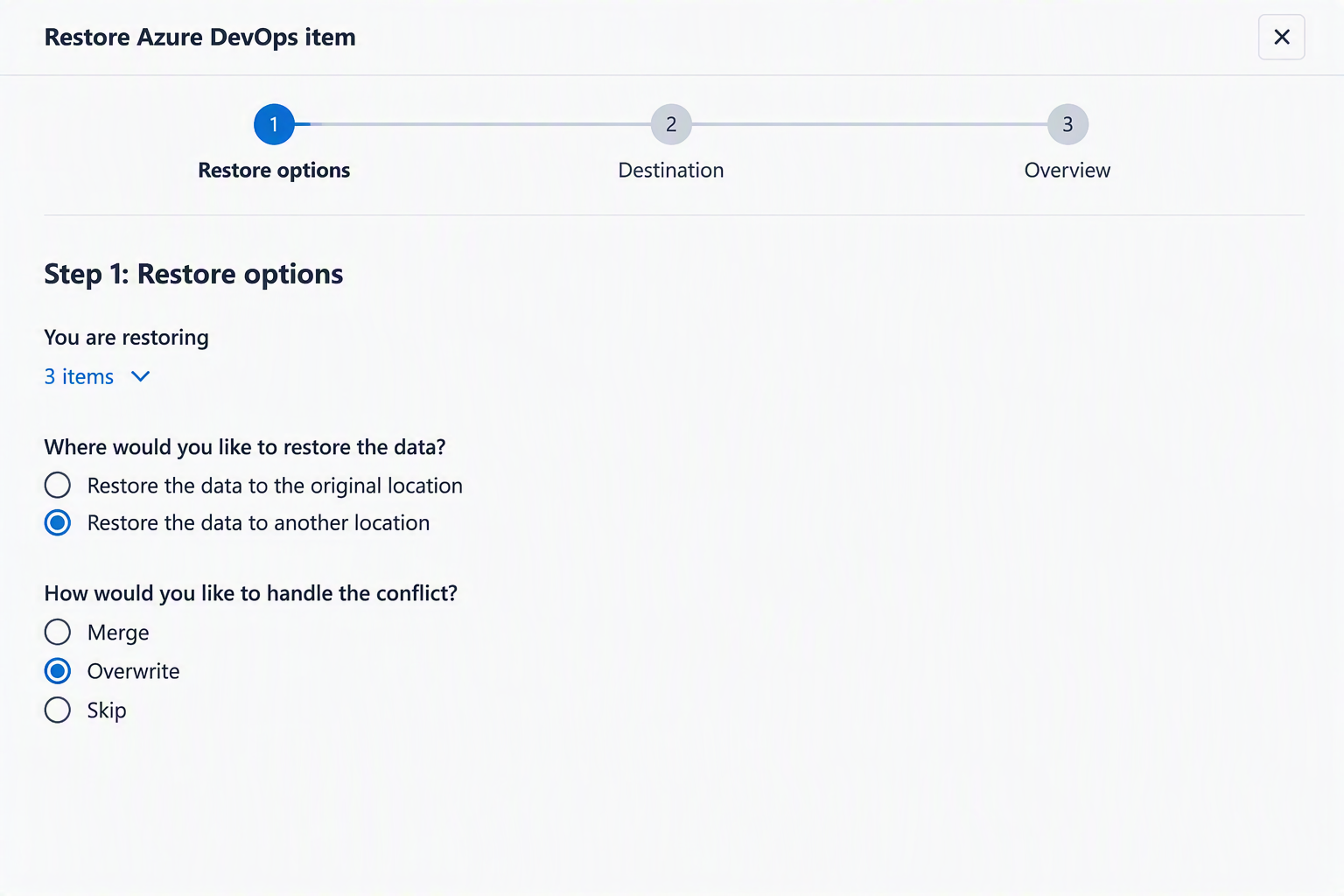
Cross-Project Restore enables Azure DevOps Repos, Pipelines, and Boards to be recovered to a different project with flexible conflict resolution options.
What’s New in Cloud Backup for SaaS Applications?
This release brings expanded protection for identity platforms, stronger recovery capabilities for business-critical applications, and more flexible administration controls.
Okta Customer Identity (Auth0) Backup is now available, bringing backup and recovery protection to applications, connections, branding, actions, rules, and other critical configuration data. When deployment issues, accidental changes, or outages occur, teams can quickly restore known-good configurations instead of manually rebuilding complex identity environments, helping keep customer-facing applications and authentication services running smoothly.
AWS Bring Your Own Storage (BYOS) support lets organizations use Amazon Simple Storage Service (S3) as the backup storage destination. This gives teams control over backup data location and retention policies for their storage, governance, or compliance requirements.
Security and governance controls have also been enhanced across SaaS environments. Confluence backups and restores now include space permissions, page restrictions, and blog restrictions, helping ensure sensitive content is recovered with its original access controls intact. New scoped SaaS access capabilities make it easier to scale backup administration by allowing organizations to assign permissions at the application level. This enables teams to manage backups, restores, and exports for the SaaS applications they own without exposing data, reports, or recovery operations for other systems, helping organizations delegate ownership without granting broad platform access.
ServiceNow HR Service Delivery (HRSD) protection, available in private preview, helps safeguard sensitive employee records with dedicated backup and granular recovery capabilities. HR cases, profiles, tasks, attachments, audit history, and access controls can be protected and restored while keeping HR data isolated from ITSM and CSM operations to support compliance and privacy requirements.
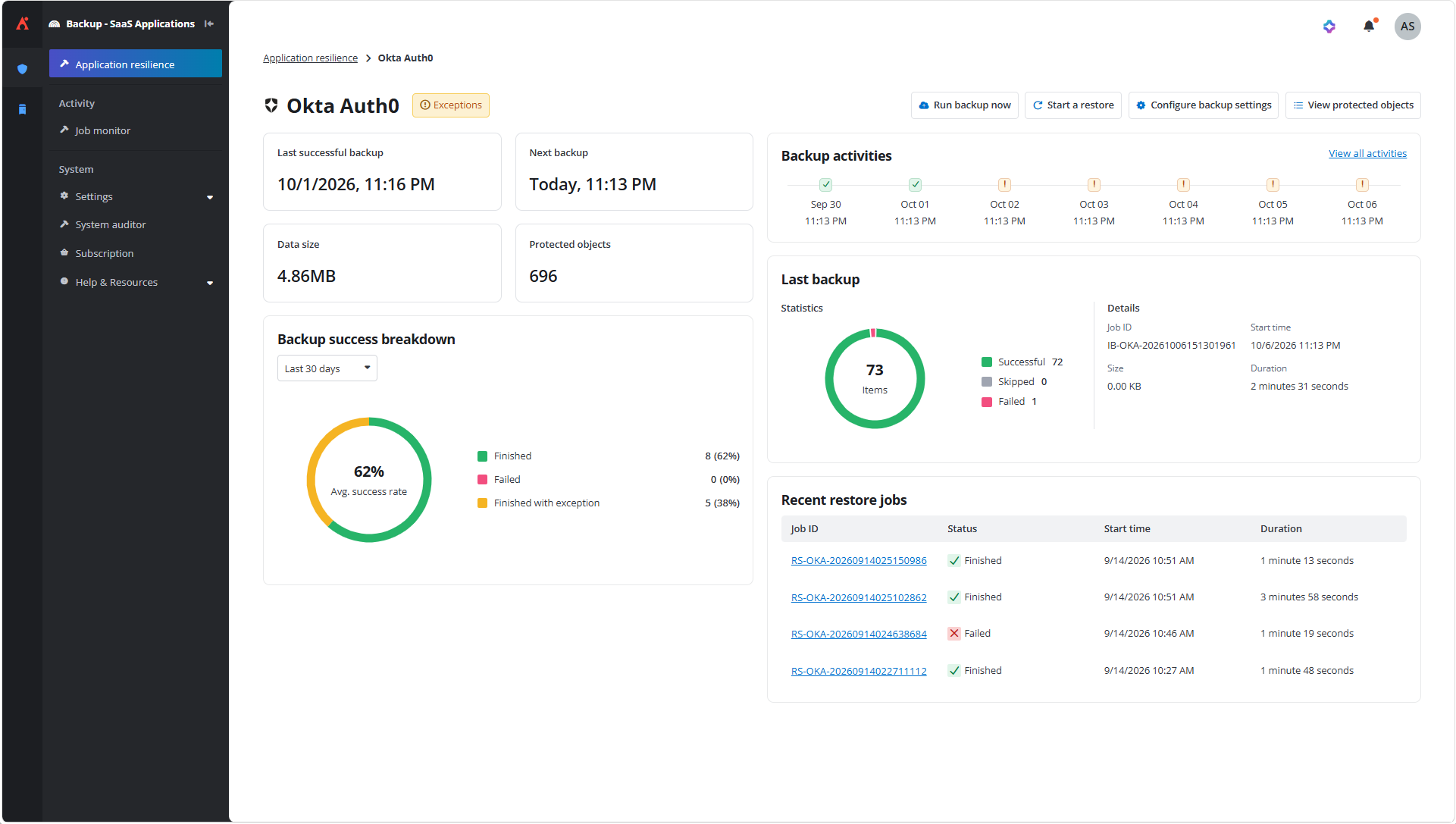
Monitor backup activity, protection status, and recovery readiness for Okta Customer Identity (Auth0) environments from a centralized dashboard.
What’s New in Cloud Backup for Dynamics 365?
The new audit data export capability gives organizations a more efficient way to manage Dynamics 365 audit history. Rather than exporting a full backup dataset, teams can export only the audit records needed for compliance, investigations, or retention requirements and send them directly to Azure Blob Storage. This helps reduce storage and export costs while simplifying long-term audit retention and audit data management.
Data Governance
What’s New in AvePoint Cloud Governance?
As organizations expand their use of Microsoft 365 and Power Platform, governance needs to scale without adding administrative overhead. This month’s updates focus on streamlining ownership management, extending lifecycle governance to more object types, and providing greater automation for Power Platform administration.
Keeping ownership information accurate becomes increasingly difficult as environments grow. Bulk ownership and membership updates allow administrators to make large-scale changes through CSV uploads, while support for the tyGraph machine learning Best Owner model introduces data-driven ownership recommendations into renewal workflows, helping administrators identify the right owners and reduce unmanaged workspaces.
Keeping governance consistent across Power Platform and Microsoft Teams environments is easier with several new capabilities. Power Platform environment provisioning introduces template-driven environment creation with standardized governance, security, and metadata settings, while Power Platform solution renewal allows organizations to manage entire solutions as governed applications rather than handling individual apps and flows separately. Mailbox attribute management simplifies Exchange administration, and channel metadata inheritance helps ensure private and shared Teams channels remain aligned with their parent team's governance configuration.
Governance has also expanded beyond traditional Microsoft 365 workloads. App registration renewals bring lifecycle governance to Microsoft Entra ID App Registrations, helping organizations apply consistent ownership and lifecycle controls to business-critical applications, while desktop flow contact election and manual import capabilities help bring existing Power Automate desktop flows under governance with assigned ownership and standardized lifecycle processes.
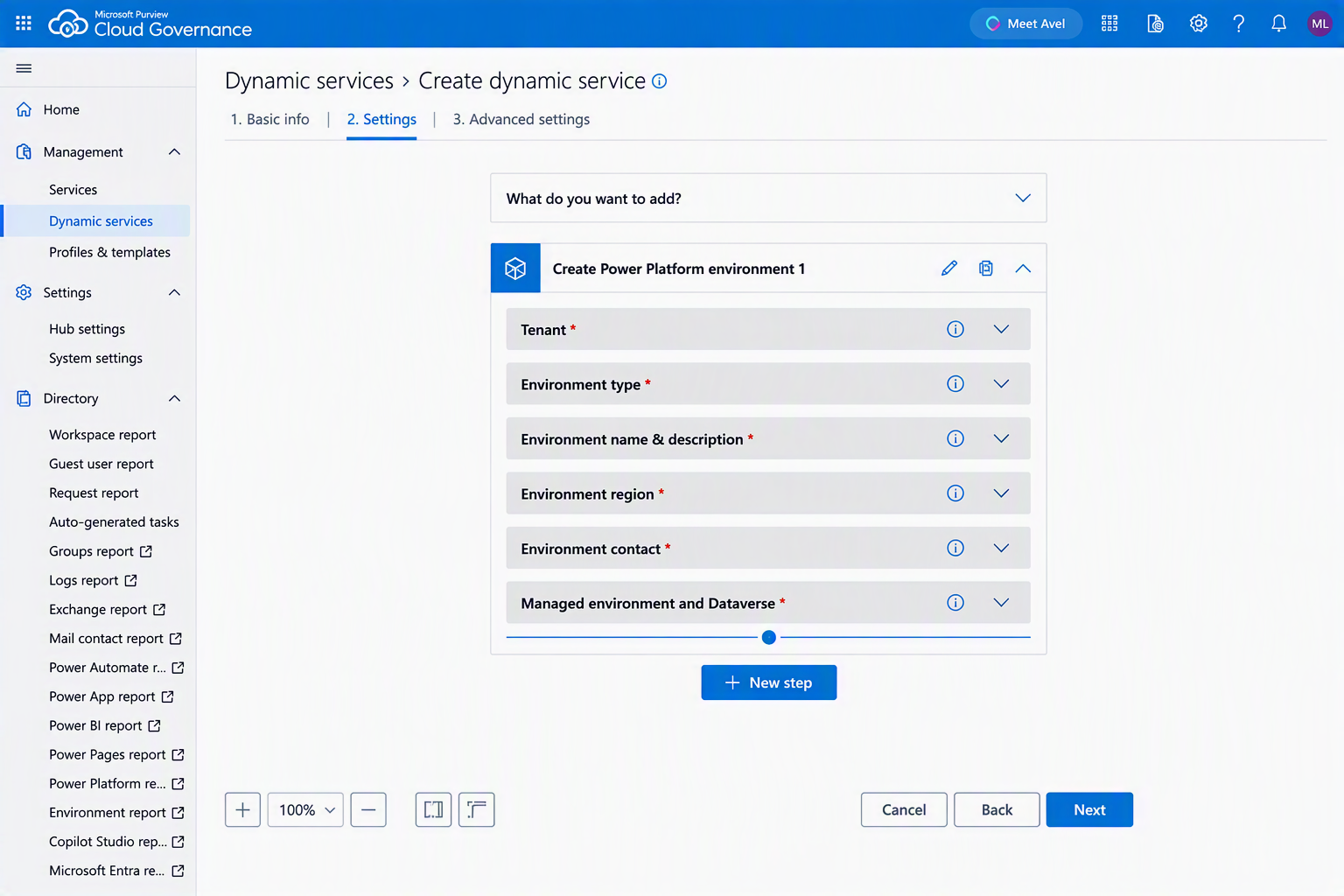
Power Platform environment provisioning helps administrators standardize environment creation with predefined governance, security, and configuration settings.
What’s New in MyHub?
As governance and lifecycle activities become more distributed across business users, MyHub continues to simplify the day-to-day experience. This month’s updates focus on helping users find the right tasks faster, gain better visibility into shared resources, and make more informed ownership and renewal decisions.
A more streamlined experience starts with personalized task filtering, which automatically surfaces the most relevant tasks based on workspace, role, and task type. At the same time, AI-powered renewal recommendations leverage the tyGraph Best Owner model to suggest responsible owners and contacts based on workspace activity, helping reduce manual effort and improve accountability during renewal processes.
Shared resources are now easier to discover and manage. Enhanced shared mailbox discovery makes it easier to identify mailboxes based on ownership, membership, and access relationships, while mail contact visibility provides a centralized location to view and manage contact details, workspace access, and activity history. Together, these updates give users a clearer view of the people and resources associated with their workspaces.
For administrators, Okta authentication is now supported, providing a more consistent sign-in experience across supported AvePoint Online Services products while maintaining dedicated administrative access controls.
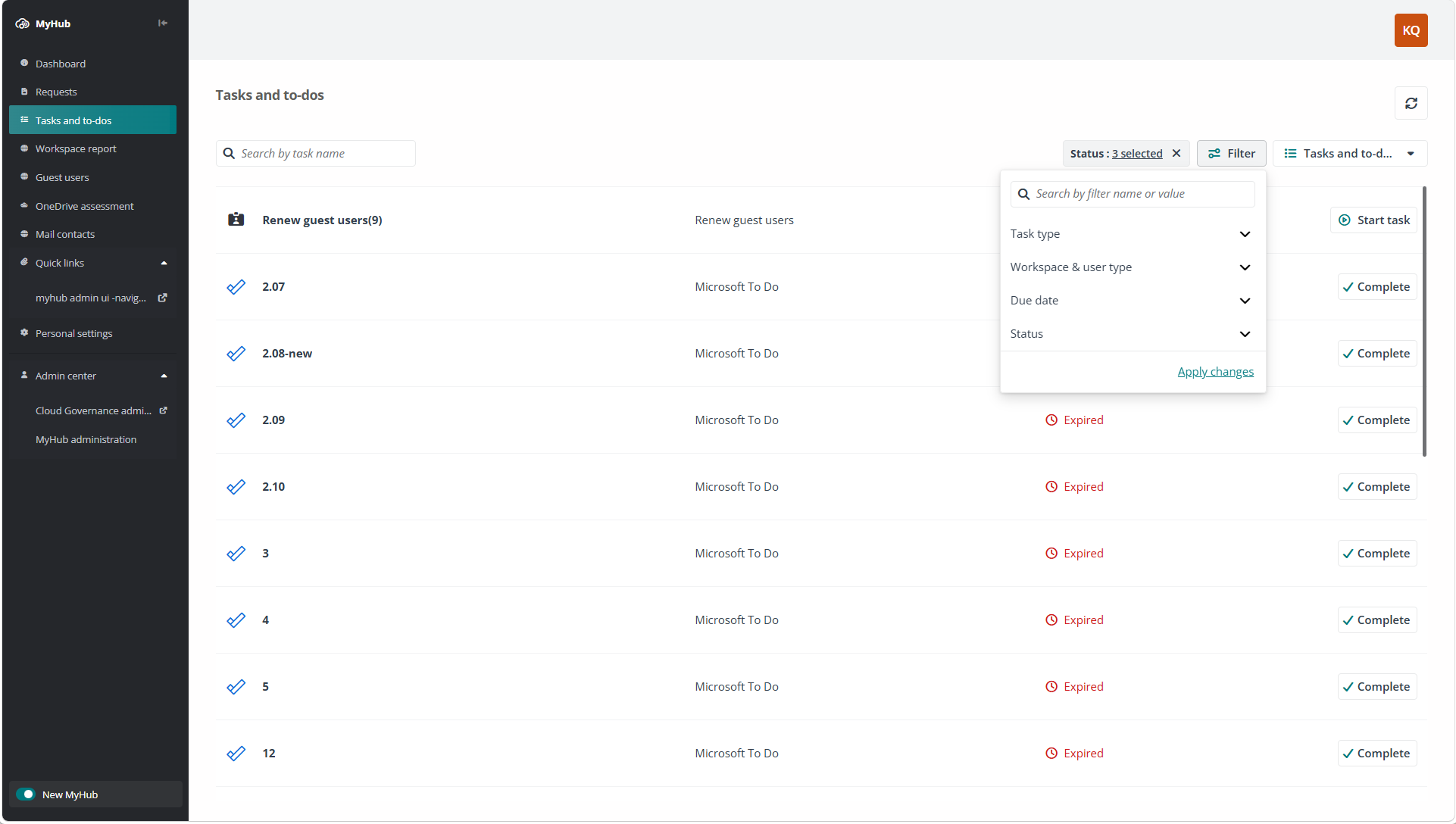
Personalized task filtering helps users quickly find the tasks that require attention based on workspace, role, task type, and status.
Data Migration
What’s New in AvePoint Fly?
Successful migrations are about more than moving content from one place to another. They also require confidence that the right content arrived as expected and that unnecessary content is left behind. This month’s updates focus on improving migration validation and giving organizations more control over what gets migrated.
Fly introduces a built-in migration comparison capability that helps validate migration results after a SharePoint or OneDrive migration. As a first-to-market capability, it compares source and destination content, identifies missing or mismatched items, and helps teams take corrective action quickly through incremental migrations. Project-level reporting provides visibility across the entire migration, helping teams spend less time on manual validation, resolve issues faster, and verify that content was migrated successfully.
Organizations migrating Exchange workloads gain more flexibility through filter policies for Exchange migrations. Administrators can define granular rules to include or exclude content based on folder names, dates, item properties, or sensitivity labels, making it easier to retire outdated content and migrate only the information that remains valuable and relevant.
Directory Sync for Microsoft Entra ID, available in private preview, helps maintain identity continuity across tenant-to-tenant migration projects. By keeping identities synchronized throughout the migration process, organizations can reduce disruption and help ensure users retain access to the resources they need as environments transition.
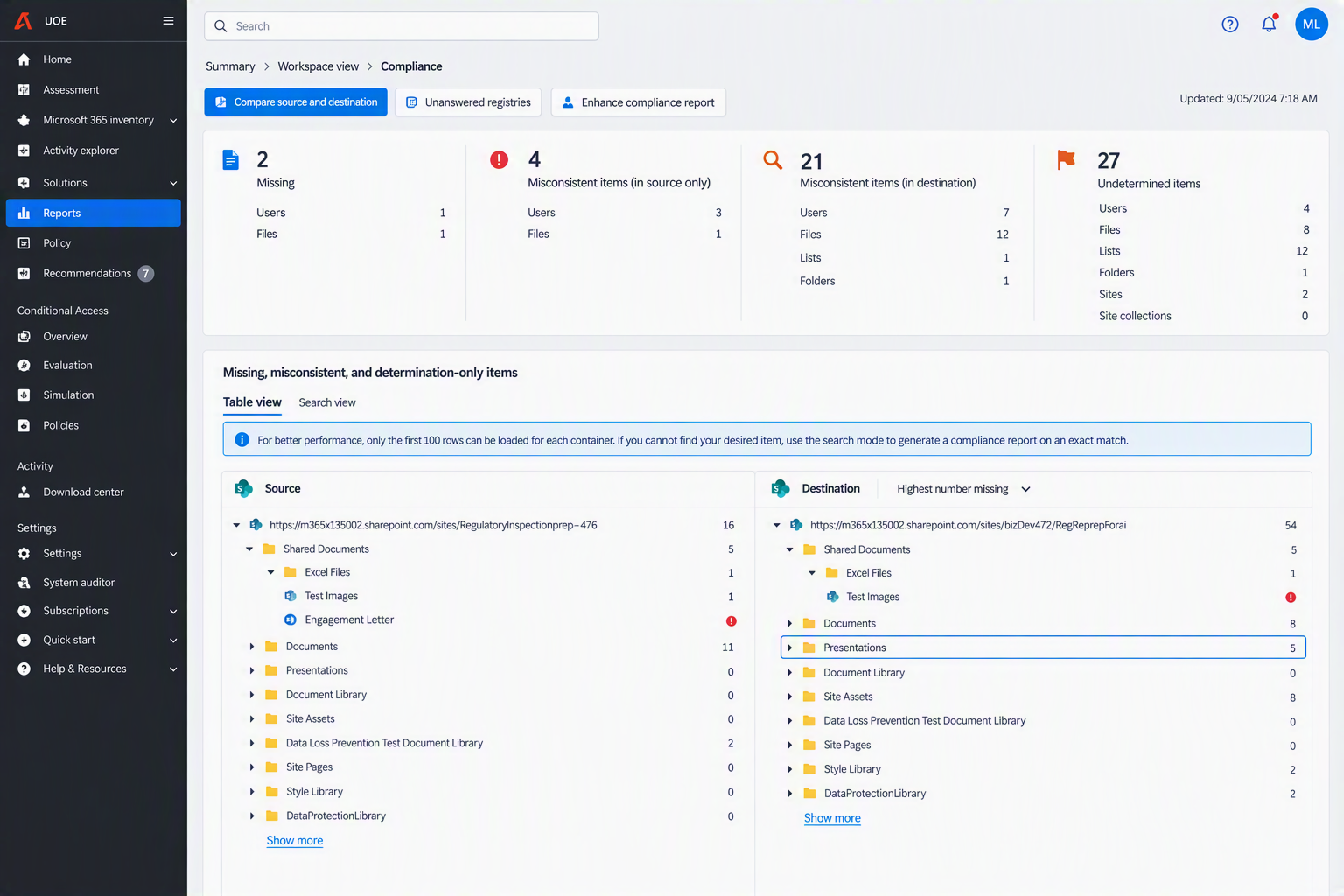
Fly's migration comparison capability highlights missing, mismatched, and destination-only items, helping teams quickly validate migration results and identify issues that require remediation.
Information Lifecycle Management
What’s New in AvePoint Opus?
This release introduces new ways to automate storage optimization, simplify archived-content recovery, and strengthen governance across digital and physical records.
Storage optimization is more flexible with archive automation, which allows inactive SharePoint Online site collections to be moved to Microsoft 365 Archive through Opus rules. This helps reduce manual lifecycle management and control storage costs while keeping archived sites within the Microsoft ecosystem. Opus also adds Wasabi BYOS support as a named storage option, eliminating the need to configure Wasabi through a generic S3-compatible connection and providing an easier setup experience.
New Restore Center capabilities make it easier to plan and complete large-scale recoveries. Restore size preview displays the total data size and item count before a restore begins, helping administrators evaluate capacity requirements and potential storage impact. Advanced Restore enables bulk recovery of archived content, including both Opus stubs and Microsoft 365 Archive native stubs, allowing entire folders, libraries, and workspaces to be restored in a single operation. This reduces manual effort and accelerates large-scale recovery scenarios.
Routine governance tasks also require less manual intervention. Scheduled report exports can deliver compliance and lifecycle reports directly to the Opus Download Center or a SharePoint library, ensuring current information is available where stakeholders already collaborate. New orphaned folder cleanup rules remove empty SharePoint folders left behind after content disposal while respecting retention protections, legal holds, and active stubs. Administrators can also opt to exclude SharePoint lists to keep lists and list items outside the scope of Opus policies and focus lifecycle management on relevant documents and content containers.
Legal and compliance teams now have more efficient ways to preserve content and maintain appropriate separation of duties. Disposal holds can now be applied across entire SharePoint sites, OneDrive accounts, and Exchange mailboxes instead of requiring teams to identify and hold individual items. The security-trimmed Hold Manager role allows designated users to manage assigned holds without exposing unrelated legal or compliance matters. For physical records, approval-based move requests, pick lists, and audit trails help maintain a chain of custody when boxes or folders are transferred between locations.
More precise search capabilities make it easier to act on the right content. With granular location search, records managers and auditors can narrow Advanced Search to specific SharePoint Online libraries, folders, and OneDrive paths rather than searching an entire site collection. This reduces irrelevant results and supports more targeted governance, audit, and lifecycle actions.
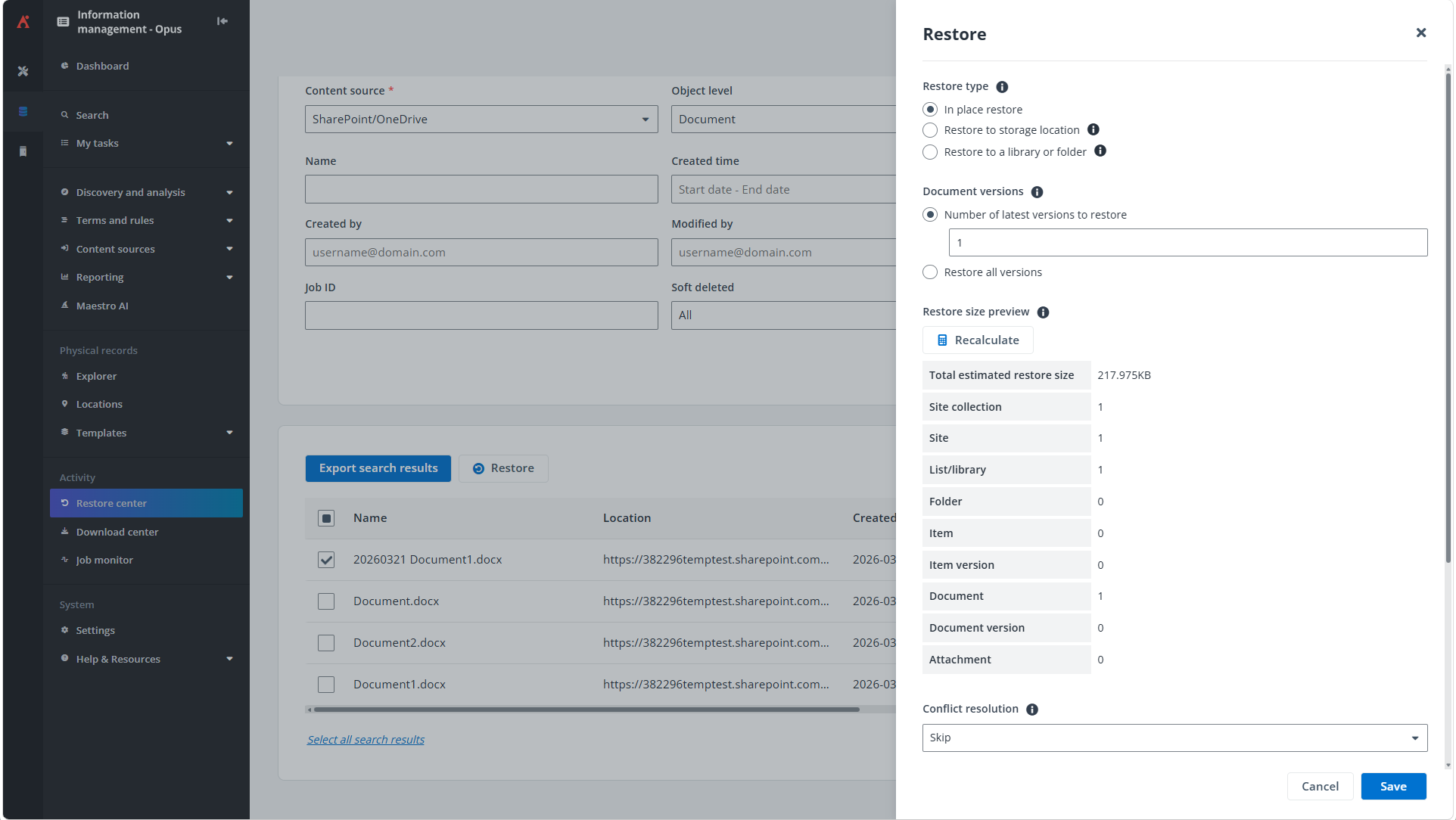
Evaluate recovery scope before restoring with visibility into total data size, item counts, and potential storage impact.
Access and Workflow Management
What’s New in AvePoint EnPower?
Managing Power Platform, Microsoft 365, and Copilot governance often requires administrators to balance control with delegation. This month’s updates focus on extending lifecycle management, improving governance intelligence, and giving teams more visibility into the content, applications, and environments they manage.
Power Platform governance continues to expand with solution lifecycle governance and bulk metadata updates. Solutions can now be managed as complete applications through unified renewal, promotion, and governance workflows, helping organizations govern related apps, flows, connectors, and configurations together rather than as individual components. Administrators can also update ownership, contacts, and metadata in bulk across environments, apps, flows, and solutions, making it easier to maintain accurate governance information at scale.
As AI adoption grows, new restricted content discovery controls help organizations determine which SharePoint sites can appear in Microsoft 365 Copilot and search experiences. Administrators can review and manage these settings for individual or multiple sites through delegated administration, providing greater control over what content is accessible to AI experiences without requiring broad SharePoint administrative permissions.
Visibility has also improved across Power BI and Microsoft Fabric environments. Workspace tag visibility makes it easier to view, filter, search, export, and report on workspace-level tags, helping organizations better understand ownership, classification, and business context across their analytics estate. New owner and member count conditions further strengthen governance by helping identify workspaces that may be under-managed or lack sufficient ownership coverage.
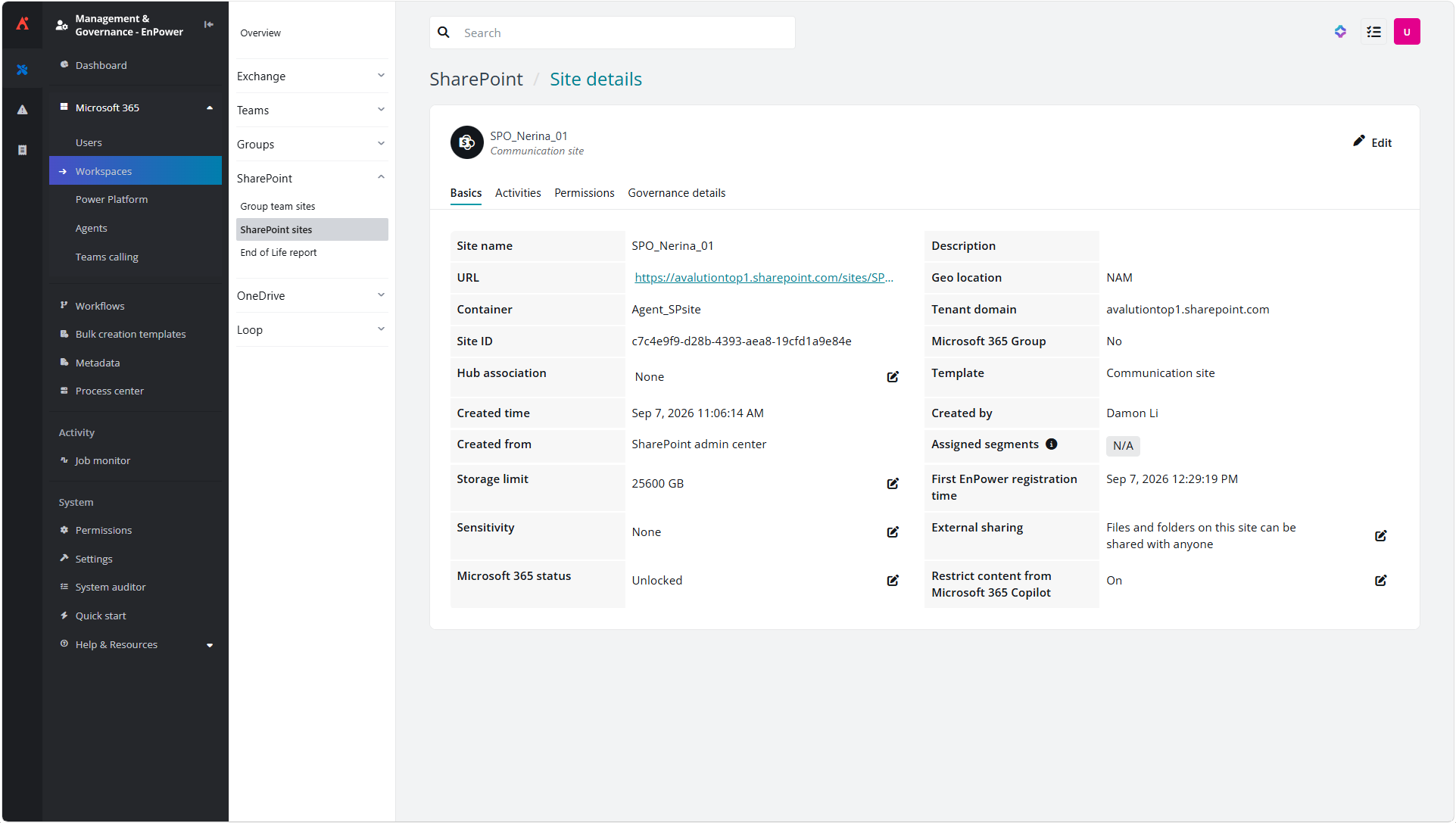
Use site-level settings to control whether content can be surfaced through Microsoft 365 Copilot.
Policies and Insights
What’s new in AvePoint Policies for Microsoft 365?
As AI adoption and collaboration continue to grow, governance policies need to keep pace. New capabilities in Policies help organizations strengthen governance across AI, collaboration, and information sharing while reducing the effort required to investigate and remediate risks.
New controls strengthen governance for content used by AI agents. Agent content labeling automatically applies sensitivity labels to content included in agent knowledge bases or accessed by Copilot Studio and SharePoint agents, while sensitive content access controls evaluate accessible content against defined sensitivity criteria and can restrict agents that exceed approved risk thresholds. These capabilities ensure that agents are only accessing the information they should and helps remediate in situations where their access has drifted.
Policies can also help organizations automatically address security and compliance risks identified through Insights. Automated risky user remediation uses findings from Insights to identify risky users and trigger remediation actions, while detailed violation context provides visibility into affected users, sites, groups, and other objects to simplify investigation and resolution.
Private and shared channel governance extends policy enforcement to additional collaboration spaces, while flexible name governance adds exceptions for approved users, groups, and service accounts. Smart link expiration helps eliminate unused sharing links while reducing the risk of unnecessary access to content, and support for the tyGraph machine learning Best Owner model introduces data-driven ownership recommendations to improve accountability and ownership management.
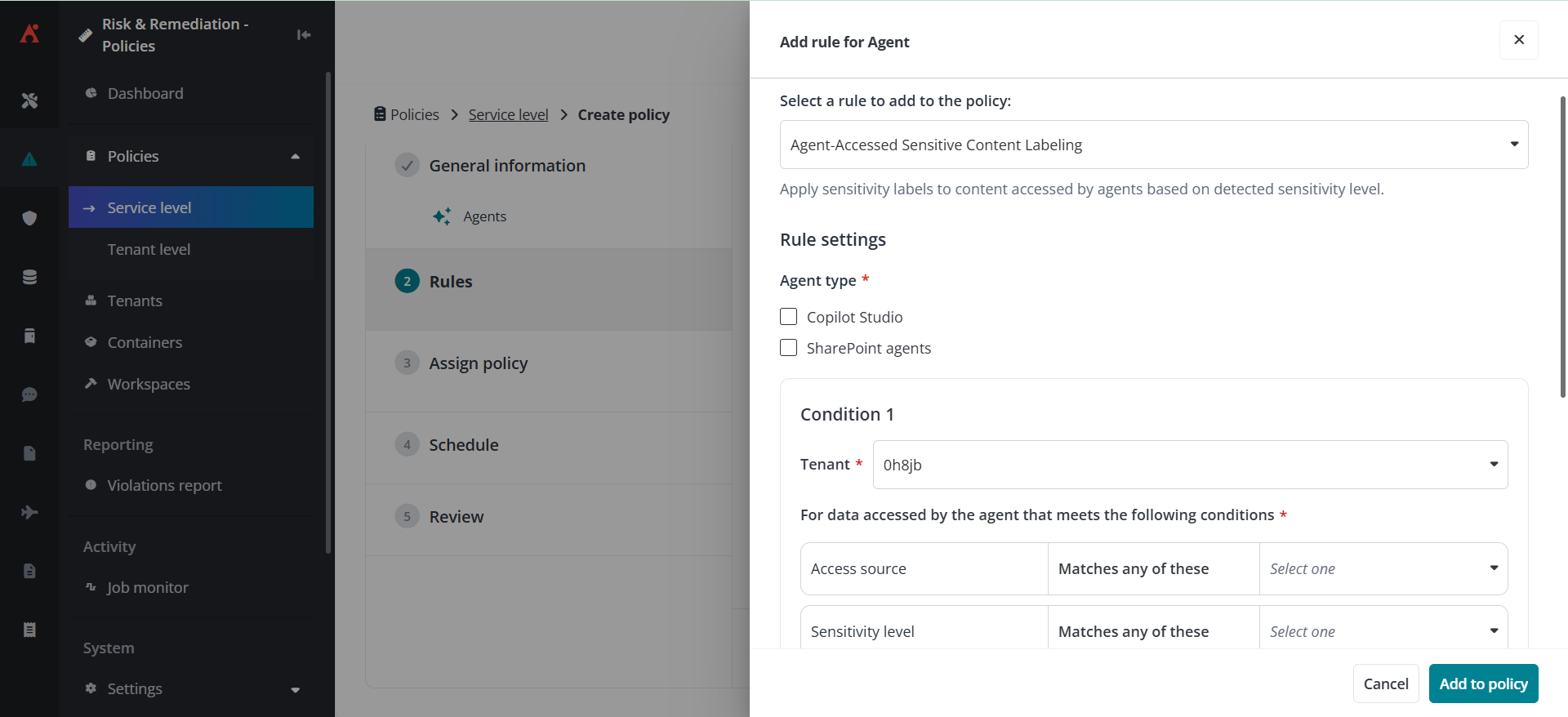
Apply sensitivity labels to content used by Copilot Studio and SharePoint agents to help ensure sensitive information remains appropriately classified and protected.
What’s New in AvePoint Insights?
Identifying risk is only the first step. The latest Insights updates help organizations take action faster with automated remediation, deeper scan visibility, and expanded insight into permissions and data exposure across Microsoft 365 and connected SaaS applications.
Now generally available, adaptive remediation automatically enforces policies based on risk findings, classification signals, and metadata. By connecting detection and remediation within a single experience, organizations can reduce manual effort, address exposure more quickly, and track remediation outcomes through centralized policy management and reporting.
A redesigned scan activity insights experience provides a clearer view into scan health and coverage. Administrators can monitor scan progress, status, and history across full, incremental, user, permission, sensitivity, and agent-based scans, while drilling into object-level details to investigate findings and validate scan results with greater confidence.
Visibility into permissions and exposure has also been expanded across supported SaaS connectors, including File System, Box, Confluence, Monday.com, AWS S3, DocuSign, and Jira. With enhanced SaaS connector access insights, organizations can identify who has access to content, analyze membership and permission relationships, detect workspaces with elevated external-user exposure, and apply workspace-level sensitivity definitions to better understand and manage risk across connected applications.
By connecting risk visibility, access intelligence, and automated remediation, Insights helps security and governance teams respond more quickly and confidently to emerging risks.
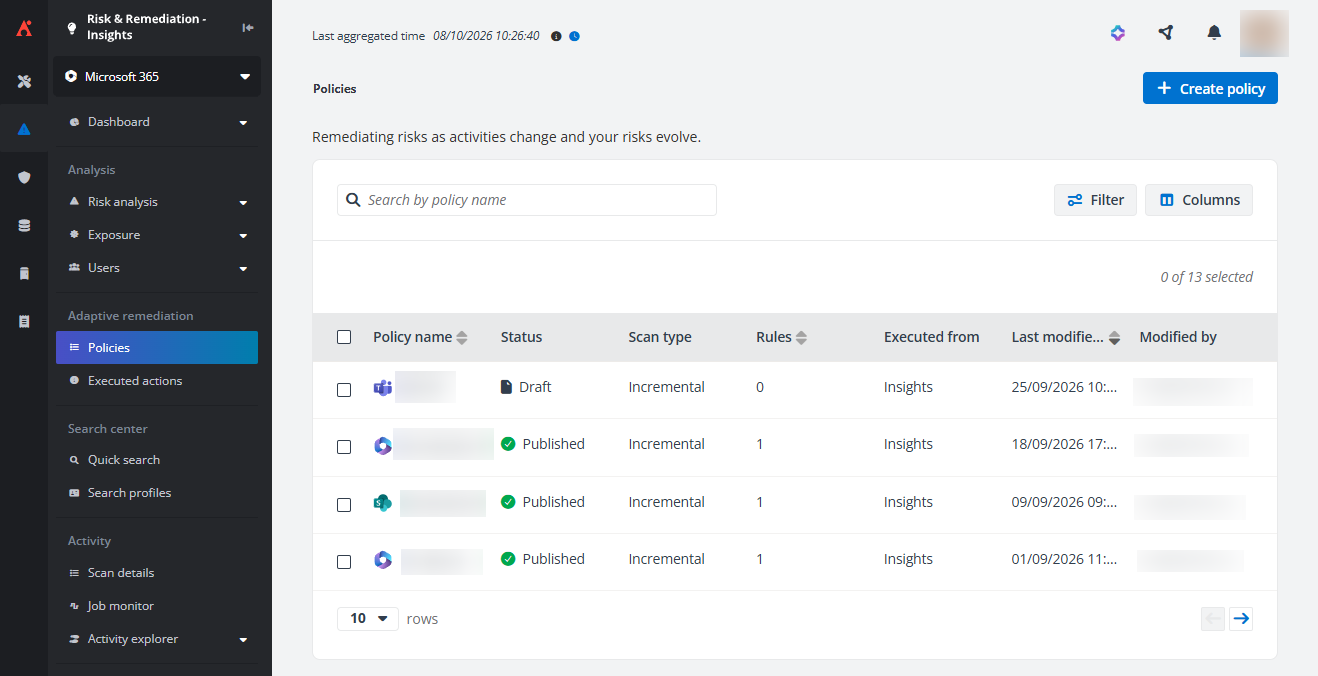
Adaptive remediation policies allow organizations to automatically identify and remediate risky users based on Insights risk findings.
Learn More About These Updates
AvePoint Learn
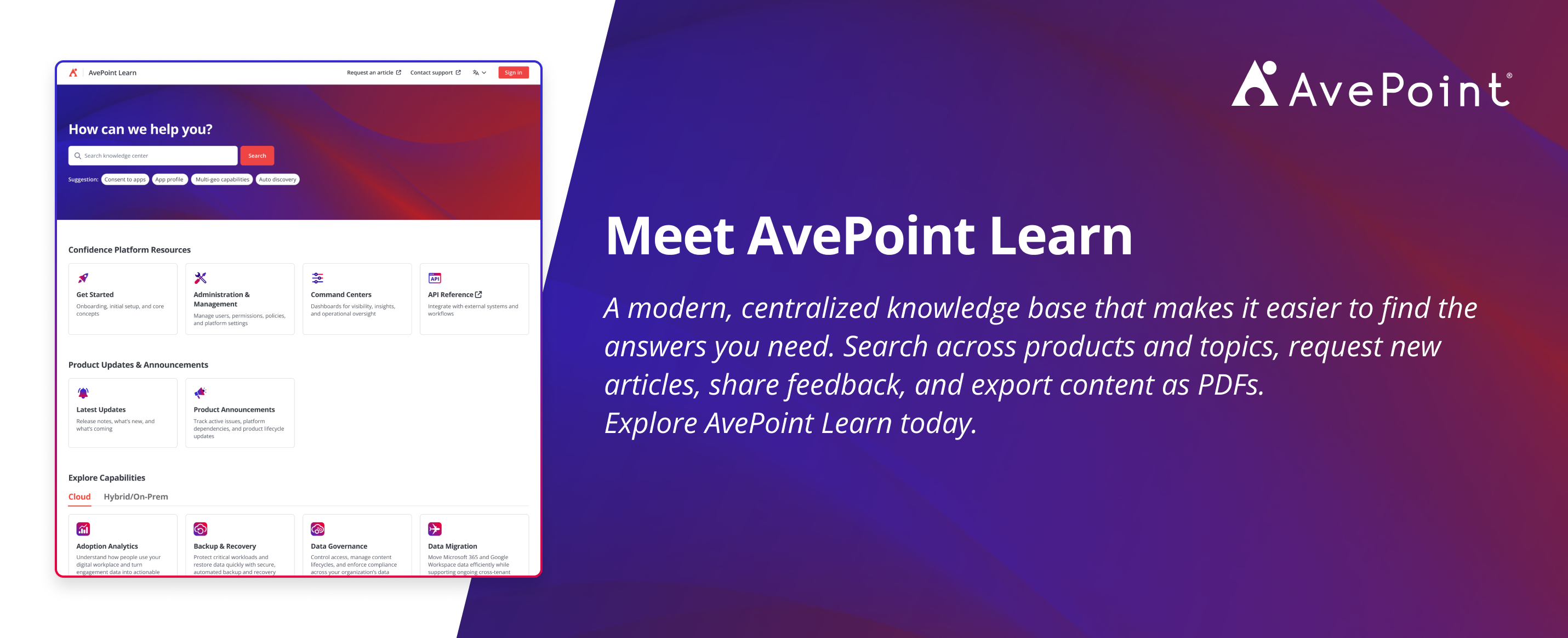
Ready to explore these capabilities in more detail? Visit AvePoint Learn for product documentation, release notes, implementation guidance, and best practices across the AvePoint Confidence Platform.

Esther is AvePoint's Director of Technical Writing, with a specialization in communicating product updates and platform updates.