

Key Takeaways
- Disaster recovery is broader than backup. It includes data, applications, dependencies, communications, validation, failover, and failback.
- The strongest recovery plans start with business impact, then define RTO and RPO, then select architecture and tools like Express Recovery to meet those outcomes.
- Multi-cloud recovery can strengthen resilience, but only when dependencies, governance, and runbooks are standardized.
- Testing is what turns a disaster recovery plan from documentation into operational capability.
Disaster recovery is no longer a niche of IT exercise. It is a core business capability that determines how well an organization responds to outages, ransomware, infrastructure failure, or human error. The companies that just recover fastest are rarely the ones with the most tools. They are the ones with the clearest priorities, the most realistic plans, and the discipline to test before a disruption forces their hand.
What Is Disaster Recovery?
What disaster recovery means in practice
Disaster recovery (DR) is the structured process of restoring technology services after a disruptive event. That includes data, applications, servers, networks, identities, and operational workflows that depend on them. In plain terms, disaster recovery answers a simple question: if a critical system goes down, how do you bring it back quickly and safely?
The trigger can take many forms, from ransomware and outages to admin error or regional incidents. In every case, the goal is the same: reduce downtime, preserve trustworthy data, and restore the services the business depends on most.
That is why disaster recovery should be treated as an operational discipline, not just a storage decision. Backups matter, but backups alone do not define recovery. Recovery also requires prioritization, speed, communications, access controls, documented procedures, and a tested path back to normal operations.
Why disaster recovery matters to the business
When systems are unavailable, the damage spreads quickly. Revenue slows or stops. Employees lose access to the tools they need. Customer trust takes a hit. Regulatory obligations become harder to meet. Even a short outage can create long follow-on effects when teams are forced into manual workarounds or cannot verify which data is accurate. That is why the cost of downtime is not limited to lost productivity alone. It can also affect revenue, service delivery, compliance, and long-term customer confidence.
Modern organizations are deeply interconnected. Identity services, APIs, cloud storage, collaboration platforms, and third-party integrations can turn one failure into a wider outage. Recovery plans should focus on speed of restoring business outcomes, not just infrastructure.
The main types of disaster recovery
Most organizations rely on one of three broad recovery models. Traditional site-based DR uses a secondary physical site or infrastructure footprint to support failover. Cloud disaster recovery uses cloud storage and compute to replicate or restore workloads when production fails.
There is no universal best model. The right approach depends on application criticality, budget, geographic risk, compliance requirements, staffing maturity, and the recovery targets each workload must meet. A practical strategy often combines methods. For example, a business may use SaaS backup for collaboration data and native cloud capabilities for certain infrastructure workloads.
Disaster Recovery vs. Backup vs. Cyber Recovery
Disaster Recovery is not the same as backup
Backup and disaster recovery are related, but they are not interchangeable. Backup is about creating recoverable copies of data. Disaster recovery is about restoring the broader environment required to resume operations. That includes applications, configurations, dependencies, access paths, failover procedures, and validation steps.
The easiest way to frame the difference is scope and speed. Backup protects data points in time. Disaster recovery restores essential services when an entire workload, environment, or site becomes unavailable. For Microsoft 365 environments, this is also where express recovery becomes relevant. In high-impact incidents such as ransomware, mass deletion, or widespread corruption, file-by-file restore may not be enough to meet business expectations. Solutions built for high-speed recovery at scale can help teams restore critical SharePoint, OneDrive, and Exchange data much faster when time matters most.
This distinction matters because many organizations overestimate what backup alone can do. If a service depends on several systems, restoring one copy of data may not restore business function. Recovery requires a coordinated sequence, including application order, authentication dependencies, network access, and post-recovery validation.
Where Cyber Recovery fits
Cyber recovery is a specialized discipline within the broader recovery conversation. It focuses on recovering from security incidents, especially ransomware, destructive malware, and identity compromise. The emphasis is not just on restoring quickly, but on restoring cleanly. Teams need confidence that recovered data and systems are free from reinfection or hidden persistence.
At the same time, recovery outcomes are improving as organizations invest in stronger backup and recovery strategies. In 2025, 53% of organizations fully recovered from ransomware within one week, up from 35% in the previous year, according to the State of Ransomware 2025 report, reflecting growing maturity in recovery planning and execution.
That usually means stronger immutability controls, tighter isolation, forensic review, privileged access protections, and more deliberate validation before bringing systems back into production. Traditional disaster recovery plans remain essential, but they should now account for the reality that the backup environment itself may be targeted during an attack.
| Category | Backup | Disaster Recovery | Cyber Recovery |
|---|---|---|---|
| Primary Purpose | Create recoverable copies of data | Restore systems and services after disruption | Recover safely after ransomware or other cyber incidents |
| Typical Trigger | Accidental deletion, corruption, retention needs | Outage, infrastructure failure, site loss, major disruption | Ransomware, destructive malware, identity compromise |
| Key Requirements | Reliable backup copies and retention policies | Runbooks, failover procedures, dependency mapping, and validation | Immutability, isolation, forensic review, privileged access controls, and clean-room validation |

Express Recovery for Microsoft 365
Powered by Microsoft 365 Backup Storage, protect and restore Microsoft 365 data faster and more efficiently than ever before.

How to Make a Disaster Recovery Plan
Start with business impact, not technology
The most effective disaster recovery plans begin with business impact analysis. Before teams choose tools, they need to understand which services matter most, what an outage would interrupt, and how long the business can function without each system. This step helps separate mission-critical workloads from important but less time-sensitive ones.
From there, teams can assess risk. That includes cyber risk, infrastructure risk, geographic exposure, vendor dependency, and operational risk tied to manual processes or underdocumented systems. The purpose is not to predict every possible incident. It is to understand which events would matter most and what level of resilience is justified for each workload.
Build the plan as a working playbook
A disaster recovery plan should be practical enough to use under stress. At minimum, it should identify critical systems, define recovery tiers, document owners, map dependencies, establish escalation paths, and outline the exact procedures for failover, restoration, validation, and failback. It should also include communications guidance, because technical recovery without stakeholder coordination often creates confusion and delay.
Strong plans are written as operating documents, not abstract policies. They should name systems and recovery locations, specify backup targets and replication methods, identify credential access requirements, and describe how teams confirm that a recovered application is functioning as expected. Where possible, use runbook language that is direct, sequential, and easy to follow.
It also helps to define who has a decision authority. During a live incident, delays often happen because teams are waiting for approvals or working from different assumptions. A clear disaster recovery plan reduces friction by assigning responsibilities in advance. reduces friction by assigning responsibilities in advance.
Review and test on a fixed cadence
A plan that is never tested is only a draft. Environments change constantly. New applications are added, integrations shift, and cloud architectures evolve. Testing is how organizations find broken dependencies, outdated contacts, failed assumptions, and recovery steps that look good on paper but fail in practice.
This gap between planning and execution is common. According to the 2026 State of Data Resilience report, 65.1% of organizations are confident they can recover from ransomware within 48 hours, yet only 35.4% were able to meet their RTO and RPO targets during testing, highlighting the disconnect between expectations and real-world performance.
At a minimum, organizations should schedule tabletop exercises and technical recovery tests on a predictable cadence. Higher-maturity programs also validate failback procedures, ransomware recovery scenarios, and cross-team decision-making. Every test should end with documented lessons learned, assigned follow-up actions, and version updates to the plan.
RTO and RPO in Disaster Recovery
What are RTO and RPO?
Recovery time objective (RTO) is the maximum amount of downtime a workload can tolerate before the impact becomes unacceptable. Recovery point objective (RPO) is the maximum amount of data loss measured in time that the business can tolerate. In other words, RTO is about how fast you must recover, while RPO is about how much recent data you can afford to lose.
For instance, if an order processing app has an RTO of one hour, the business expects that service back within an hour of a disruption. If it has an RPO of 15 minutes, the organization can tolerate losing no more than 15 minutes of data changes. Those targets directly influence architecture, replication frequency, and the recovery capabilities you implement, including solutions like Express Recovery which helps meet strict RTO and RPO requirements.
How to set realistic recovery targets
RTO and RPO should come from business requirements, not guesswork. Start by estimating the cost and operational impact of downtime for each application. Then consider legal obligations, customer commitments, and downstream dependencies. An internal wiki and a customer-facing commerce platform should not be held to the same recovery target simply because they sit on similar infrastructure.
Many organizations tier workloads. Tier 1 systems need the shortest RTO and lowest RPO. Tier 2 systems can tolerate longer recovery windows. Tier 3 systems can often be restored later or supported through manual workarounds.
RTO vs. SLA: why they are not interchangeable
RTO is an internal recovery target tied to business needs. A service-level agreement, or SLA, is a provider commitment tied to service delivery. The two may support each other, but they are not the same. A cloud vendor might offer availability terms that sound strong, yet those terms may not meet the recovery timeline your business requires.
For example, a provider could meet its SLA for uptime over a billing period while your application still experiences a disruption longer than your acceptable RTO. That is why organizations should design recovery around their own risk tolerance first, then assess whether vendor commitments meaningfully support those targets.
RTO (Recovery Time Objective) | RPO (Recovery Point Objective) | SLA (Service-Level Agreement) |
|---|---|---|
| Helps determine recovery architecture, failover design, and operational priorities. | Influences backup frequency, replication strategy, and storage cost. | Useful for vendor accountability, but it does not replace internal recovery planning. |
Multi-Cloud and Cross-Cloud Disaster Recovery
Why multicloud recovery is harder than it looks
Cross-cloud disaster recovery refers to recovery strategies that span more than one cloud environment. Organizations pursue it for several reasons: to reduce concentration risk, meet regional or compliance needs, support mergers or acquisitions, or avoid being overly dependent on a single provider. In theory, flexibility strengthens resilience. In practice, it introduces additional complexity.
Different clouds have different identity models, networking patterns, storage behaviors, service limits, and native recovery options. Without mapped dependencies, a workload that fails over cleanly in one platform may be much harder to restore across platforms.
How to make multicloud DR workable
A practical multicloud strategy starts with workload inventory and classification. Teams should identify what runs where, which services are business-critical, and what external dependencies each workload relies on. From there, document the recovery pattern for each class of application: backup and restore, warm standby, pilot-light style recovery, or active-active design where justified.
Standardization matters. The more consistent your naming, tagging, monitoring, identity governance, and runbook format are across environments, the easier it becomes to recover under pressure. Centralized visibility is also important. If teams must piece together status from multiple consoles during an incident, recovery will slow down.
Shared challenges and practical fixes
Most multicloud DR problems fall into a few buckets: fragmented tooling, inconsistent SLAs, data gravity, network complexity, and unclear ownership. The solution is rarely a single platform. It is usually a mix of standardized policy, immutable protection, strong dependency documentation, realistic testing, and a governance model that spans infrastructure, security, and application owners.
Organizations do not need identical recovery methods for every workload. They do need a consistent decision framework. When teams know which workloads require rapid orchestration and which can rely on staged restore, recovery becomes more predictable and more cost-efficient.
How to Manage, Test, and Improve Disaster Recovery
Governance keeps recovery from drifting
A disaster recovery strategy weakens when ownership is vague. Governance gives the practice staying power. That means assigning executive sponsorship, naming technical owners for each critical workload, defining review cycles, and making sure plan updates follow infrastructure and application changes. Recovery should not be rediscovered during an incident.
Good governance also includes vendor review, documentation control, and reporting. Leaders should know which systems are covered, which recovery tests passed, where gaps remain, and whether recovery targets still match business priorities. That visibility turns DR from a one-time project into a managed capability.
What meaningful testing looks like
Not all testing offers the same value. Tabletop exercises help teams rehearse decisions, communications, and escalation. Technical simulations validate that runbooks, automation, and access controls work as intended. Full failover tests go further by proving that production-like operations can continue from the recovery environment. For security-sensitive organizations, ransomware restore validation is now a necessary part of recovery testing.
The most mature teams do not test for a perfect restore. They test for believable disruption. That includes partial failures, identity issues, unavailable personnel, and dependencies that do not come back in the expected order. The goal is to make the disaster recovery strategy more honest, not merely more optimistic.
Retention, updates, and best practices
Backup retention should reflect business needs, legal requirements, and threat models. Short retention may lower storage cost, but it can leave teams without a clean recovery point if corruption or malicious activity went undetected for weeks. Longer retention improves recovery options, but it should be governed carefully to control cost and align with policy.
The best practices for a durable disaster recovery strategy are straightforward: do not confuse backup with recovery, define dependencies early, document failback as carefully as failover, align DR with business continuity, and update the plan when the environment changes.
How to Build a Disaster Recovery Strategy
Get the 5-step framework for mapping shared responsibility, closing backup gaps, and recovering your business, not just your data.
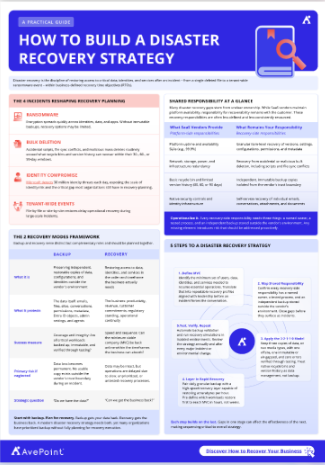
Enterprise Disaster Recovery for Business Continuity
Enterprise recovery needs a business continuity lens
Enterprise disaster recovery is not just a technical design problem. It is part of business continuity. Business continuity is the broader discipline of keeping essential operations running during disruption. Disaster recovery is the IT-focused subset that restores the systems and data those operations depend on. You need both when outages affect customers, employees, revenue, compliance, or service delivery.
This matters most in large environments where applications span regions, departments, and vendors. A technically restored system is not truly recovered if the business process around it is still blocked. That is why enterprise DR planning should involve operations leaders, security teams, compliance stakeholders, and application owners alongside infrastructure specialists.
What mature enterprise solutions look like
At the enterprise level, recovery solutions are usually tiered, centralized, and policy-driven. They account for application interdependencies, multiple recovery locations, privileged access controls, audit needs, and structured testing. They also recognize that different platforms require different recovery methods, particularly across SaaS, IaaS, and on-premises environments.
For SaaS environments such as Microsoft 365, mature programs may also need express recovery capabilities for high-impact incidents. When ransomware, mass deletion, or large-scale outages affect critical collaboration workloads, file-by-file recovery may not be enough to support real business continuity targets. In those cases, high-speed recovery at scale can help organizations restore large volumes of SharePoint, OneDrive, and Exchange data faster and with less operational disruption.
Mature programs focus on recoverability, not tool count. That means clear ownership, measurable recovery targets, tested workflows, and the ability to produce evidence that recovery controls are current and effective. In many organizations, that is what separates a nominal DR program from a resilient one.
How MSPs can support recovery readiness
Managed service providers can help organizations fill capability gaps in planning, monitoring, testing, and execution. That can be especially valuable for lean IT teams or fast-growing businesses that need stronger coverage without building a large in-house recovery practice. The best MSP relationships are transparent about roles, escalation models, and the split between provider obligations and customer-owned decisions.
Turn Disaster Recovery Planning into Operational Readiness
Disaster recovery is no longer about restoring data. It is about protecting the systems and processes that keep the business running when disruption hits. The strongest recovery programs are built on realistic RTO and RPO targets, tested runbooks, and strategies that support fast, confident recovery across modern environments.
See how AvePoint’s Ransomware Protection and Disaster Recovery solutions help teams recover quickly, stay compliant, and build resilience across modern cloud environments.
Go Beyond Traditional Backup: Comprehensive Data Protection and Recovery
AvePoint empowers IT leaders to protect against ransomware, meet compliance requirements, and recover fast with isolated, immutable backups and proactive detection across multi-cloud environments.
Frequently Asked Questions About Disaster Recovery

Grace Harrison is a Product Marketing Manager at AvePoint, Inc., based in Jersey City, NJ. She works in the Product Strategy department, contributing to solutions like AvePoint Cloud Backup, AvePoint Fly, and AvePoint tyGraph. Grace plays a key role in developing marketing strategies and competitive intelligence to support AvePoint's field teams and enhance their selling tools.