

The shared responsibility model is a framework that divides security and data protection duties between a cloud provider and the customer. In Microsoft 365, Microsoft covers physical infrastructure, platform uptime, and service-level security. Customers are responsible for data backup, access management, compliance configuration, and recovery, including all Exchange Online, SharePoint, Teams, and OneDrive data.
Key Takeaways
- The shared responsibility model is not optional. It defines real legal and operational obligations for every organization using Microsoft 365.
- Microsoft protects the platform. Physical infrastructure, network availability, and geo-redundant replication are Microsoft's responsibility. Data backup, access control, and compliance are yours.
- Replication is not backup. Deleted and corrupted data replicates as deleted and corrupted. Native recycle bin retention is time-limited, manual, and can be cleared by ransomware attackers.
- All five Microsoft 365 workloads require backup. Exchange, SharePoint, OneDrive, Teams, and Entra ID each carry distinct data and recovery requirements. Teams and Entra ID are the most commonly overlooked.
- AI extends the model. Microsoft 365 Copilot and AI agents introduce new data access and governance responsibilities that the traditional shared responsibility model does not address.
- Microsoft's own documentation recommends third-party backup. The Microsoft Service Agreement explicitly recommends using third-party applications to back up data stored in Microsoft 365.
- Start with backup, MFA, and AI inventory. These three actions address the highest-frequency failure modes for organizations that have not yet fully addressed their side of the shared responsibility model.
How Does Responsibility Change Across IaaS, PaaS, and SaaS?
Responsibility shifts progressively toward the provider as you move from IaaS to PaaS to SaaS. In IaaS, you manage operating systems, applications, and data. In PaaS, the provider manages the platform. In SaaS, including Microsoft 365, the provider manages the full application stack. In all three models, data backup, identity management, and compliance remain the customer's responsibility.
Here is how specific responsibilities are allocated across cloud service models. The key insight: Regardless of how much of the stack the provider manages, data backup and recovery never transfer to the provider.
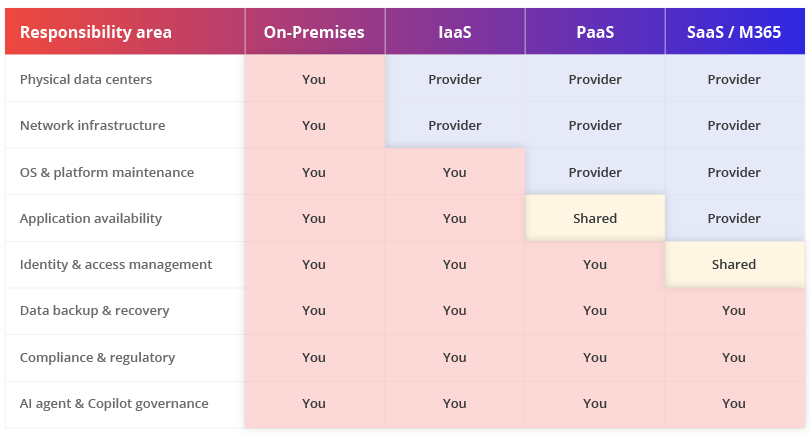
Note: Geo-redundant replication is a platform availability feature, not a backup. Deleted or corrupted data replicates across data centers in its deleted or corrupted state.
A common misreading of SaaS environments is that because the provider manages so much of the stack, data protection is also handled. Microsoft manages the platform. You manage the data on it.
What Does Microsoft Actually Cover in Microsoft 365?
Microsoft is responsible for the physical security of its data centers, the availability of the Microsoft 365 platform, network infrastructure, and replication of data across multiple geographically distributed data centers. Microsoft is not responsible for protecting customer data from accidental deletion, ransomware, misconfiguration, or unauthorized access by internal users.
Microsoft's responsibilities under the shared responsibility model in Microsoft 365 are substantial, but they are infrastructure– not data protection – responsibilities. Specifically, Microsoft covers:
- Physical security. Data center access controls, environmental controls, hardware security, and power redundancy across Microsoft's global infrastructure.
- Network infrastructure. Internal network routing, distributed denial-of-service (DDoS) protection, and infrastructure-level firewall controls within Microsoft's data centers.
- Platform uptime. Microsoft provides a 99.9% uptime service-level agreement (SLA) for most Microsoft 365 services. When the service is unavailable due to a Microsoft infrastructure failure, Microsoft is accountable.
- Geo-redundant replication. Data is replicated across multiple data centers. This protects against data center hardware failure, but not against deletion, corruption, or ransomware, all of which are replicated faithfully across data centers.
- Platform-level security patching. Microsoft maintains the operating systems, application servers, and platform components that run Microsoft 365.
- Service compliance certifications. Microsoft maintains ISO 27001, SOC 2, GDPR, HIPAA, and other certifications at the platform level. Customer-level compliance is the customer's responsibility.
What Microsoft does not cover: It does not protect against accidental or intentional deletion by users or administrators, ransomware that encrypts files synced to OneDrive, misconfiguration of sharing settings, data exfiltration by compromised accounts, or any data loss resulting from actions taken within the tenant.
What Are You Responsible for in Microsoft 365?
Under the Microsoft 365 shared responsibility model, customers are responsible for data backup and recovery, identity and access management, security configuration, endpoint protection, compliance policy setup, and retention configuration across all Microsoft 365 workloads. Microsoft's native recycle bin and short-term retention features do not constitute backup and are not a substitute for a third-party backup solution.
Customer responsibilities span every layer of the Microsoft 365 environment. The following table maps each Microsoft 365 workload to its specific customer-owned responsibilities:
| Microsoft 365 Workload | Customer's Responsibility | MSP Responsibility |
| Exchange Online | Backup mailbox data, configure retention policies, manage mail flow rules, and monitor for account compromise | Configures and monitors automated mailbox backup on the client's behalf; sets and maintains retention policies and mail flow rules; alerts and acts, per SLA, on signs of account compromise |
| SharePoint Online | Backup site collections and document libraries, configure permissions, and manage external sharing policies. | Runs backup coverage across every site collection and library it manages for the client; configures and audits permissions and external sharing policies against the client's risk tolerance |
| OneDrive for Business | Backup file data, configure sync settings, and manage version retention beyond the native 30-day window | Extends backup beyond the native 30-day window for every user account; configures sync settings and version retention to the client's agreed policy |
| Microsoft Teams | Backup Teams chats, channel messages, and meeting recordings; manage guest access; govern app integrations | Covers Teams chats, channels, and meeting recordings under the same backup policy as the rest of the tenant; reviews guest access and app integrations on a standing cadence |
| Entra ID (Azure AD) | Backup user accounts and group configurations; configure MFA; manage conditional access policies | Backs up identity and group configurations; enforces MFA and conditional access baselines consistently across every client tenant it manages |
| Power Platform | Govern Power Automate flows and Power Apps; backup Dataverse data; manage connector access | Inventories and governs Power Automate flows and Power Apps; backs up Dataverse data; reviews connector access against the client's data policy |
| Microsoft Copilot | Control what data Copilot can access; configure sensitivity labels; govern AI-generated output | Scopes what data Copilot can access per client; configures and maintains sensitivity labels; monitors AI-generated output for compliance |
Identity and access management is a shared responsibility in Microsoft 365, but the configuration decisions are entirely customer-controlled. Enabling multifactor authentication (MFA), configuring conditional access, and managing privileged identity are all customer responsibilities. Microsoft provides the tools; the customer must configure and enforce them.
Where Do MSPs Fit into the Shared Responsibility Model?
Hiring a managed service provider (MSP) does not remove a customer’s responsibilities under the shared responsibility model. It simply delegates the day-to-day management of many of them.
Microsoft remains responsible for the security and availability of the Microsoft 365 platform. Customers remain accountable for their data, identities, compliance, and AI governance. MSPs help execute and maintain the controls that support those responsibilities.
Managing at Scale
As MSPs grow across multiple client tenants, maintaining consistency becomes increasingly difficult. Configuration drift, policy exceptions, and manual processes can quickly create security and compliance gaps. Platforms such as AvePoint Elements help MSPs standardize backup, security, compliance, and AI governance controls across customer environments, reducing complexity and improving consistency.
Typical MSP Responsibilities
To help customers meet their side of the shared responsibility model, MSPs commonly manage:
- Microsoft 365 backup and recovery
- Identity and access management
- Security monitoring and compliance enforcement
- Teams, SharePoint, OneDrive, and Exchange governance
- Copilot and AI governance controls
- Recovery testing and reporting
MSP Shared Responsibility in Practice
Even with an MSP in place, customers remain responsible for setting requirements, approving policies, meeting compliance obligations, and maintaining oversight.
Ultimately, Microsoft secures the platform, MSPs operationalize protection, and customers remain accountable for governance, risk, and compliance. When all three work together with clearly defined responsibilities, organizations can reduce risk, strengthen resilience, and minimize security and compliance gaps.
What Are the Most Common Gaps Organizations Miss Under the Shared Responsibility Model?
The most common gap is assuming that Microsoft's built-in replication and short-term retention features constitute backup. Replication protects against data center failure, not against data loss caused by human error, ransomware, or misconfigurations. A deleted file replicates as deleted across all data centers within minutes. In a ransomware attack, attackers routinely clear recycle bins as a first step.
Organizations that operate under the shared responsibility model without fully understanding their obligations face five specific and recurring exposure gaps:
- Treating geo-redundancy as backup. Microsoft's data replication ensures availability in the event of a data center failure. It does not protect against deletion or corruption. Both replicate instantly.
- Relying on the recycle bin as a recovery strategy. Exchange Online retains deleted items for 30 days by default. SharePoint and OneDrive recycle bins retain items for 93 days. Neither is automated; both require manual action, and ransomware attackers typically clear them on entry.
- Overlooking Teams data. Teams chat messages, meeting recordings, and channel posts are among the least backed up Microsoft 365 workloads. Many organizations back up email and SharePoint but neglect Teams entirely.
- Misunderstanding retention policies. Retention policies preserve data for compliance holds — they are not recoverable backup copies. An item preserved by a litigation hold cannot be restored to its original location through that hold.
- Leaving Entra ID ungoverned. Microsoft does not back up user accounts, groups, and conditional access policies. If an admin account is compromised and deletes users or alters access policies, recovery requires manual reconstruction or a third-party backup of directory data.
How Does the Shared Responsibility Model Apply to Microsoft 365 Backup?
Microsoft 365 backup is entirely the customer's responsibility under the shared responsibility model. Microsoft provides short-term recovery features, recycle bins, and version history. But these have hard time limits, require manual action, cover a limited set of data types, and are not sufficient to meet most organizations' recovery or compliance requirements. Third-party backup is required to fulfill the customer's side of the model.
The table below shows the native recovery capabilities Microsoft provides for each Microsoft 365 workload, alongside the gaps that require a third-party backup solution:
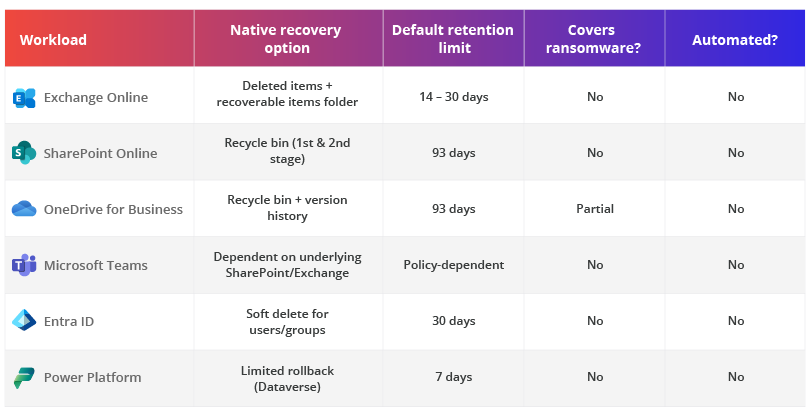
A critical distinction: Microsoft does offer a Microsoft 365 Backup service (released in 2024), which provides faster restoration than native recycle bin recovery. However, this is an additional paid service, not a default protection included in Microsoft 365 licensing. Its inclusion validates rather than negates the shared responsibility model. Microsoft created it specifically because native Microsoft 365 does not constitute a backup.
For organizations subject to regulatory requirements such as HIPAA, GDPR, SOC 2, or financial services regulations, native retention options typically fail to meet the point-in-time recovery, immutability, and long-term retention requirements specified by those frameworks.
What Does the Shared Responsibility Model Mean for AI Workloads and Microsoft Copilot?
AI workloads in Microsoft 365, including Microsoft Copilot and custom AI agents built on the Microsoft 365 platform, introduce a new layer of responsibility not addressed in the traditional shared responsibility model. Microsoft secures the AI infrastructure and model hosting. Customers are responsible for governing what data AI systems can access, what actions they can execute, and ensuring AI-generated outputs do not expose sensitive or regulated information.
The shared responsibility model was designed for static data. AI changes the dynamic: Agents act on data, not just store it. When a Copilot agent accesses a SharePoint library, summarizes email threads, or executes a workflow, the question of who is responsible for the data it touches and the outputs it produces becomes materially more complex.
Under the extended shared responsibility model for AI workloads in Microsoft 365, here’s the breakdown of responsibilities:
- Microsoft: Securing AI infrastructure, ensuring model availability, maintaining platform-level safeguards against model-level vulnerabilities, and providing governance tooling, such as Microsoft Purview
- Customer: Controlling what data AI agents can access (sensitivity labels, permission scoping), governing which agents are running in the tenant, detecting and responding to shadow agents operating outside sanctioned workflows, and ensuring AI outputs comply with regulatory obligations.
Many organizations know which users have access to their Microsoft 365 data. Far fewer know which AI agents do, what those agents are doing with it, or whether agents deployed through Power Platform or third-party integrations are operating within policy.
As organizations expand their use of Copilot, Power Automate agents, and third-party AI tools integrated with Microsoft 365, the governance surface under the shared responsibility model grows. Data that was once accessed only by humans is now being processed, summarized, and acted upon by agents that may not have the same access controls.
Governing AI agents in Microsoft 365 is the emerging frontier of the shared responsibility model, and most organizations have not yet mapped it.
What Are the Best Practices for Meeting Your Side of the Shared Responsibility Model in Microsoft 365?
Meeting your responsibilities under the Microsoft 365 shared responsibility model requires implementing third-party backup for all Microsoft 365 workloads, configuring identity and access policies with MFA enforced, establishing retention and compliance settings beyond native defaults, and governing AI agents and Copilot access to sensitive data. These are operational requirements, not optional add-ons.
The table below maps organizations to three maturity tiers based on how completely they have addressed their side of the shared responsibility model:
| Tier | Level | Key actions | Risk posture |
| Tier 1 | Foundational | Third-party backup is enabled for Exchange, SharePoint, and OneDrive. MFA is enforced for all accounts. Basic retention policies configured. | Partial: core data protected, but Teams, Entra ID, and AI workloads likely uncovered |
| Tier 2 | Intermediate | All Microsoft 365 workloads, including Teams and Entra ID, are backed up. DLP policies are active. Backup tested quarterly. Guest access is governed. Conditional access policies deployed. | Moderate: data recoverable, identity risks largely mitigated. |
| Tier 3 | Advanced | Immutable backup with off-site retention. AI agent governance is active (Copilot access scoped, shadow agents detected). CSPM integration. Automated backup testing. Regulatory compliance validated. | Low: full coverage across data, identity, AI, and compliance |
Specific Steps for Each Responsibility Area:
1. Data Backup and Recovery
- Select a third-party backup solution that covers Exchange Online, SharePoint, OneDrive, Teams, and Entra ID with point-in-time recovery.
- Configure automated daily backups with off-site or immutable storage to meet ransomware recovery requirements.
- Test recovery at least quarterly. An untested backup is not a backup.
2. Identity and Access Management
- Enforce MFA for all accounts, including service accounts and admin accounts.
- Configure conditional access policies to restrict access by device compliance, location, and risk level.
- Regularly review privileged accounts with Global Admin rights, which represent the highest-risk surface in your tenant.
3. AI Agent and Copilot Governance
- Inventory AI agents in your tenant to know which Copilot agents, Power Automate flows, and third-party AI integrations are active and what data they can access.
- Scope Copilot access using sensitivity labels to prevent AI from surfacing sensitive data to unauthorized users through summarization or search.
- Establish a governance policy for AI agents that defines which agents are sanctioned, how they are monitored, and what constitutes a policy violation.
Protect Your Side of the Shared Responsibility Model
AvePoint Cloud Backup covers all five Microsoft 365 workloads, Exchange, SharePoint, OneDrive, Teams, and Entra ID, with automated daily backups, point-in-time restore, and immutable storage options. For organizations using Microsoft Copilot and AI agents, AvePoint AgentPulse provides the AI agent discovery, risk assessment, and governance controls needed to address the emerging AI layer of the shared responsibility model.
Frequently Asked Questions
What is the shared responsibility model in simple terms?
The shared responsibility model means that when you use cloud services, some security and protection duties belong to the cloud provider and some belong to you. The provider secures the infrastructure. You secure your data, manage who has access to it, and ensure it is backed up. Moving to the cloud shifts some responsibilities to the provider, but never eliminates your responsibility for your own data.
Does Microsoft back up Microsoft 365 data?
Microsoft does not provide a comprehensive backup of Microsoft 365 data by default. Microsoft's platform offers geo-redundant replication to support availability and limited recovery options such as the recycle bin, but these are time-bound, require manual intervention, and do not cover all data types. Microsoft's Service Agreement recommends that customers "regularly backup your Content and Data that you store on the Services using third-party applications and services." In 2024, Microsoft introduced a paid Microsoft 365 Backup service, which is separate from standard subscriptions. To address these gaps, solutions like the AvePoint Confidence Platform provide centralized cloud backup for Microsoft 365, alongside Entra ID and IaaS and PaaS workloads across the Microsoft ecosystem.
What is the difference between replication and backup in Microsoft 365?
Replication copies data across multiple data centers to ensure service availability if one data center fails. Backup creates a recoverable, point-in-time copy of data that can be restored if the data is deleted, corrupted, or encrypted by ransomware. The key difference: replication faithfully copies deletions and corruptions across all data centers. A backup preserves the data as it was before the deletion or corruption occurred. In Microsoft 365, Microsoft provides replication; backup is the customer's responsibility.
What does the shared responsibility model mean for Microsoft 365 specifically?
In Microsoft 365, the shared responsibility model means Microsoft manages the platform infrastructure and availability, while customers are responsible for protecting their data within it. Specifically, customers must implement backup and recovery for Exchange, SharePoint, OneDrive, Teams, and Entra ID; manage identity and access policies; configure compliance and retention settings; govern external sharing; secure endpoints; and increasingly, govern AI agents and Copilot access to sensitive data.
How does ransomware affect the Microsoft 365 shared responsibility model?
Ransomware attacks on Microsoft 365 expose the limits of native retention features. When ransomware encrypts files synced to OneDrive or SharePoint, or when an attacker deletes mailboxes after gaining access to admin credentials, the 93-day recycle bin window and native version history may be sufficient for recovery, but only if the attack is detected quickly. Attackers commonly clear recycle bins immediately after gaining access, eliminating native recovery options. Organizations that meet their side of the shared responsibility model have immutable, off-site backups that ransomware cannot reach or delete.
Does the shared responsibility model apply to Microsoft Copilot and AI agents?
Yes. AI workloads in Microsoft 365 extend the shared responsibility model in important ways. Microsoft secures the AI infrastructure and model hosting. Customers are responsible for governing what data AI agents and Copilot can access, detecting unauthorized or shadow AI agents operating in the tenant, and ensuring AI outputs comply with data security and regulatory requirements. The traditional shared responsibility model addresses stored data; AI adds the dimension of data that is actively being processed, summarized, and acted upon by automated systems.
What is a good starting point for meeting the Microsoft 365 shared responsibility model?
A practical starting point is to implement third-party backup for Exchange Online, SharePoint, and OneDrive, the three highest-risk workloads for data loss, and enforce MFA for all accounts. These two actions address the most common and costly failure modes. From there, expand to cover Teams and Entra ID backup, configure data-loss prevention (DLP) policies, and establish governance for AI agents as Copilot adoption increases.
How often should I review my shared responsibility posture for Microsoft 365?
Organizations should review their Microsoft 365 shared responsibility posture at a minimum quarterly, and whenever Microsoft announces significant platform changes. Microsoft 365 evolves continuously; new features, data types, and AI capabilities regularly create new responsibility surfaces. For AI governance specifically, monthly reviews are advisable given the pace of Copilot and agent deployment.
Is the shared responsibility model different for Microsoft 365 Government (GCC)?
The core division of responsibilities in Microsoft 365 Government (GCC and GCC High) mirrors the standard shared responsibility model, but compliance requirements are significantly more prescriptive. FedRAMP, ITAR, and CMMC frameworks impose additional obligations on both Microsoft and the customer. In GCC High environments, data sovereignty and export control requirements create additional customer responsibilities around backup storage location and data handling. Organizations in regulated government sectors should verify their backup and governance posture against the specific control frameworks that apply to their environment.
Related Questions

Shyam Oza brings over 15 years of expertise in product management, marketing, delivery, and support, with a strong emphasis on data resilience, security, compliance, and business continuity. Throughout his career, Shyam has undertaken diverse roles, from teaching video game design to modernizing legacy enterprise software and business models by fully leveraging SaaS technology and Agile methodologies. He holds a B.A. in Information Systems from the New Jersey Institute of Technology.