

As organizations manage data, users, and AI across increasingly complex cloud environments, confidence depends on having the right controls, visibility, and automation in place. The April updates to the AvePoint Confidence Platform focus on expanding precision, strengthening governance, and extending coverage across Microsoft, Google, and SaaS ecosystems. This release introduces more targeted backup and restore controls, deeper insights across engagement and risk, expanded command center visibility for AI agents, and a unified governance framework for Google Workspace — helping organizations operate with greater clarity and control as environments continue to evolve.
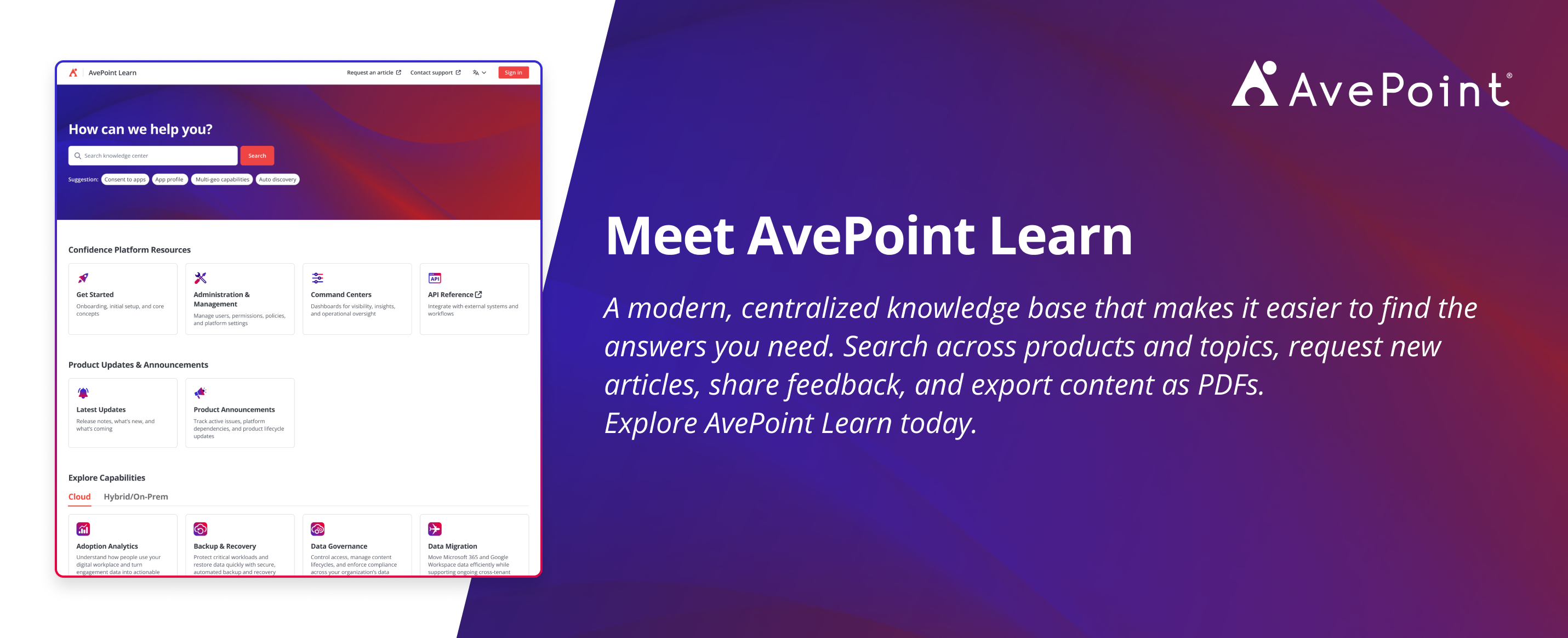
Alongside these platform enhancements, we’re also introducing AvePoint Learn, a new centralized knowledge base designed to make it easier to find, share, and maintain product knowledge. With intuitive navigation, cross-product search, article requests, built-in feedback, and PDF exports, AvePoint Learn makes product guidance easier to find, use, and share.
Explore what’s new across the platform below, or jump directly to the areas most relevant to your organization.
- Adoption Analytics
- Backup and Recovery
- Data Governance
- Data Migration
- Information Lifecycle Management
- Access and Workflow Management
- Policies and Insights
- Cloud Cost Management
Learn more about the latest AvePoint Confidence Platform innovations on our webinar series.
Register now for our next session on Thursday, April 30th: AvePoint Innovates: Discover What's Next!
Command Centers
What’s New in Command Centers
Command Centers provide centralized oversight across key areas of the AvePoint Confidence Platform, helping organizations monitor activity, maintain control, and respond quickly as environments evolve.
With this release, AgentPulse offers expanded connectivity and reporting for AI agents across Microsoft and Google environments. Microsoft tenants can now configure custom Azure applications to connect to AgentPulse, providing greater flexibility when integrating agent data. Reporting support has also expanded to Google agents, with Google tenants now able to configure connections using Google Vertex AI agents — extending visibility and consistency across multi-cloud agent deployments.
Adoption Analytics
What’s new in AvePoint tyGraph
tyGraph adds deeper insight into engagement and governance across Microsoft 365. Engage Campaign Insights for Viva Engage now measure performance based on topics and hashtags, helping communications teams understand what drives engagement, when activity peaks, and which messages resonate most.
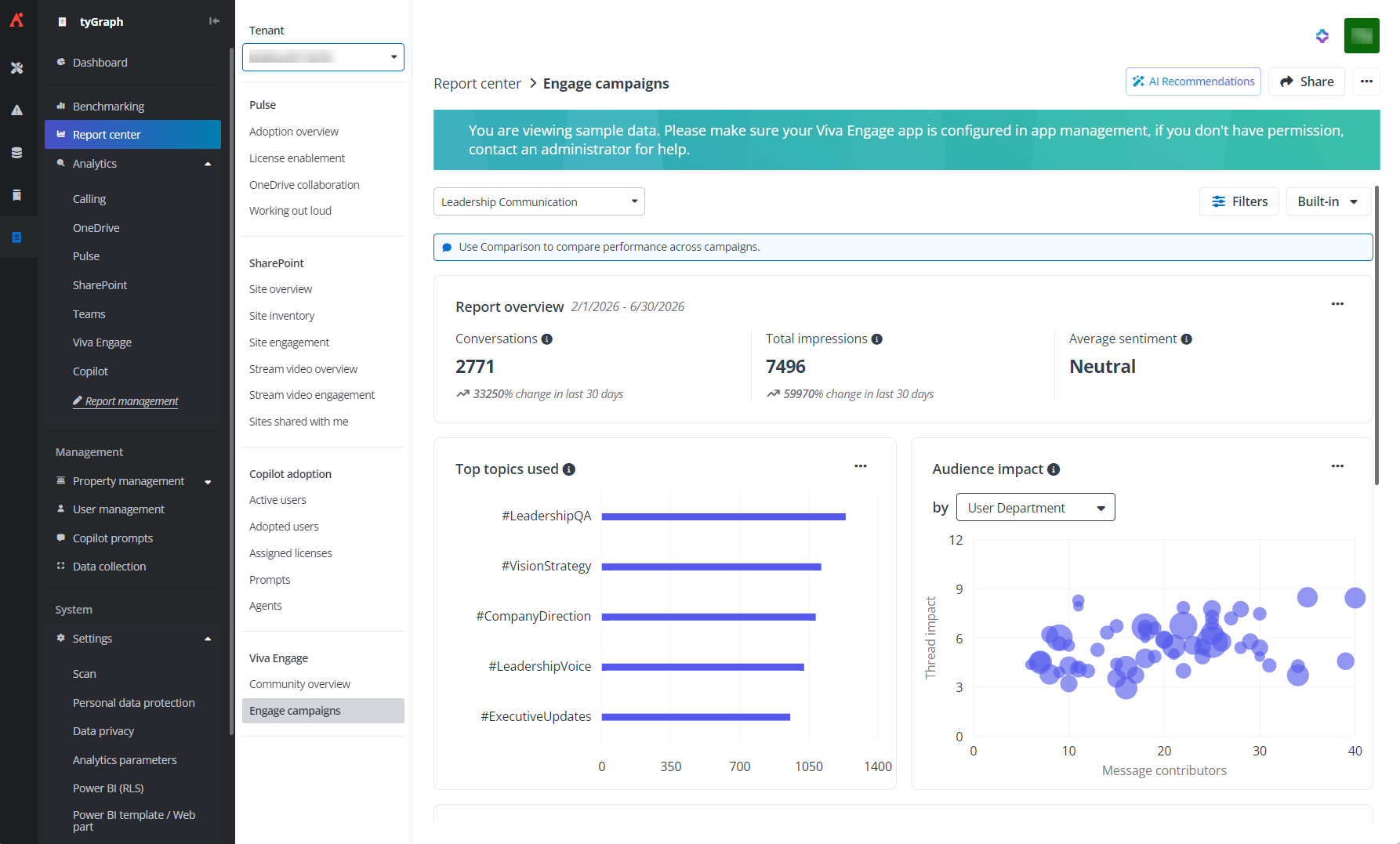
Engage campaign insights help you understand what drives engagement and which messages resonate most.
Administrators also gain more control over data retention with rolling, date‑based policies, with 36 months included by default and the option to extend beyond three years with add‑on licenses. Dashboard and report navigation is improved with favorites, shared and published views, and a new Dashboard Publisher role that makes it easier to broadcast insights across the tenant.
Enhanced SharePoint reports and optimized best owner machine learning provide clearer insights with improved efficiency, reducing processing time and storage costs while making licensing requirements more transparent before enablement.
Unified Control for Google
What’s New in Confidence Platform for Google
Confidence Platform for Google is now generally available, delivering a unified governance and operations framework purpose‑built for Google Workspace.
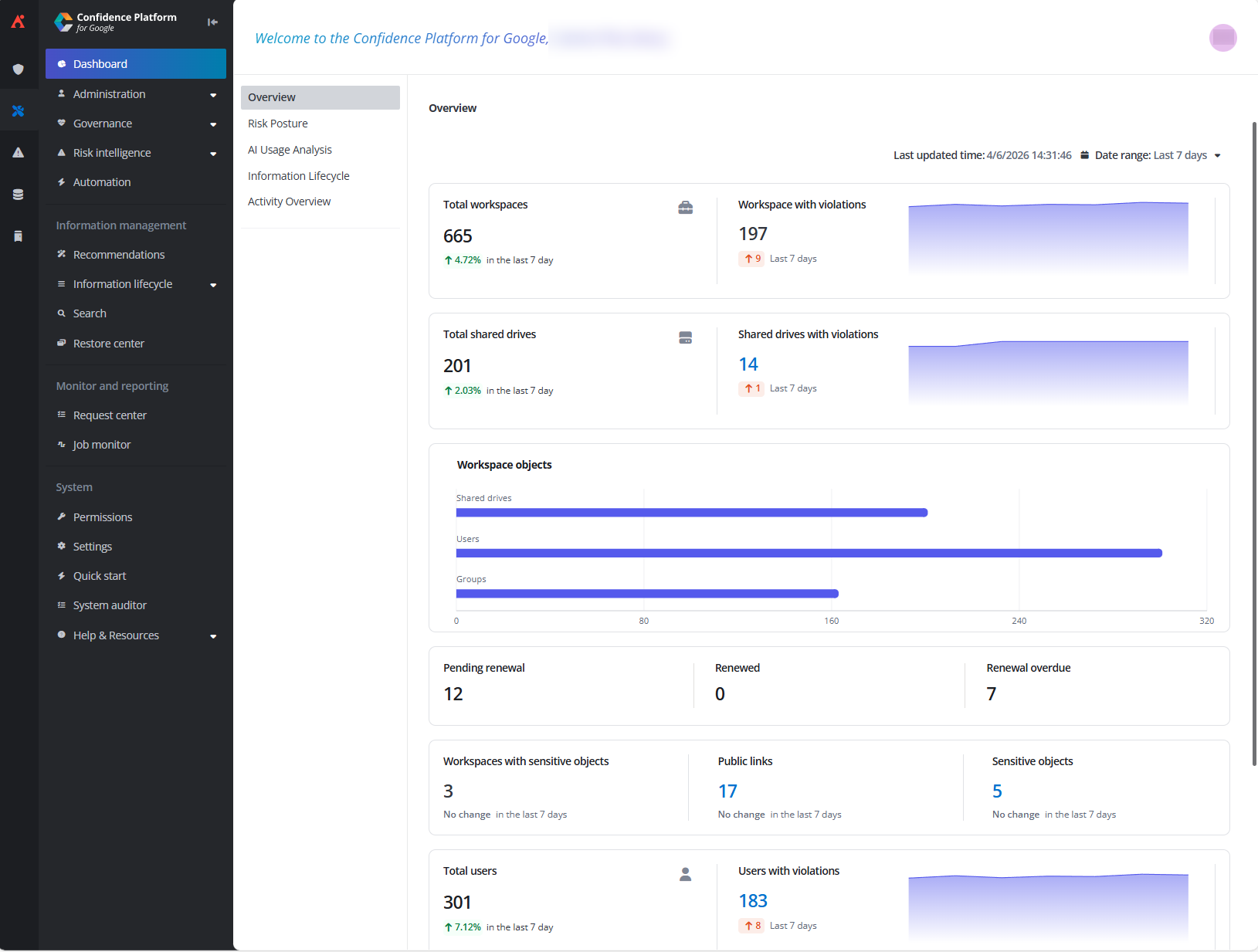
Centralized governance, risk intelligence, and automated workflows for managing Google Workspace at scale.
The platform brings together administration, governance, risk intelligence, policy enforcement, automation, and information management to help organizations manage users, shared drives, and content lifecycles with consistency and control. With centralized visibility into risk and compliance exposure, scalable policy enforcement, and automated governance workflows, teams can reduce manual effort while maintaining defensible, compliant environments. MyHub for Google completes the experience by providing a single, guided portal where business users can submit requests and complete governance tasks, while administrators retain full oversight across the platform.
Backup and Recovery
What’s new in Cloud Backup for Microsoft 365
April brings greater precision and control to Cloud Backup for Microsoft 365, helping organizations reduce risk, manage storage more efficiently, and maintain compliance without disrupting existing environments. New metadata-based backup filters allow you to fine-tune protection across OneDrive, SharePoint, Microsoft 365 Groups, and Teams. By excluding content based on path, size, file type, or creation and modification dates, admins can better align backups with regional data residency requirements and cost considerations without needing to restructure existing sites.
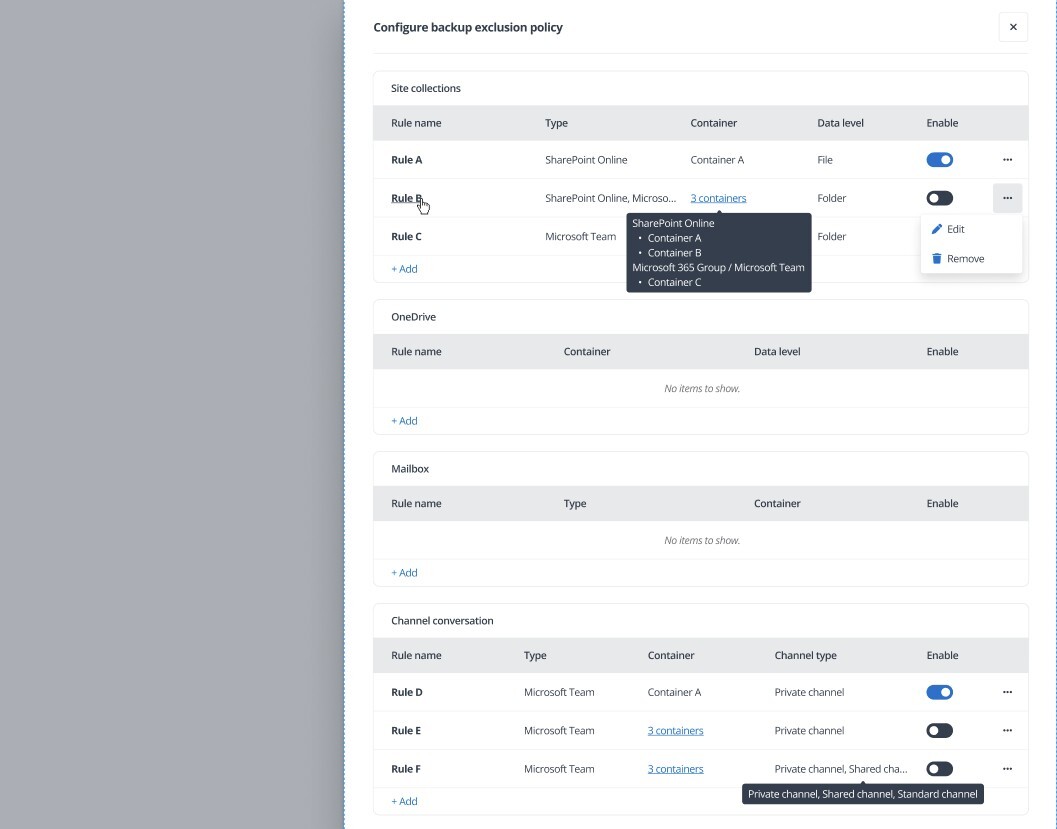
Granular file and folder-level exclusion filters are now available for OneDrive, SharePoint, Groups, and Teams.
Restore capabilities have also expanded to support more complex tenant and collaboration scenarios. Out-of-place OneDrive restores now support Domain Mapping mode, enabling batch restores that map source and target domains so content lands in the correct tenant structure, while maintaining full audit visibility. When restoring Teams and Microsoft 365 Groups data, admins can now choose whether to restore guest user memberships, helping preserve collaboration context where needed.
For organizations using ReCenter, new Shared Mailbox restore controls add another layer of governance. Admins can now disable shared mailbox restoration entirely, helping enforce least privileged access policies and ensuring that sensitive, shared content remains tightly controlled.
What’s new in Cloud Backup for Salesforce
Salesforce archiving now supports multiple archive policies for the same object using condition‑based rules, allowing different subsets of records within a single object to follow distinct retention schedules.
Enhanced permission check reporting now highlights Salesforce objects the backup service account cannot access. This makes it easier to identify gaps, correct permissions, and ensure complete coverage across both standard and custom data.
In addition, custom archive permissions can now be configured in the AvePoint ReCenter Salesforce app. Administrators can control who can preview and restore archived Salesforce records using targeted permission sets, reducing reliance on broad admin access while ensuring the right users can manage archived data with confidence.
What’s New in Cloud Backup for Google Workspace
Cloud Backup for Google Workspace now supports day-based retention policies, giving organizations more flexibility to align protection with internal and regulatory requirements. Retention can be configured for as little as 30 days or extended to match specific data policies, helping teams balance compliance, efficiency, and storage management with greater precision.
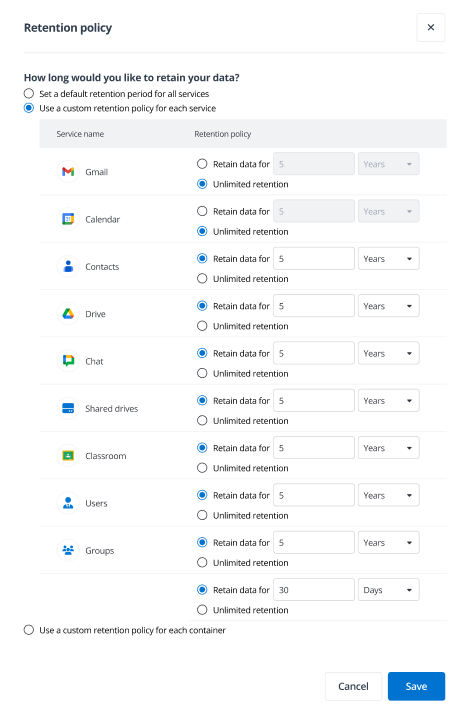
Define a retention window in days rather than years to better comply with regulatory policies.
What’s new in Cloud Backup for IaaS + PaaS
Cloud Backup for Infrastructure continues to expand coverage for critical Azure services. Support for Azure Cosmos DB NoSQL brings automated backups with flexible restore options for databases and containers, helping organizations move beyond native limitations while maintaining long-term retention alongside other protected workloads.
Azure PostgreSQL Flexible Server is now also supported, with automated backups and retention beyond native limits. Granular restore options allow recovery of individual databases or tables without full server recovery, reducing operational risk and making it easier to meet compliance requirements with minimal disruption.
To learn more about when full infrastructure disaster recovery is needed, and when granular recovery is the better fit, read this breakdown of infrastructure disaster recovery vs. granular recovery.
What’s New in Cloud Backup for SaaS Applications
As part of expanded SaaS coverage across the platform, Cloud Backup continues to add protection for critical identity, development, and collaboration services. New support for Okta Workforce Identity enables granular backup and restore for complex identity configurations, including users, groups, policies, and assignments. This helps organizations recover access quickly after outages or misconfigurations and reduces the operational impact of identity-related incidents.
Expanded Okta coverage further strengthens this protection by including branding, sign-in experiences, and application settings, while flexible restore filters make it easier to recover exactly what is needed.
Protection for developer tools and collaboration platforms has also expanded. GitHub repository restores now automatically reapply Custom Properties, ensuring restored repositories immediately align with organizational governance rules. Jira Admin Settings are now protected, safeguarding project relationships and work items, while new Bitbucket support adds automated backup and granular restore for repositories, code, and key project metadata. This ensures the underlying configurations of your development ecosystem remain as resilient as the code itself.
Data Governance
What’s new in AvePoint Cloud Governance
Cloud Governance introduces new risk awareness and efficiency improvements across provisioning, renewal, and access workflows. Operational flexibility continues to expand with bulk guest renewals and task exclusions for selected users or service accounts, helping organizations streamline governance activities at scale. Admins can also copy branch settings when creating new branches, making it easier to apply consistent governance models across environments.
During SharePoint renewal workflows, Sharing Link Risk Insights now allow admins to configure which high‑risk sharing links are surfaced based on sensitivity and risk signals from Insights. Reviewers see only the links that matter most for their organization, enabling more focused, informed decisions directly within the renewal experience.
Mailbox governance continues to expand with policy‑driven workflows for managing custom attributes and provisioning on‑premises shared mailboxes through MyHub. Requests are validated, approved, applied automatically, and fully audited, reducing reliance on scripts and manual admin intervention.
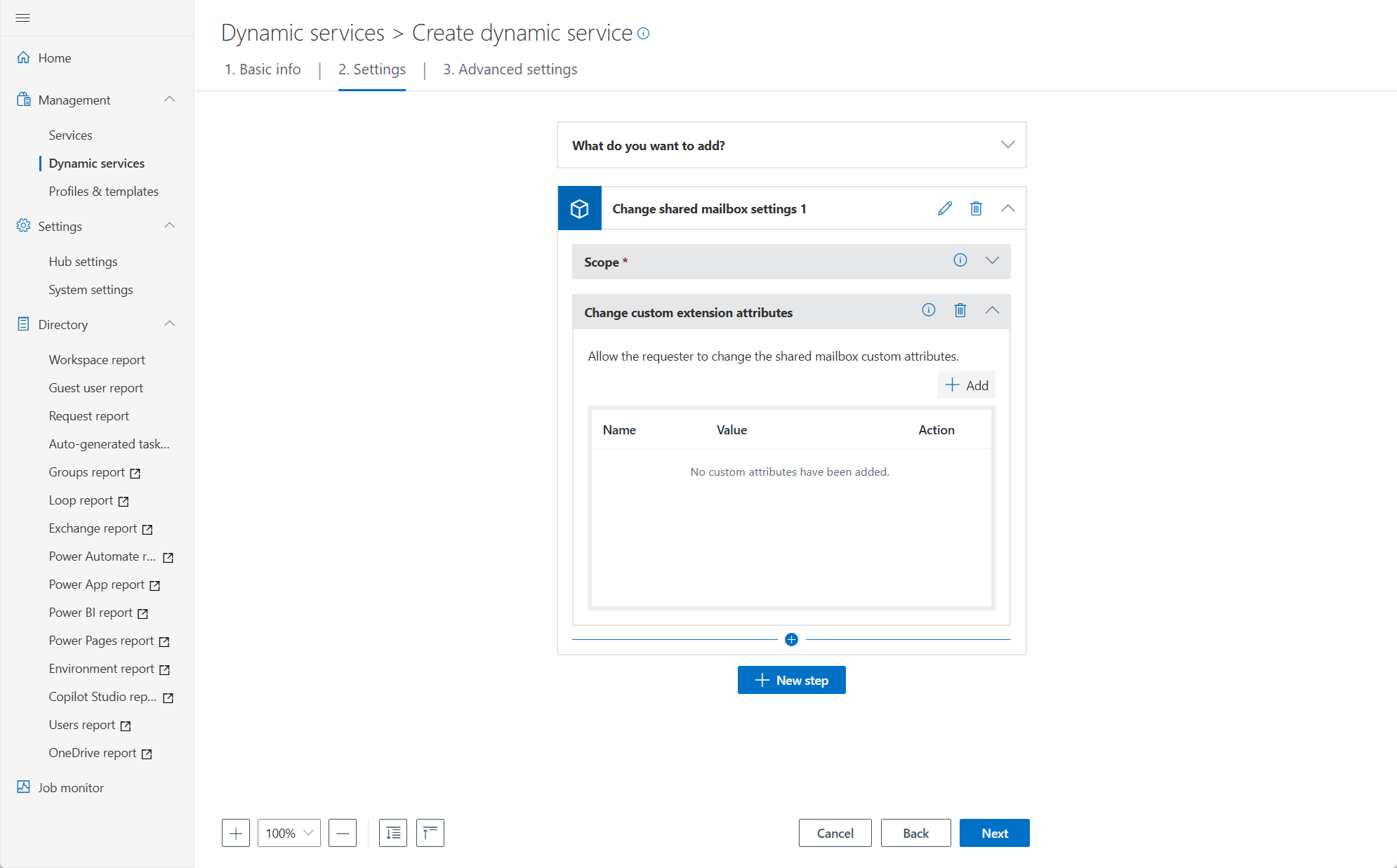
Authorized users can now edit or add custom attributes on shared mailboxes through a guided, policy driven workflow.
What’s new in AvePoint MyHub
MyHub now supports Workspace Discovery, allowing administrators to surface discoverable workspaces that users are not yet part of. This helps employees explore available collaboration spaces and request access directly, encouraging reuse while respecting existing security controls.
Data Migration
What’s new in AvePoint Fly
Migration support has been enhanced for Exchange Online Public Folder migrations, with both pre‑migration and in‑progress calculators now providing clearer visibility into scope and progress — helping teams better plan and track complex migrations. Fly can also automatically create shared mailboxes in the destination when they don’t already exist, reducing manual setup and streamlining migration cutover.
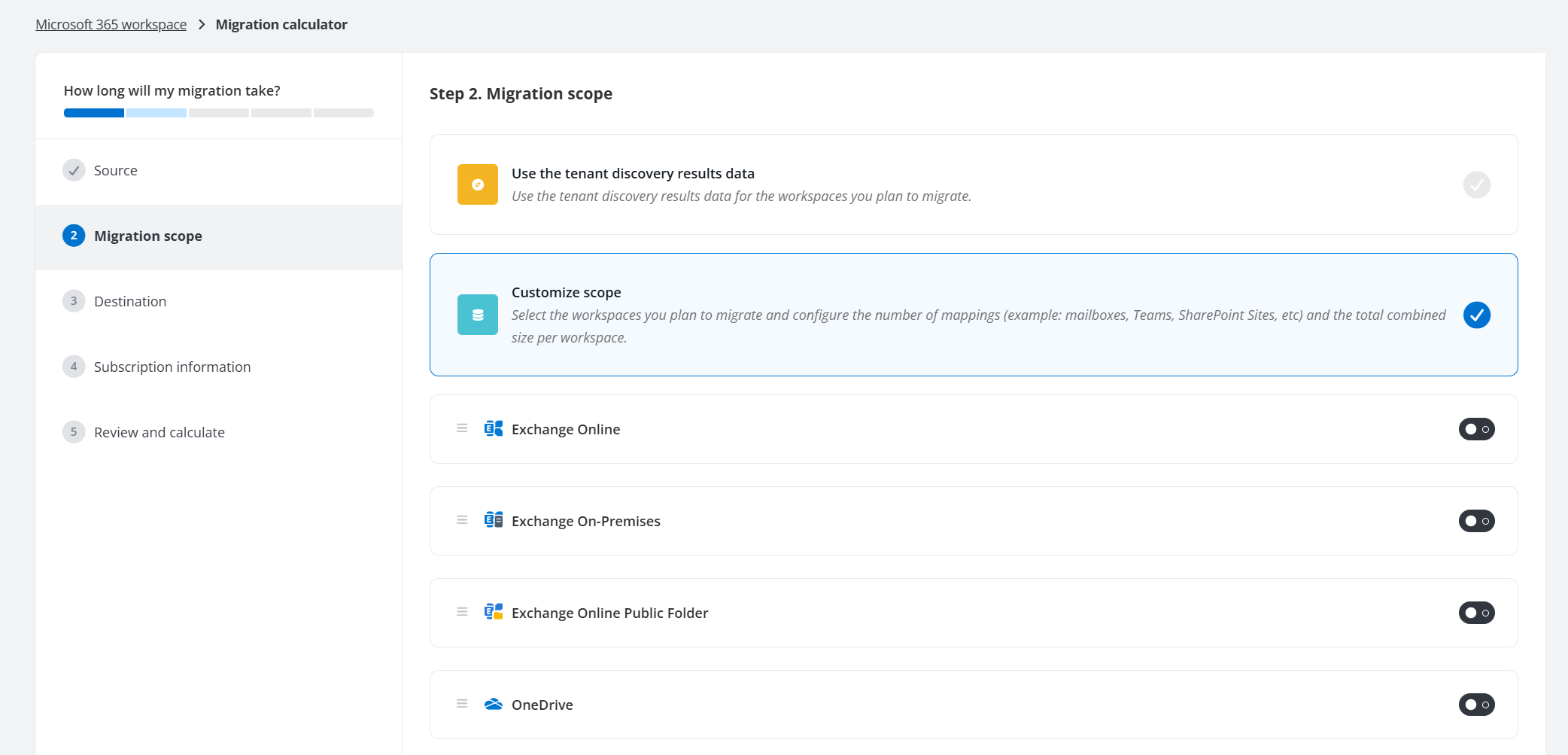
Gain visibility into scope and progress with pre‑migration and in‑progress calculators.
Cross‑platform migration controls continue to improve with support for synchronized deletions when migrating SharePoint Online and OneDrive content to Google Drive. These updates help maintain consistency between source and destination environments while simplifying ongoing migration management.
Information Lifecycle Management
What’s New in AvePoint Opus
Microsoft is modernizing compliance in Microsoft 365, retiring legacy SharePoint capabilities in favor of Microsoft Purview. AvePoint Opus aligns with Records Labels to enforce immutability, automate lifecycle governance, and provide a clear upgrade path. Read the full blog – Future-Ready Records Management in Microsoft 365 with AvePoint Opus – and contact your AvePoint representative to access documentation and plan next steps.
Archived content can now be restored to a user-defined location in SharePoint Online, providing greater flexibility when accessing and reusing content after it’s returned from archival storage. Teams can also take action on duplicate content directly from analysis results, deleting or archiving duplicates in bulk to reduce clutter and storage usage.
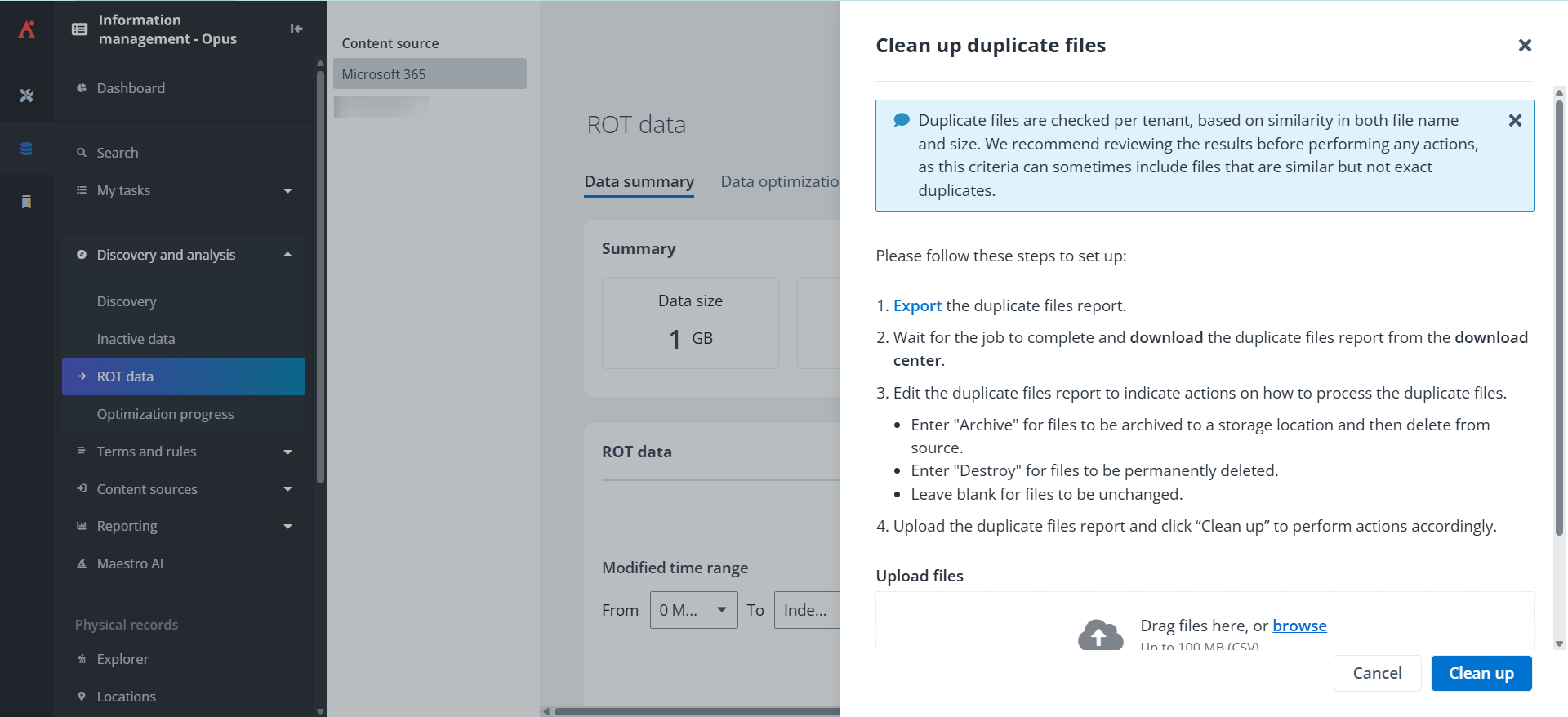
Take action on identified duplicate content directly from analysis results.
Archived Content Search is now generally available with flexible, usage-based licensing, making it easier to find and access content even when it resides in archival storage. Opus can also temporarily unlock locked SharePoint Online sites to safely perform classification and disposition actions, then automatically relock them when complete.
Physical records management is enhanced with more granular, role-based access controls, including location‑based security and scoped access to individual reports.
Access and Workflow Management
What’s new in AvePoint EnPower
EnPower continues to expand governance and automation capabilities across Microsoft 365, with new visibility into AI agents and deeper integration with Insights‑driven governance workflows. New agent inventory insights provide expanded coverage across SharePoint agents, Microsoft 365 agents, and Azure AI Foundry agents, helping administrators better understand where agents exist and make more informed governance decisions across their environment.
Access management is also enhanced with dynamic access roles that now stack with existing EnPower roles, combining permissions for clearer, more complete role assignments. New roles include Co‑owner for Power Apps, Owner for cloud and desktop flows, and expanded support for Copilot Studio and Power Pages.
Risk‑driven automation continues to evolve as Insights risk signals, such as exposure, sensitivity, and risk level, now sync directly into EnPower workflows. This enables automated actions, escalations, and notifications based on high‑risk conditions while respecting existing permissions.
Additional updates improve identity hygiene and operational governance. EnPower can now detect and resolve reused UPN mismatches in SharePoint, automate governance for Loop workspaces, and manage custom attributes for on‑premises shared mailboxes, reducing manual effort while maintaining consistent controls.
Policies and Insights
What’s new in AvePoint Policies for Microsoft 365
Policies now provides deeper visibility into policy effectiveness with enhanced violation trends on the dashboard. Clearer summaries and trend views make it easier to compare manual versus auto-fixes, filter by activity or object type, and quickly understand detected, resolved, and outstanding violations at a glance.
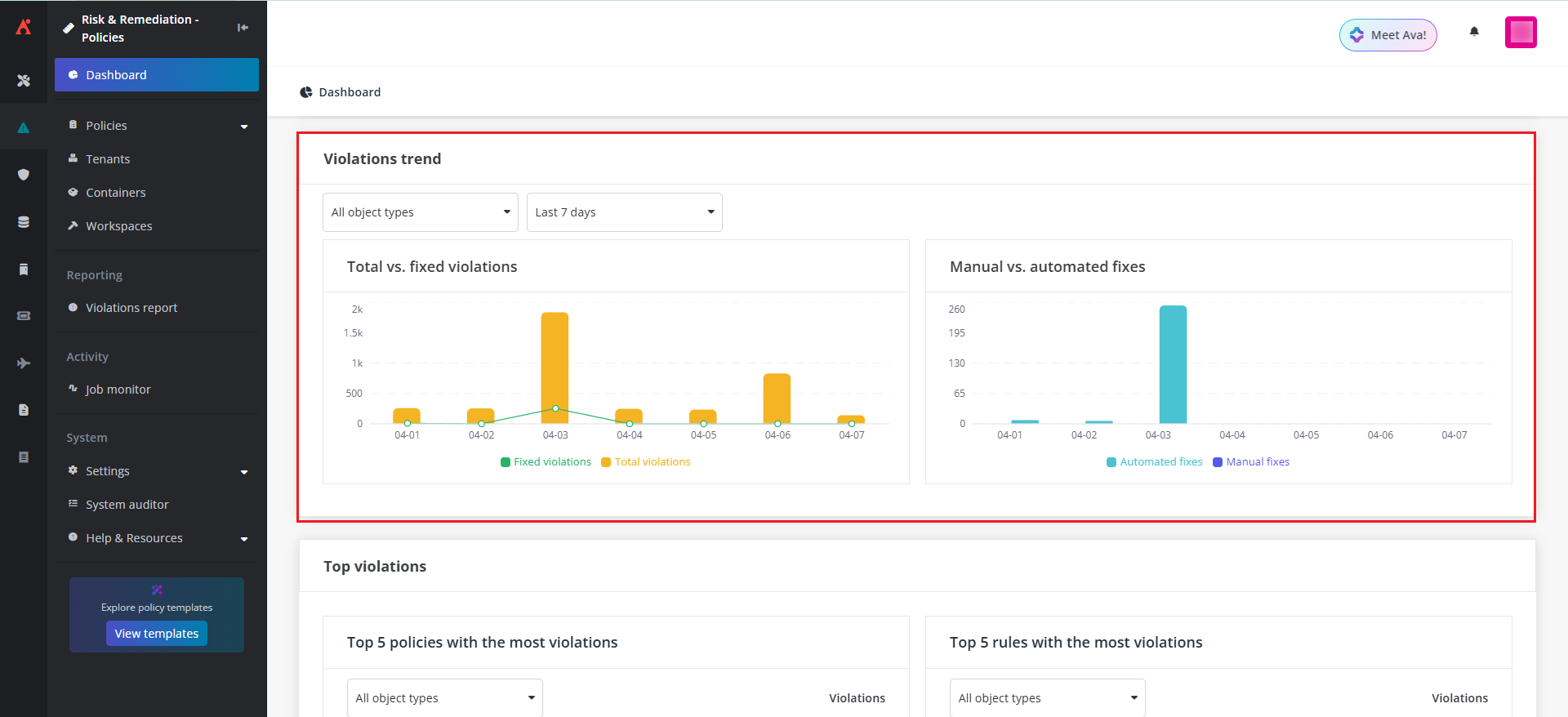
The Policies dashboard now includes enhanced violation insights.
Experience better performance and flexibility with expanded support for independent scan intervals. Targeted scans can now be run for specific rules without impacting overall job performance, helping reduce long scan times while maintaining strong policy coverage.
New enforcement options in Ownership Restriction rules support auto demotion, allowing unapproved Team Owners to be downgraded to Members instead of removed entirely. Policies can also promote designated contacts to Primary Site Admin when enforcing admin rules, helping prevent orphaned sites and maintain continuous administrative coverage.
What’s new in AvePoint Insights for Microsoft 365
Insights now delivers clearer, more actionable risk intelligence. Sensitive Data Confidence Insights introduce confidence scores for detected sensitive information, helping teams quickly understand which detections are reliable, which require refinement, and where custom rules are needed. This reduces false positives and enables more accurate risk definitions from the start.
Risky User insights are also enhanced. User detail views now surface clearer activity trends and enable key remediation actions directly within Insights, making it easier to understand behavior over time and respond quickly to potential risks.
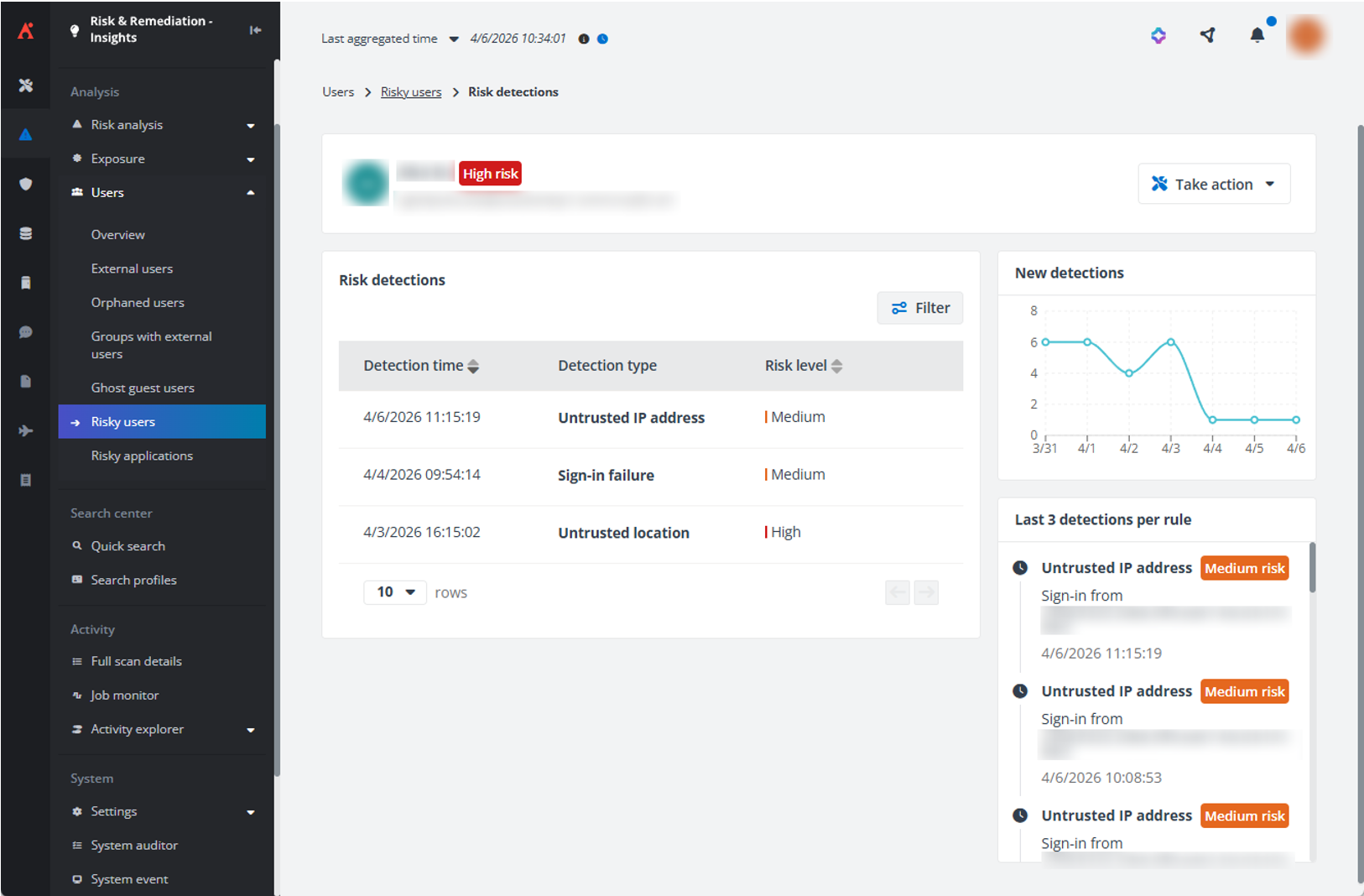
Insights offer more actionable risky user views with visual activity trends.
Risky user detection can now be configured directly within the Risk Definitions wizard. User-based rules, activity detections, and exclusions can be managed in one consistent, guided flow, simplifying setup and ongoing risk management.
Cloud Cost Management
What’s New in AvePoint Cense?
AvePoint Cense introduces stronger cost visibility for Microsoft 365 and AI usage. New insights help identify users and agents that may drive pay-as-you-go AI charges, making it easier to manage Copilot licensing and reduce unexpected spend.
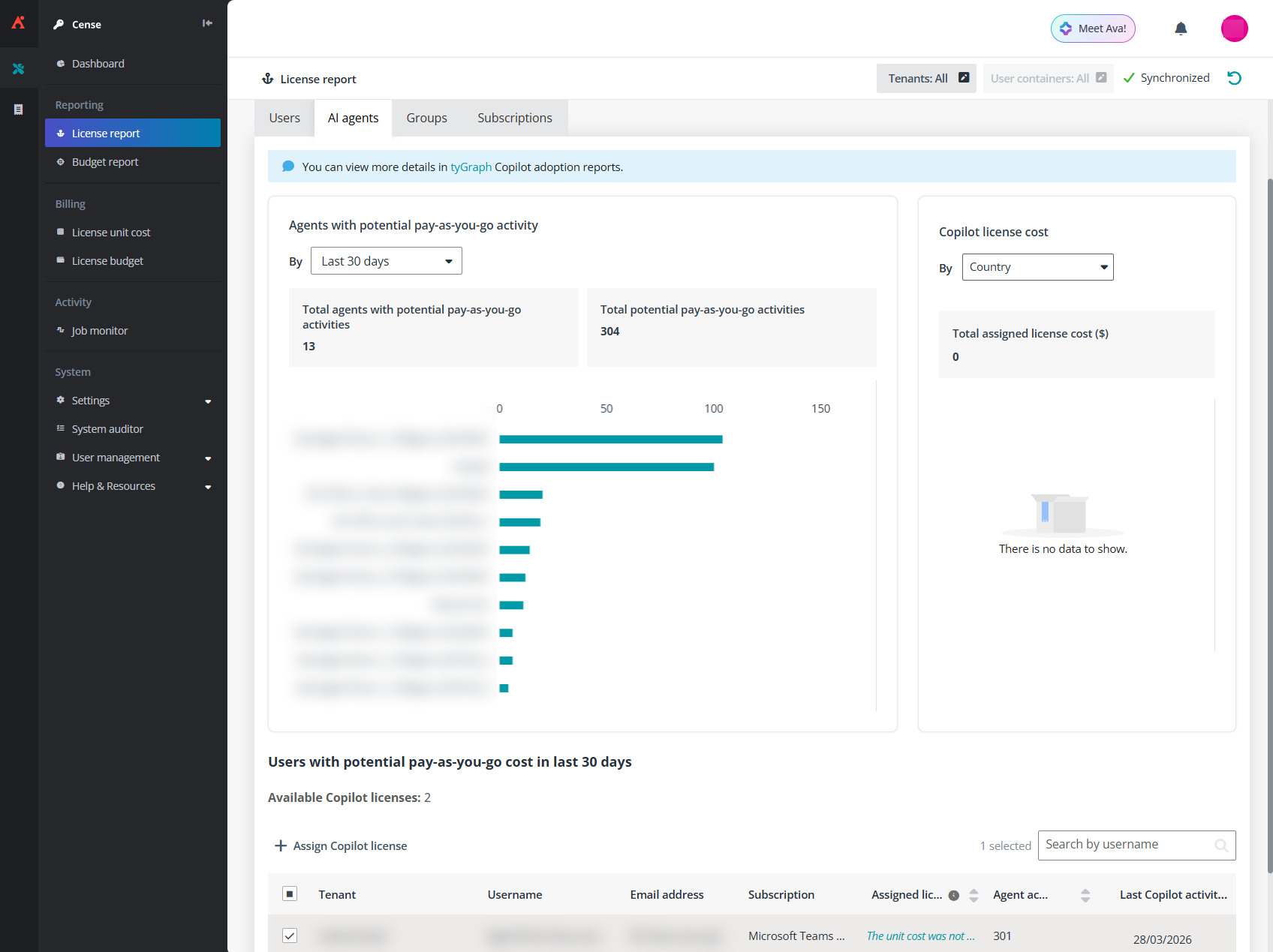
See which users and agents may drive potential pay-as-you-go charges from AI agent usage.
Expanded license cost reporting enables analysis by user properties such as role, subscription, company, office, and country, supporting chargeback models and more informed budget decisions. Suggested retail license costs are shown when using USD, speeding up initial setup and planning.
Organizations can also opt into anonymized license cost benchmarking to compare spending against similar environments, helping strengthen renewal negotiations and understand cost efficiency.
Learn more about these updates
AvePoint Learn
Meet AvePoint Learn, a centralized knowledge base designed to make finding answers faster and easier. Easily search across products and topics, request new articles, share feedback, and export content as PDFs — all from one place. Explore AvePoint Learn.

Esther is AvePoint's Director of Technical Writing, with a specialization in communicating product updates and platform updates.