

Key Takeaways
- Immutable backup defined. A backup locked at the storage layer against modification, deletion, or encryption for a defined period — not just protected by application-level policies.
- WORM and Object Lock are the mechanisms. Immutability is delivered through WORM storage, S3 Object Lock (compliance or governance mode), or hardened repositories — each has different security and compliance implications.
- Ransomware cannot delete a properly configured immutable copy. But short-lock windows, governance-mode locks, and compromised storage admin credentials are real risks that configuration must address.
- Air-gapped and immutable are complementary, not interchangeable. Air-gapping maximizes isolation; immutability maximizes accessible recovery speed. Enterprise strategies often combine both.
- SaaS platforms require third-party immutable backup. Microsoft 365, Salesforce, and Google Workspace do not provide customer-controlled immutable backups natively — shared responsibility means the customer owns data protection.
- Compliance matters most in compliance mode. SEC Rule 17a-4, HIPAA, PCI DSS, and CISA all support or require immutable data retention. Governance mode alone does not satisfy most regulatory requirements.
- Immutability without restore testing is incomplete. Test recovery from immutable copies at least monthly. An immutable backup that cannot be restored provides no protection.
What Makes a Backup Immutable?
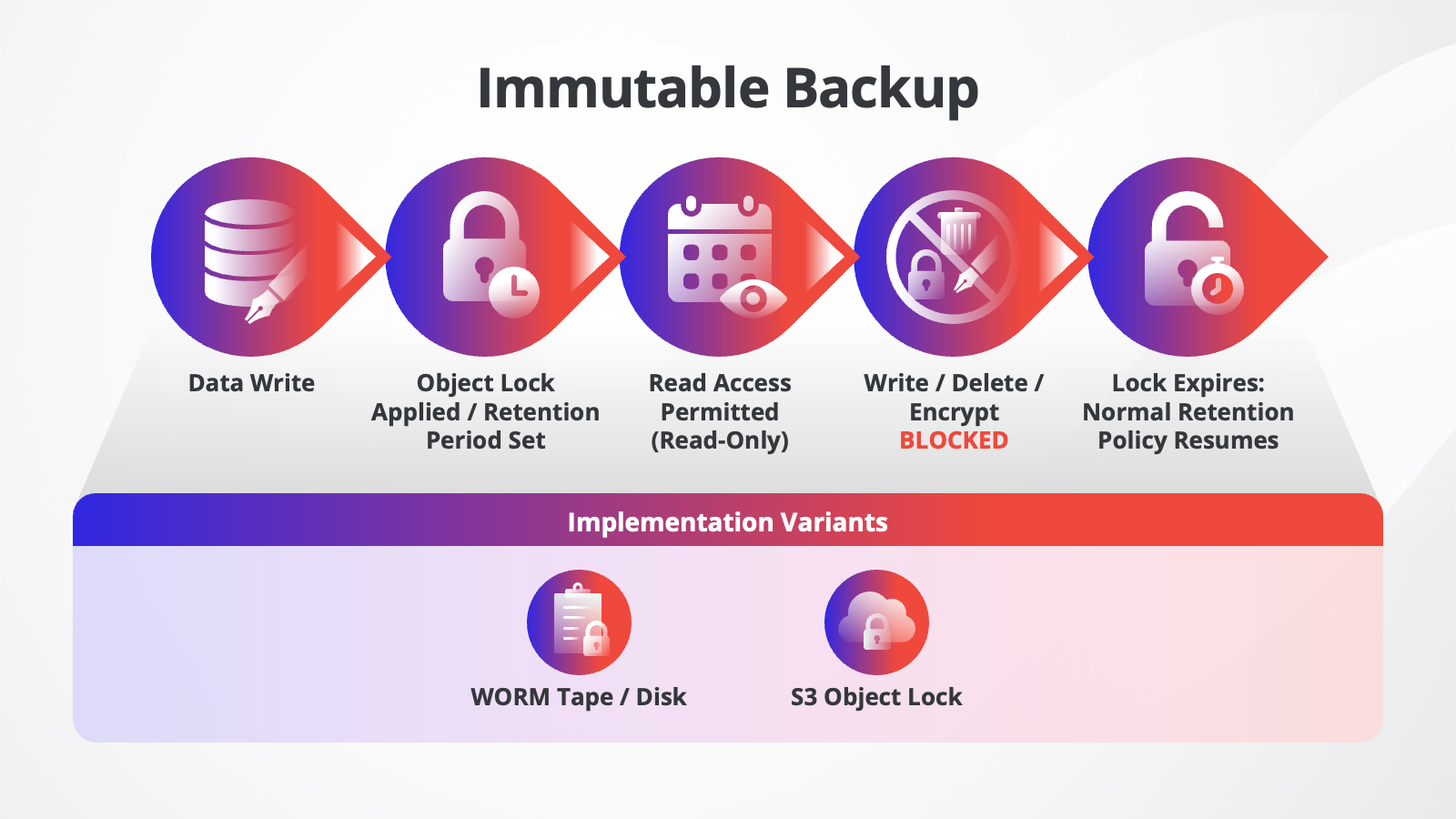
An immutable backup is a backup copy of data that is locked against modification, deletion, or encryption for a defined retention period. Once written, the data cannot be changed, not by the backup system, not by administrators, and not by attackers. Immutability is enforced at the storage layer, independent of the backup application.
The term "immutable" means unchangeable. In data protection, it refers specifically to storage states that prevent any write, delete, or encryption operation from succeeding, even with elevated privileges. The lock has a defined duration, for example, 30 days, 90 days, or seven years for regulatory archives, after which the data may be modified or deleted according to normal retention policy.
This is distinct from simply having a backup. A conventional backup can be overwritten, encrypted by ransomware, or deleted by a malicious insider with the right credentials. An immutable backup cannot, because the lock is enforced at the storage or object level, not the application level.
The term is often used interchangeably with Write Once, Read Many (WORM) storage, S3 Object Lock, and hardened repository, though these refer to specific technical implementations of the same underlying principle.
How Does Immutable Backup Work? WORM, Object Lock, and Retention Modes
Immutable backups work by writing data to storage that enforces a time-based lock at the object or block level. The most common implementations are S3 Object Lock (used in cloud and on-premises object storage), WORM tape or disk, and hardened Linux repositories. Locks can be set in compliance mode (no override possible) or governance mode (override requires elevated privileges).
There are two primary technical mechanisms used to deliver immutability in modern backup environments:
- WORM storage. Hardware or software-enforced storage that physically prevents overwrite. Common in regulated industries. Tape-based WORM has been used for decades for archival compliance.
- S3 Object Lock. A software feature available in Amazon S3, Azure Blob Storage, and S3-compatible on-premises solutions. Objects are locked for a defined period using either compliance or governance mode. Over 50 storage providers now support S3-compatible object lock.
Within S3 Object Lock, there are two retention modes that organizations need to understand:
| Retention Mode | What It Means |
|---|---|
| Compliance Mode | The retention period cannot be shortened or overridden by anyone, including the storage administrator. This is required for regulatory use cases (SEC 17a-4, FINRA, HIPAA). |
| Governance Mode | A storage administrator with specific permissions can override the lock and delete backups. Provides flexibility but is not appropriate for compliance-mandated retention. |
For most organizations starting with immutable backup, compliance mode is the safer default for any backup copy intended as the ransomware-resistant copy. Governance mode is better suited for day-to-day operational backups where IT teams need some administrative flexibility.
The immutability period needs to match your recovery window. If your backup system is configured with a seven-day immutability period and an attacker compromises your environment on day two, you have five days to detect the attack and initiate rollback before the clean restore point expires.
What Is the Difference Between Immutable and Regular Backups?
A regular backup is a copy of data that can be modified, deleted, or encrypted by administrators, backup software, or attackers with sufficient access. An immutable backup is locked at the storage layer for a defined period, making it write-protected regardless of user permissions. Immutability does not replace regular backups; it upgrades one copy of them.
| Characteristic | Regular Backup | Immutable Backup |
|---|---|---|
| Deleted by the admin | Yes | No, during lock period |
| Encrypted by ransomware | Yes, if accessible | No, storage enforces the lock |
| Modified or overwritten | Yes | No |
| Enforced retention | Backup software policy | Storage layer (hardware or object lock) |
| Require separate infrastructure | No | Depends on implementation |
| Suitable for compliance archiving | Often not | Yes, especially compliance mode WORM/S3 |
| Accessible during lock period | Yes | Yes, read-only |
| Typical use cases | Day-to-day operational recovery | Ransomware defense, regulatory retention, and audit |
The key distinction is where the enforcement happens. Backup software policies can be changed or bypassed by someone with administrator credentials. Storage-layer locks, whether WORM hardware, S3 Object Lock, or chattr-based Linux hardening — cannot be overridden by the backup application or by anyone without specific storage-level access controls. This is precisely why attackers who gain access to backup administrators' credentials still cannot delete or encrypt properly configured immutable backups.
Can Ransomware Encrypt or Delete Immutable Backups?
Properly configured immutable backups cannot be encrypted or deleted by ransomware during the lock period. Ransomware that gains network access, even with elevated privileges, cannot overwrite storage-layer immutability locks. However, immutability does not protect against exfiltration, short-lock windows, misconfigured permissions, or compromise of the storage administrator account.
In larger organizations, ransomware is a component of 39% of breaches, while SMBs experienced ransomware-related breaches at 88% overall. Modern ransomware strains – including Conti, LockBit, and BlackCat variants – are specifically designed to identify and attack backup infrastructure before initiating the primary encryption phase. A backup copy without storage-layer immutability is vulnerable to this sequence.
Immutable backups stop the encryption and deletion step because the lock is enforced at the application layer. However, several conditions still represent real risk:
- Short immutability windows. If the lock period is three days and the attacker moves slowly across your environment over five days before triggering encryption, your clean restore point may have expired by the time you detect the attack. Set retention periods that give you enough runway to detect and respond.
- Compromised storage admin accounts. Immutability in governance mode can be overridden by a storage administrator. If an attacker gains that identity, the lock can be removed. Use compliance mode for your ransomware-resistant backup copy to enforce multi0factor authentication (MFA) and role separation for any account with storage admin privileges.
- Data exfiltration. Immutability prevents modification and deletion, not reading. Attackers can still exfiltrate backup data if the repository is network-accessible and not encrypted. Immutable backups should also be encrypted at rest.
- Misconfigured access controls. An immutable backup stored in governance mode with shared credentials is far weaker than it appears. Verify role-based access controls (RBAC) configuration, not just the immutability flag.
- Misconfigured retention policies. Immutable copies of data are still subject to destruction once a retention period is met. A misconfigured policy or rule would still trigger the irreversible loss of data. This can also occur in Cloud data vaults like Google Vault in Google Workspace, Microsoft Purview, etc. not just storage.
What Is the Difference Between Air-Gapped and Immutable Backup?
Air-gapped backups are physically or logically isolated from external network connections, such as the internet, preventing remote access entirely. Immutable backups remain network-accessible but are locked against modification or deletion at the storage layer. Air-gapping maximizes isolation; immutability maximizes recovery speed. Both are complementary; the strongest strategies combine them.
| Characteristic | Air-Gapped Backup | Immutable Backup |
|---|---|---|
| Network accessible | No | Yes, read-only |
| Remote attack surface | None | Minimal, locked at storage layer |
| Recovery speed | Slower, requires physical access or reconnection | Faster, accessible on demand |
| Protect against ransomware | Yes, isolation | Yes, storage lock |
| Protect against exfiltration | Yes, isolated | No, readable if network-accessible |
| Management overhead | Higher, physical media or logical isolation | Lower, automated lock configuration |
| Best for | Maximum isolation, offline archival, tape-based DR | Operational ransomware defense, cloud backup, SaaS protection |
Many enterprise environments combine both approaches: a network-accessible immutable copy (using S3 Object Lock or a hardened repository) for fast recovery, and a physically isolated air-gapped copy on tape or offline media for maximum protection. This is sometimes called the 3-2-1-1 rule: three copies, two media types, one offsite, one immutable or air-gapped.
What Are the Benefits of Immutable Backup?
The primary benefits of immutable backup are ransomware defense, regulatory compliance, insider threat protection, and data integrity assurance. Because the lock is enforced at the storage layer, immutability provides guarantees that backup software policies alone cannot deliver.
- Guaranteed clean restore point for ransomware recovery. If production data and standard backups are encrypted, an immutable copy is a provably clean restore point. Organizations with well-configured immutable backups have recovered from ransomware without paying a ransom.
- Regulatory compliance for records retention. GDPR, HIPAA, SEC Rule 17a-4, FINRA, and PCI DSS all include requirements for tamper-proof data retention. Immutable backups, particularly in compliance mode, satisfy these requirements in a way that standard backups cannot.
- Regulatory compliance for records retention. GDPR, HIPAA, SEC Rule 17a-4, FINRA, and PCI DSS all include requirements for tamper-proof data retention. Immutable backups, particularly in compliance mode, satisfy these requirements in a way that standard backups cannot.
- Safeguarding from compromised agents. High-trust agents for everything from backup to Antivirus and malware protection can be compromised to gain privileged access to endpoints, even at the OS layer or lower.
- Protection against insider threats. Immutability applies to everyone, including backup administrators. A disgruntled employee or a credential-compromised admin account cannot delete an immutable backup during the lock period. However, this does not guarantee protection from all attack paths once a privileged account is compromised
- Data integrity for legal and audit purposes. An immutable backup provides a provable chain of custody, and you can demonstrate that the restored data is identical to the original capture. This has value in litigation, audits, and regulatory investigations.
- Confidence in recovery operations. IT and security teams can initiate recovery from an immutable copy with confidence that the data has not been tampered with since the backup was written.
What Compliance Regulations Require Immutable Backups?
Several major compliance frameworks require or strongly recommend tamper-proof data retention that immutable backups satisfy: SEC Rule 17a-4 requires WORM storage for broker-dealer records; HIPAA requires protected health information to be preserved and protected from unauthorized modification; GDPR requires documented controls over data integrity; and CISA's Stop Ransomware guidance specifically recommends immutable backups.
| Regulation / Framework | Immutability Requirement |
|---|---|
| SEC Rule 17a-4 (FINRA) | Require non-rewriteable, non-erasable WORM storage for broker-dealer communications and transaction records. Compliance mode S3 Object Lock satisfies this. |
| Health Insurance Portability and Accountability Act (HIPAA) | Require protected health information (PHI) from unauthorized modification or deletion. Immutable backup supports the HIPAA Security Rule's integrity controls. |
| General Data Protection Regulation (GDPR) | Require documented controls over data accuracy and integrity. Immutable retention can demonstrate compliance with data integrity obligations. |
| PCI DSS v4.0 | Require audit logs and cardholder data to be protected from unauthorized modifications. Immutable storage is an accepted control. |
| CISA Stop Ransomware Guide | Explicitly recommend maintaining immutable, offline backups of critical data as a best practice for ransomware mitigation. |
| NIST SP 800-53 | Control CP-9 (Information System Backup) and SI-12 (Information Handling and Retention) support immutable retention as an integrity control. |
| NIS2 / DORA (EU) | Require financial and critical infrastructure entities to maintain data availability and integrity controls — immutable backup is a recognized technical measure. |
It is worth noting that the specific implementation matters for compliance. SEC Rule 17a-4 requires WORM storage in compliance mode, as governance-mode WORM does not satisfy this requirement because an administrator can override the lock. If you are backing up data for regulatory purposes, verify that your immutability implementation uses compliance-mode locking that cannot be shortened or overridden by any user.
How Does Immutable Backup Work for SaaS Platforms Like Microsoft 365, Salesforce, and Google Workspace?
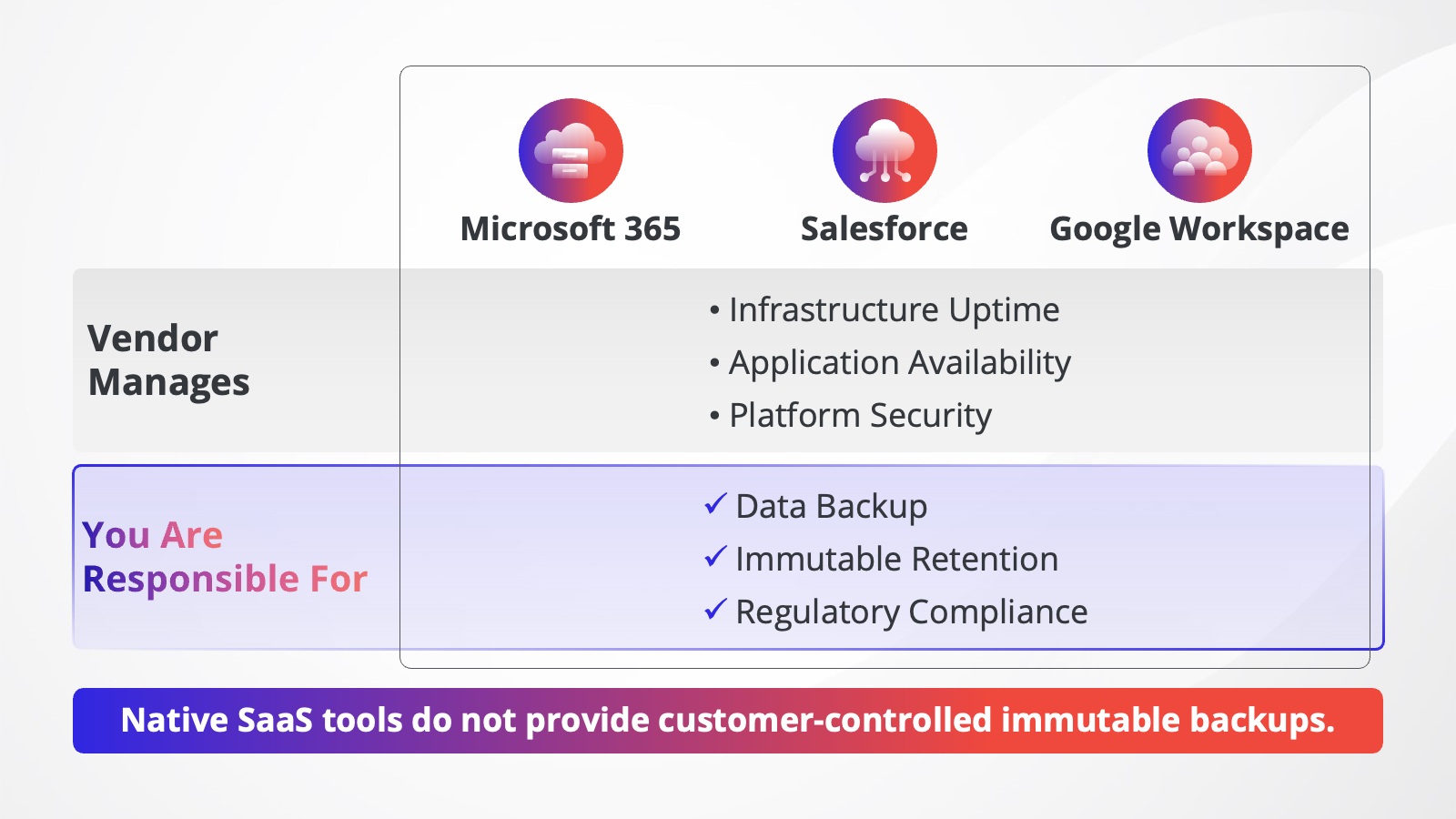
SaaS platforms, including Microsoft 365, Salesforce, and Google Workspace, operate on a shared responsibility model: the vendor manages infrastructure availability, but data protection, including backup and immutable retention, is the customer's responsibility. Native platform tools do not provide customer-controlled immutable backups. A third-party backup solution with immutable storage is required.
This is one of the most common gaps in enterprise data protection strategies. IT and security teams often assume that because Microsoft 365, Salesforce, or Google Workspace are highly available, resilient SaaS platforms, their data is inherently protected. This is not the case.
Microsoft's shared responsibility model makes clear that customers are responsible for protecting their own data from accidental deletion, ransomware, insider threats, and retention requirements. Microsoft provides a 93-day recycle bin for most workloads, along with some native retention policies. Still, these do not constitute immutable backups, cannot be restored at the item level across the full workload scope, and cannot satisfy regulatory retention requirements in most cases.
The same applies to other SaaS platforms:
- Salesforce. Retired their data recovery services due to high costs and limited recovery options. They recently acquired third-party backup vendor OwnData but these backups may no longer count as independent data copies. Rising costs and other factors have become a major concern within the community.
- Google Workspace. Google Vault provides some archiving functionality, but it is not a backup system and does not provide customer-controlled immutable backups. Organizations with Google Workspace data protection requirements need a third-party solution.
- Microsoft 365. Exchange Online, SharePoint, OneDrive, and Teams data can be backed up using third-party tools that write to immutable storage. Microsoft 365 Backup Storage (an API-level backup service from Microsoft) provides faster in-place restore but does not replace customer-controlled immutable copies for ransomware defense.
When evaluating immutable backup for SaaS environments, the relevant questions are:
- Is the backup stored in customer-controlled storage or in vendor-managed storage?
- Can immutability be configured in compliance mode to meet regulatory retention requirements?
- Does the backup cover all workloads, email, files, Teams channels, SharePoint sites, Salesforce objects, or only a subset?
- What is the granularity of recovery? Can individual items, folders, or sites be restored from the immutable copy?
For organizations running Microsoft 365, AvePoint Cloud Backup provides immutable backup with granular item-level recovery across Exchange Online, SharePoint, OneDrive, Teams, and Microsoft Entra ID. It supports immutable storage configurations that satisfy both ransomware defense and regulatory retention requirements.
What Should I Look for in an Immutable Backup Solution?
The most important criteria for an immutable backup solution are storage-layer enforcement (not just application-level policy), compliance-mode locking availability, granular recovery to the item level, coverage of all workloads in scope (infrastructure and SaaS), and documented regulatory compliance certification.
| Evaluation Criteria | What to Verify |
|---|---|
| Immutability enforcement level | Is the lock enforced at the storage layer (S3 Object Lock, WORM, hardened repo), or only at the application level? Application-level policies can be bypassed by credential compromise. |
| Compliance vs. governance mode | Can you configure compliance mode (non-overridable) for regulatory use cases? Governance mode is less secure. |
| SaaS workload coverage | Does the solution protect your SaaS platforms, Microsoft 365, Salesforce, Google Workspace, not just VMs and on-prem data? |
| Granular recovery | Can you restore individual emails, files, Teams messages, or Salesforce records from the immutable copy, or only full restores? |
| Immutability period flexibility | Can you configure different lock periods for different data tiers (e.g., 30 days operational, 7 years regulatory archive)? |
| Encryption at rest | Is the immutable copy also encrypted? Immutability prevents deletion; encryption prevents exfiltration. |
| Access control separation | Are backup admin credentials separate from storage admin credentials? Shared access undermines immutability. |
| Regulatory certification | Has the solution been assessed for SEC 17a-4, HIPAA, or other relevant compliance requirements? |
| Recovery testing | Does the solution support automated restore verification to confirm that the immutable copy is actually usable? |
How Do I Implement Immutable Backup for My Organization?
Implementing immutable backup involves four steps: identifying which data requires immutable protection, selecting the appropriate storage technology and retention mode, configuring access controls to separate backup and storage admin identities, and establishing a regular restore testing cadence to verify that immutable copies are recoverable.
- Identify protection scope. Start with high-risk and compliance-critical data: Identity stores, financial records, legal files, and business-critical SaaS workloads (Microsoft 365, Salesforce). Making all data immutable indefinitely will drive up storage costs and complicate retention hygiene.
- Choose immutability technology. For cloud and object storage: S3 Object Lock with compliance mode; for on-premises: WORM disk or tape, or a hardened Linux repository;. for SaaS workloads: a third-party backup solution that supports configurable immutable storage.
- Set the right retention period. The immutability period must exceed your expected attack dwell time — the average time an attacker spends moving through your environment before you detect them. For most organizations, a minimum 30-day immutability window is recommended for operational backups; regulatory archives may require one to seven years of immutability.
- Separate access controls. Use dedicated, least-privilege identities for backup administration. Storage admin credentials should be separated from backup admin credentials. Apply MFA to all accounts with the ability to modify storage settings. Use single-use deployment credentials where supported.
- Enable encryption at rest. Configure encryption on the immutable backup repository. This ensures that even if the storage is physically accessed or exfiltrated, the data cannot be read without the encryption key.
- Test recovery regularly. Configure automated restore verification on a weekly or monthly cadence to confirm that the immutable copy can actually be restored. An immutable backup that cannot be recovered provides no protection.
- Document and audit.Maintain records of your immutability configuration, retention periods, and restore test results. This documentation supports regulatory audits and internal governance reviews.
Categorize your immutability strategy based on data risk and compliance requirements:
| Tier | Data Type | Recommended Immutability |
|---|---|---|
| Tier 1: Mission critical | Identity data, financial records, legal files, SaaS workloads (M365, Salesforce) | 30 – 90 days operational lock + compliance-mode long-term archive |
| Tier 2: Business critical | Internal collaboration data, project files, secondary databases | 7 – 30 days operational lock with compliance mode where regulated |
| Tier 3: Operational | Dev/test environments, non-regulated internal data | 7-day lock minimum; governance mode acceptable |
Get Your Immutable Backup with AvePoint
Protect your cloud data with immutable backup. AvePoint Cloud Backup provides immutable backup with granular item-level recovery across Microsoft 365, Salesforce, and Google Workspace — supporting both ransomware defense and regulatory retention requirements. For organizations managing multicloud and SaaS data, immutable backup is a foundational control, not an optional add-on.
Frequently Asked Questions
What is the difference between immutable and regular backups?
A regular backup is protected only by application-level policies, which can be changed or bypassed by anyone with administrator credentials. An immutable backup is locked at the storage layer (S3 Object Lock, WORM, or a hardened repository), making it resistant to modification or deletion even by privileged users or ransomware. Immutability upgrades the ransomware resistance and compliance value of a backup copy — it does not replace your regular backup strategy.
Can ransomware encrypt or delete immutable backups?
Ransomware cannot encrypt or delete a properly configured immutable backup during the lock period, because the lock is enforced at the storage layer below the application. Even if ransomware gains administrative access to the backup software, the storage-layer lock prevents write and delete operations. However, immutability does not protect against data exfiltration (reading), short-lock windows that expire before detection, or governance-mode locks that a compromised storage administrator could override.
What is WORM storage and how does it work?
Write Once, Read Many (WORM) storage is a hardware or software mechanism that allows data to be written once and then read indefinitely, but never modified or deleted until the retention period expires. WORM can be implemented in hardware (dedicated WORM disk or tape), as a filesystem attribute (Linux chattr immutable flag), or as a software policy on object storage (S3 Object Lock). Financial and healthcare regulators have accepted WORM storage as a compliant mechanism for tamper-proof records retention for over two decades.
What is the difference between air-gapped and immutable backup?
An air-gapped backup is physically or logically isolated from any network, preventing remote access entirely. An immutable backup remains network-accessible but is locked against modification or deletion at the storage layer. Air-gapping provides maximum isolation but slower recovery; immutability provides fast, accessible recovery with strong tamper protection. Many enterprise strategies combine both: an accessible immutable copy for fast ransomware recovery and an isolated air-gapped copy on tape for maximum protection.
What compliance regulations require immutable backups?
SEC Rule 17a-4 explicitly requires WORM storage in compliance mode for broker-dealer records. HIPAA requires integrity controls for protected health information that immutable storage satisfies. PCI DSS v4.0 requires audit logs and cardholder data to be protected from unauthorized modification. CISA's Stop Ransomware Guide recommends immutable backups as a primary ransomware mitigation control. GDPR data integrity obligations are supported by documented immutable retention. Many organizations in the EU are also subject to NIS2 and DORA, which require technical measures for data availability and integrity.
What does an immutable backup mean for Microsoft 365 environments?
Microsoft 365 operates on a shared responsibility model, where data protection is the customer's responsibility, not Microsoft's. Native M365 tools – including the recycle bin, retention policies, and Microsoft 365 Backup Storage – do not provide customer-controlled immutable backups that satisfy ransomware defense or regulatory retention requirements. A third-party backup solution that supports compliance-mode immutable storage is required to protect Exchange Online, SharePoint, OneDrive, Teams, and Entra ID data with the same guarantees as on-premises immutable backup.
How long should my immutability period be?
The minimum recommended immutability period for operational ransomware defense is 30 days. This provides time to detect the attack, investigate, and initiate recovery before the clean restore point expires. For regulatory archives, retention periods are defined by the applicable requirements — a minimum of six years for most records in SEC Rule 17a-4 and six years from the date of creation in HIPAA. Set your immutability based on the longer period of your expected attack dwell time and your compliance retention requirement.
How often should immutable backup restore tests be performed?
Immutable backup restore tests should be performed at least monthly for mission-critical data, and quarterly for other tiers. An immutable backup that cannot be successfully restored provides no protection. Automated restore verification – where the backup system automatically restores a test copy and validates the result – is the most reliable approach and removes the operational burden of manual testing.
Is immutable backup the same as backup encryption?
Immutability and encryption are complementary but different controls. Immutability prevents modification and deletion — it does not prevent an attacker from reading the backup data. Encryption at rest prevents unauthorized parties from reading it but does not prevent deletion if access controls are weak. A complete backup security posture requires both immutability to protect against ransomware encryption and deletion, and encryption at rest to protect against exfiltration.
Related Questions
→ What is the 3-2-1-1-0 backup rule?
→ How do I balance immutability requirements with privacy laws?
→ What is a recovery point objective (RPO) and how does immutability affect it?

Shyam Oza brings over 15 years of expertise in product management, marketing, delivery, and support, with a strong emphasis on data resilience, security, compliance, and business continuity. Throughout his career, Shyam has undertaken diverse roles, from teaching video game design to modernizing legacy enterprise software and business models by fully leveraging SaaS technology and Agile methodologies. He holds a B.A. in Information Systems from the New Jersey Institute of Technology.