

As data extends across SaaS, cloud, users, and workflows, the AvePoint Confidence Platform delivers confidence at scale, helping organizations stay resilient, compliant, and in control as environments grow in complexity. The February updates expand cyber resiliency through broader backup coverage, unified visibility in the Data Resiliency Command Center, and faster recovery, while strengthening governance for people, data, and AI agents to support secure Copilot adoption and smarter cloud and AI spend.
Explore what’s new across the platform below or jump to what matters most to your organization.
- Adoption Analytics
- Backup and Recovery
- Data Governance
- Data Migration
- Information Lifecycle Management
- Access and Workflow Management
- Policies and Insights
- Cloud Cost Management
Adoption Analytics
What’s new in AvePoint tyGraph?
AvePoint tyGraph continues to evolve from insight to action with deeper integrations and smarter administrative controls. The new tyGraph and Cense integration connects Microsoft 365 Copilot adoption analytics directly to license management, allowing admins to act immediately on real usage data. From tyGraph, organizations can identify high-probability adopters, non-users, or users with limited Copilot engagement and jump straight into Cense’s User License Report to grant, remove, or convert Copilot and Teams Premium licenses in just a few clicks, closing the loop between adoption insights and cost optimization.
Content governance is also enhanced with SharePoint video cleanup. Admins can quickly identify low engagement or inactive Stream videos using clear metrics such as storage size and unique views, review activity trends, and archive or delete content directly with Opus. This helps reduce storage costs, keep SharePoint environments up to date, and ensure Copilot surfaces relevant, high-value content.
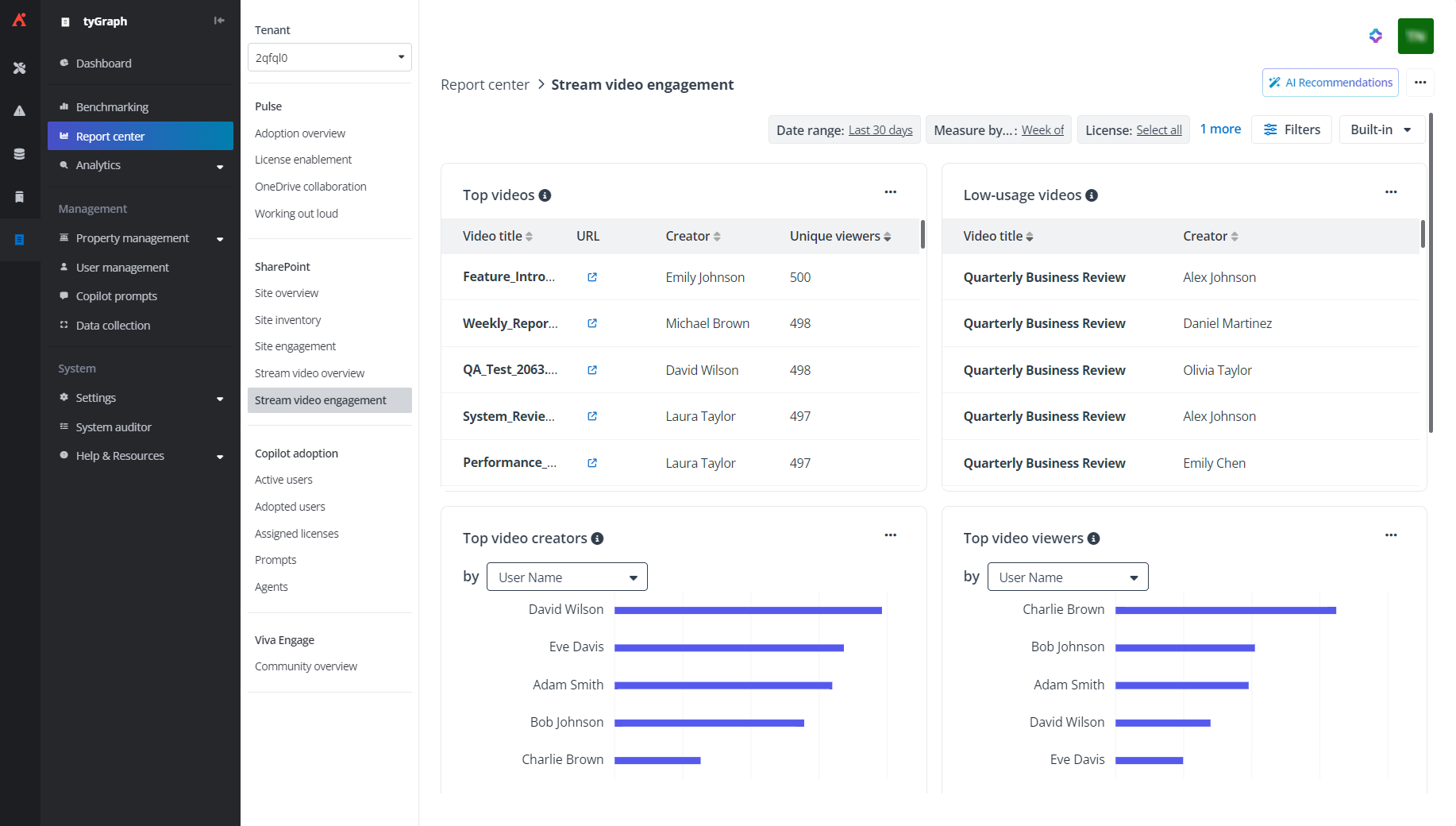
The Stream video engagement report highlights top videos, creators, viewers, and low‑usage video metrics in a single view
To support enterprise and government customers at scale, tyGraph also introduces configurable parameters for AvePoint-hosted Power BI Embedded reports and new support for Microsoft 365 GCCH environments. Admins can fine-tune site scope and date ranges to improve report performance in large tenants, while government cloud customers gain access to the same trusted analytics and Copilot adoption reporting.
Backup and Recovery
A Redesigned Data Resiliency Command Center
This release introduces a newly redesigned Data Resiliency Command Center, providing a clear, at-a-glance view of protection and recovery across all supported services. Instead of navigating between tools, teams can now quickly assess overall resiliency from a single, centralized dashboard.
The refreshed experience surfaces the most relevant signals, highlighting what’s protected, what’s changed, and where attention may be needed. Custom dashboards now support new Backup and Recovery widgets, including Environment Health, Total Protected Size, Storage Growth Percentage Change, and Backup Job Trends. Together, these insights make it easier to track growth over time, monitor capacity, and proactively address issues before they impact recovery.
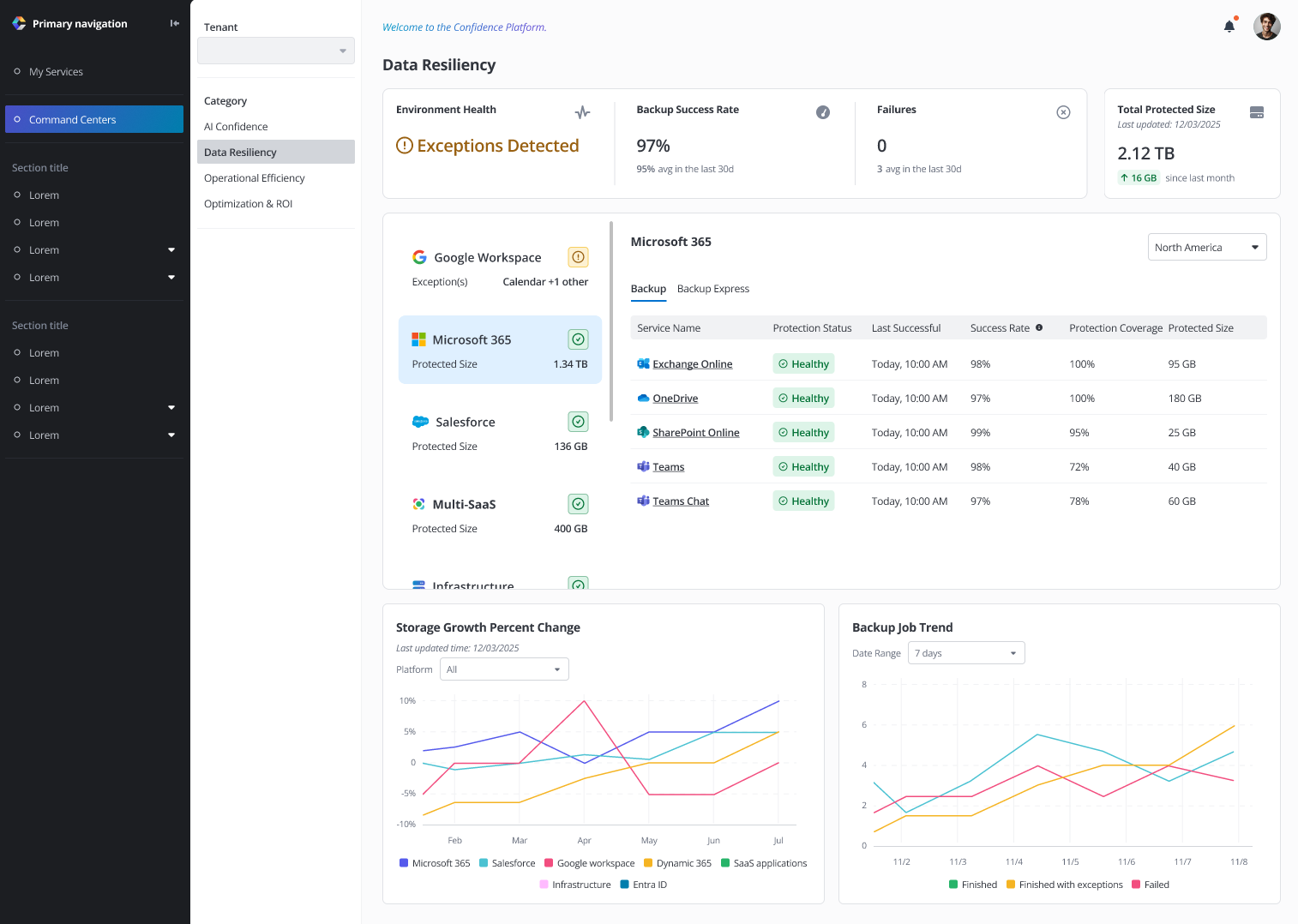
Unified view of your protection and recovery posture in the Data Resiliency Command Center
New Backup Sources: SaaS Applications
As organizations increasingly rely on third-party SaaS applications to run critical business processes, protecting that data is no longer optional. Cloud Backup for SaaS Applications extends enterprise-grade backup, restore, and export capabilities across the SaaS tools employees use every day, ensuring contracts, records, and project data remain protected even when they live outside core collaboration platforms.
With support for applications including Confluence, Jira, Okta, Docusign, GitHub, Monday.com, and Smartsheet, AvePoint delivers consistent protection and recovery for critical business data across the full workflow. This eliminates reliance on native SaaS retention assumptions and reduces exposure to accidental deletion, ransomware, and service disruptions, while giving organizations full control over their data lifecycle.
To centralize visibility and simplify oversight, the AvePoint Confidence Platform now integrates SaaS backups directly into the Data Resiliency Command Center. From a single dashboard, admins can monitor backup success rates, failed jobs, and total protected data size. By leveraging storage growth trends and job analytics, teams can track adoption, anticipate capacity needs, and proactively manage risk across their entire SaaS environment.
What’s new in Cloud Backup for Microsoft 365?
Full text eDiscovery for SharePoint now enables consistent content and metadata searches across Teams sites, Microsoft 365 Group sites, and standalone SharePoint sites, supporting defensible investigations with complete results.
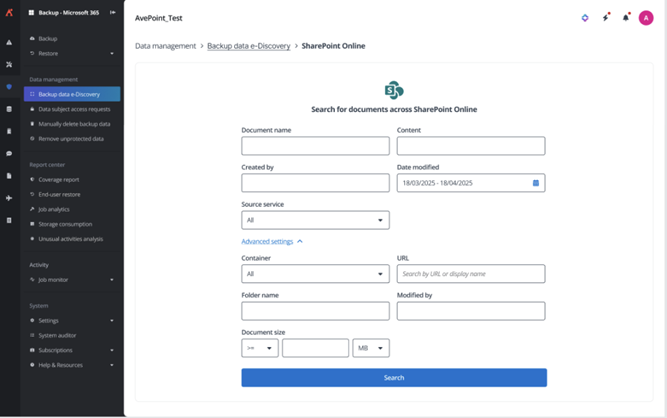
Enable more consistent content and metadata searches with SharePoint Full Text eDiscovery
As organizations prepare for the retirement of Microsoft Project Online on September 30, 2026, a new standalone export tool provides a secure and streamlined way to preserve project data. Libraries, lists, files, and folders can be exported directly, ensuring long-term access while simplifying transition planning.
Backup governance and capacity management are also enhanced for multi-geo environments. Granular role-based access controls restrict Subscription Report visibility by region, while new regional consumption reports and alerts enable teams to monitor usage and manage growth proactively, without exposing data beyond authorized boundaries.
What’s new in ReCenter?
Time-limited public link generation now allows users to securely share files directly from the preview page, featuring admin-controlled permissions, expiration windows, and auto-generated passwords. This ensures fast access without compromising governance or auditability.
Manager self-service has also been expanded to include restore access for departed employees. When enabled, managers can browse and restore OneDrive and Exchange data for former team members, accelerating continuity during transitions while ensuring all actions remain governed and fully auditable.
What’s new in Cloud Backup for Salesforce?
Customizable data retention now allows policies to be defined in years or set to unlimited (when licensed), with defaults applied across orgs or tailored individually to meet regulatory and business requirements.
To reduce unnecessary restore activity, the Salesforce Archive widget now supports in-place preview directly within ReCenter. Users can inspect supported documents and images before unarchiving, saving time and minimizing operational overhead. Governance is strengthened with dual admin approval for retention changes, preventing unauthorized or accidental policy updates; you can archive policies to simplify management across multiple Salesforce orgs while ensuring consistency.
What’s new in Cloud Backup for IaaS + PaaS?
Cloud Backup continues to expand protection across hybrid and multi-cloud workloads with general availability support for Microsoft SQL Server and Azure VMware Solution (AVS). Organizations can protect SQL Server databases running on Azure VMs with application-consistent backups, fast incremental recovery points, and point-in-time restores, while AVS workloads benefit from full in-place recovery that preserves VM settings and configurations.
This release also introduces Google Cloud Storage backup, enabling centralized, policy-based protection for object data alongside Microsoft 365 and Azure workloads. Granular, object-level restores, flexible retention, and immutable storage help safeguard data against ransomware, accidental deletion, and corruption. In-place recovery at the bucket or object level minimizes downtime, ensuring cloud native data remains resilient, compliant, and recoverable — all managed from a single platform.
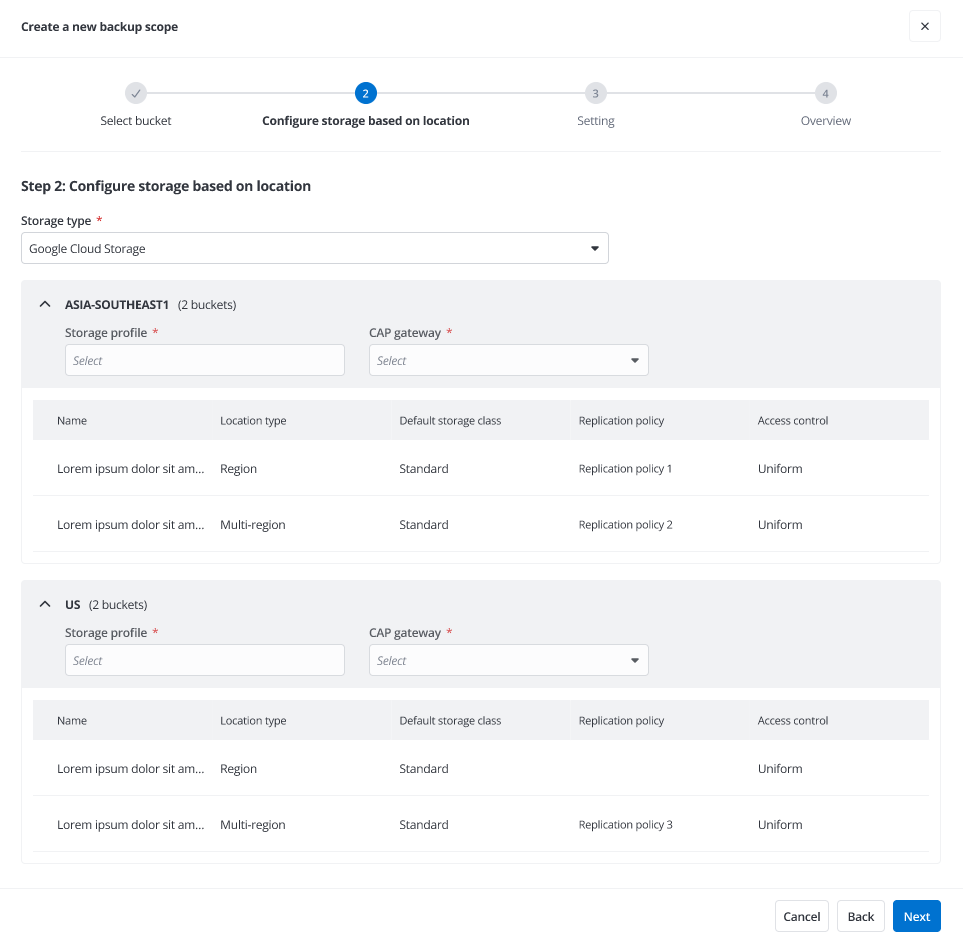
Explore how you can enable comprehensive data protection with our new support for Google Cloud Storage
Data Governance
What’s new in AvePoint Cloud Governance?
AvePoint Cloud Governance continues to strengthen controls that help organizations balance collaboration with compliance. Granular external sharing requirements now prompt users to specify external domains during provisioning, with support for allowlists and blocklists to prevent unauthorized access. Storage management also gains flexibility through dynamic quota adjustments, allowing quotas to increase or decrease over time while keeping notifications automatically aligned.
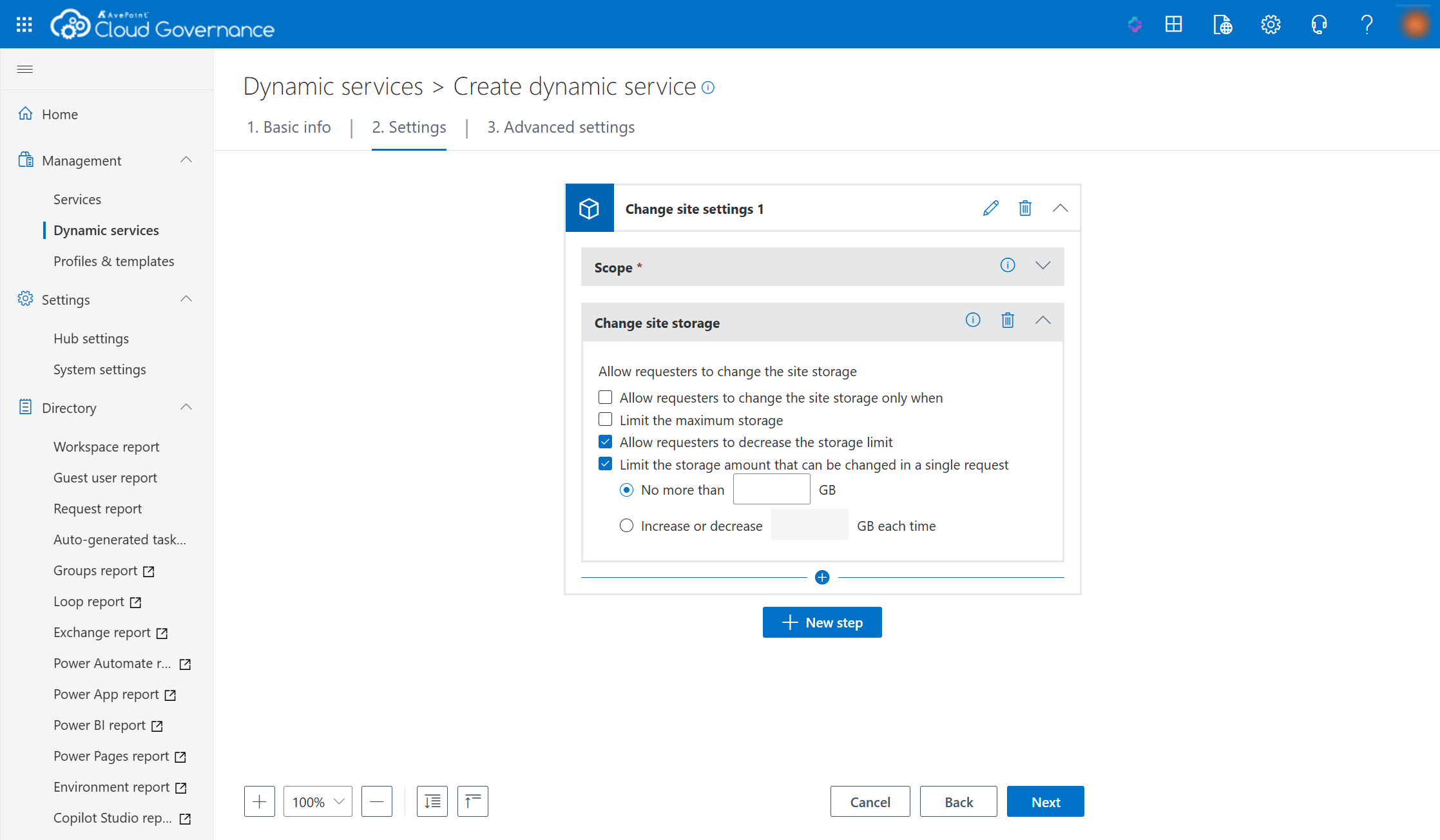
Flexible storage quota controls let you set, increase, or reduce site storage limits
This release also introduces a modernized shared mailbox permission management experience, aligning Cloud Governance more closely with Microsoft 365 native roles and reducing ambiguity across provisioning, renewals, and ongoing change management. Permissions are now clearly defined using four Microsoft aligned roles, Read & Manage (Full Access), Send As, Send on Behalf, and Read Only, and applied consistently across cloud and hybrid shared mailboxes. Renewal flows allow admins to review and update permissions across all roles, while dynamic services and forms have been updated to reflect the new model. These changes improve clarity, reduce access risk, and support cleaner audit trails for mailbox permissions.
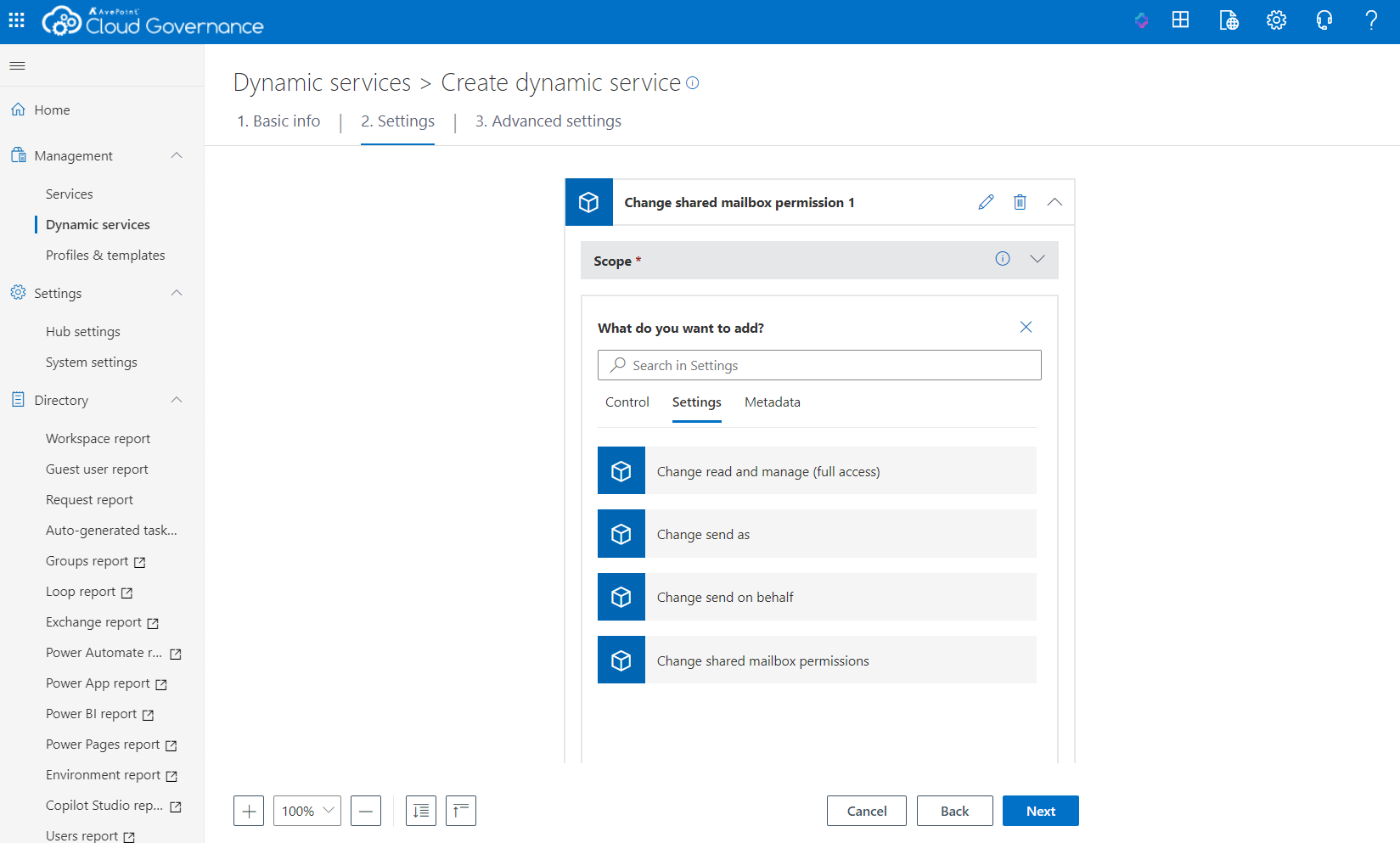
Shared mailbox permission updates now support user level permission changes
Additional enhancements support global and regulated environments. Multilingual choice metadata ensures consistent user-experiences by displaying metadata values in their preferred languages. Geo-specific Teams creation helps organizations meet data residency requirements, while guided workflows for shared mailbox management and conditional metadata logic dynamically adapt questions based on user input, simplifying governance without sacrificing control.
What’s new in AvePoint MyHub?
The MyHub dashboard has been refreshed to deliver a cleaner, more focused user experience. Improved layout, clearer context, and customizable widgets make it easier for users to see requests, manage tasks, and take action quickly.
Admins can tailor layouts by hiding unused components and spotlighting governance insights that matter most, helping users proactively manage risk while keeping the experience intuitive and approachable.
Data Migration
What’s new in AvePoint Fly?
AvePoint Fly continues to modernize large-scale migrations with stronger safeguards and expanded workload coverage designed for enterprise environments. Tenant links introduce strict, directional controls that explicitly define which source and destination tenants are allowed to exchange data. By preventing “wrong tenant” migrations before they happen, tenant links reduce risk, enforce compliance boundaries, and keep complex migration programs precise and predictable.
Active Directory and Entra ID Device migrations are now available, joining existing capabilities for user identities. Fly can support device migration from local Active Directory Server and hybrid setups to local Active Directory/Hybrid, and Entra ID to Entra ID device migrations.
As Microsoft prepares to retire Exchange Online Public Folders on October 1, 2026, Fly also delivers a secure, full-fidelity path to modern Microsoft 365 workloads. Organizations can migrate legacy Exchange Online public folder content – including mail, calendars, contacts, and files – directly into supported destinations such as Exchange Online Shared Mailboxes, preserving structure and accessibility while eliminating long-term dependency on deprecated technology.
Plus, with new role-based access controls limiting who can run migrations and what workloads they can move, Fly helps organizations ensure migrations remain governed from start to finish.
Information Lifecycle Management
What’s New in AvePoint Opus?
AvePoint Opus simplifies information lifecycle with a more unified and defensible approach. Centralized manual approval settings consolidate approvers, review options, and notifications into a single configuration experience, ensuring consistent disposition decisions.
Content can now be reclassified directly during manual review, instantly applying new retention rules while maintaining a full audit trail. Lifecycle rules also support using container level properties as rule criteria, enabling more precise, business-driven automation. Expanded export and restore capabilities, along with prioritized restores and clearer recovery tracking, ensure confidence across the full data lifecycle.
Access and Workflow Management
What’s new in AvePoint EnPower?
AvePoint EnPower continues to streamline enterprise-scale governance by reducing manual intervention and closing ownership gaps across Microsoft 365 and Power Platform environments. Automated Ownership Identification (Best Owner) now proactively identifies and promotes the most appropriate owner when workspaces become ownerless, eliminating one of the most common sources of governance breakdown. This ensures permissions, access reviews, and lifecycle actions remain governed without forcing IT to step in for remediation.
EnPower also expands centralized control with direct metadata management across Microsoft 365 and Power Platform objects. Admins can define fields, set defaults, and synchronize updates at any time, ensuring accurate classification and reporting without manual intervention. Bulk workspace provisioning further accelerates governance at scale, applying naming conventions, metadata, and policies through CSV-based automation.
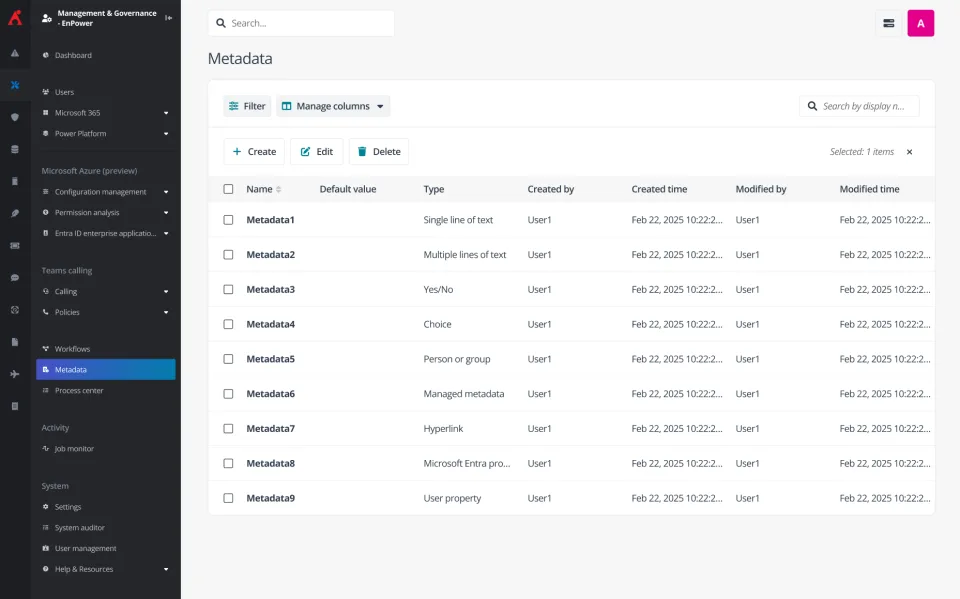
Create and manage metadata for Microsoft 365 and Power Platform objects directly in EnPower
Additional enhancements include custom attribute management for Exchange groups and distribution lists and unified governance reporting that surfaces Cloud Governance insights directly within EnPower. Together, these updates align ownership, metadata, and permissions into a single, automated workflow, helping governance scale with your organization.
Policies and Insights
What’s new in AvePoint Policies for Microsoft 365?
AvePoint Policies strengthens accountability by closing ownership and compliance gaps before they become risks. Intelligent Ownership Identification (Best Owner) works in tandem with policy enforcement to ensure workspaces never remain ownerless. When owners leave or access models change, the right owner is automatically identified and promoted, improving Copilot accuracy and keeping governance moving without manual intervention.
Upload Restriction rules now audit not only initial uploads, but also edits, restores, copies, and moves, ensuring files edited into a restricted state are no longer overlooked. In Microsoft Teams, AutoFix for private channel owner requirements automatically promotes eligible members when owner counts drop below policy thresholds, preventing unmanaged collaboration from persisting unnoticed.
The refreshed Policies dashboard delivers clearer visibility with modern visuals, compliance summaries, and visual indicators that show policy status at-a-glance. Together, these enhancements ensure policies don’t just signal risk, but actively resolve it, keeping governance accurate, enforceable, and aligned to how teams actually work.
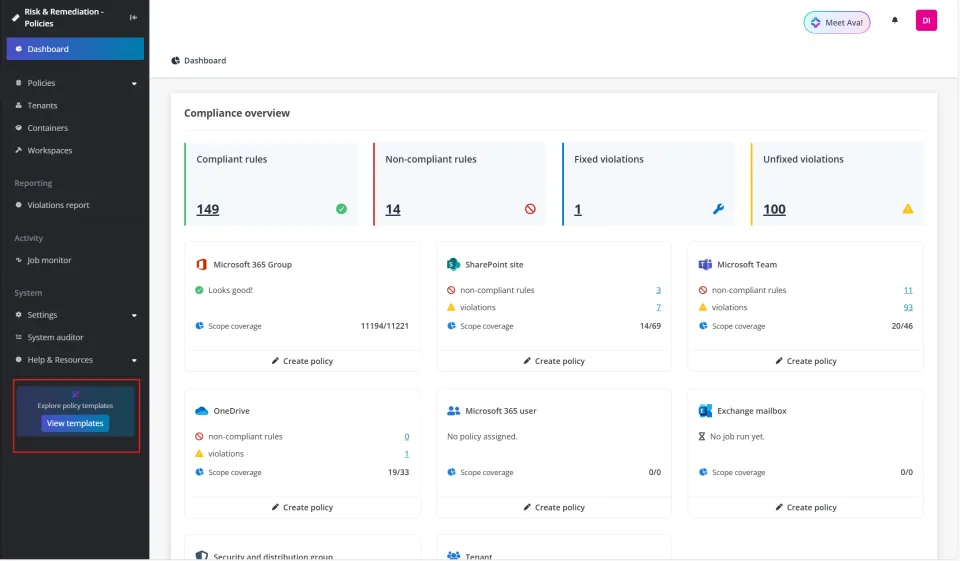
The updated dashboard highlights key action items and features newly added charts enabling clearer visibility and faster action.
What’s new in AvePoint Insights for Microsoft 365?
AvePoint Insights continues to advance AI governance by helping organizations move from ad hoc oversight to structured, scalable control. New Agent Risk Definitions allow teams to classify Copilot and AI agents as high, medium, or low risk based on factors such as access scope, sensitive data exposure, and alignment with internal policies. These definitions surface agent-level risk directly within Insights, enabling organizations to prioritize remediation and focus attention where it matters most.
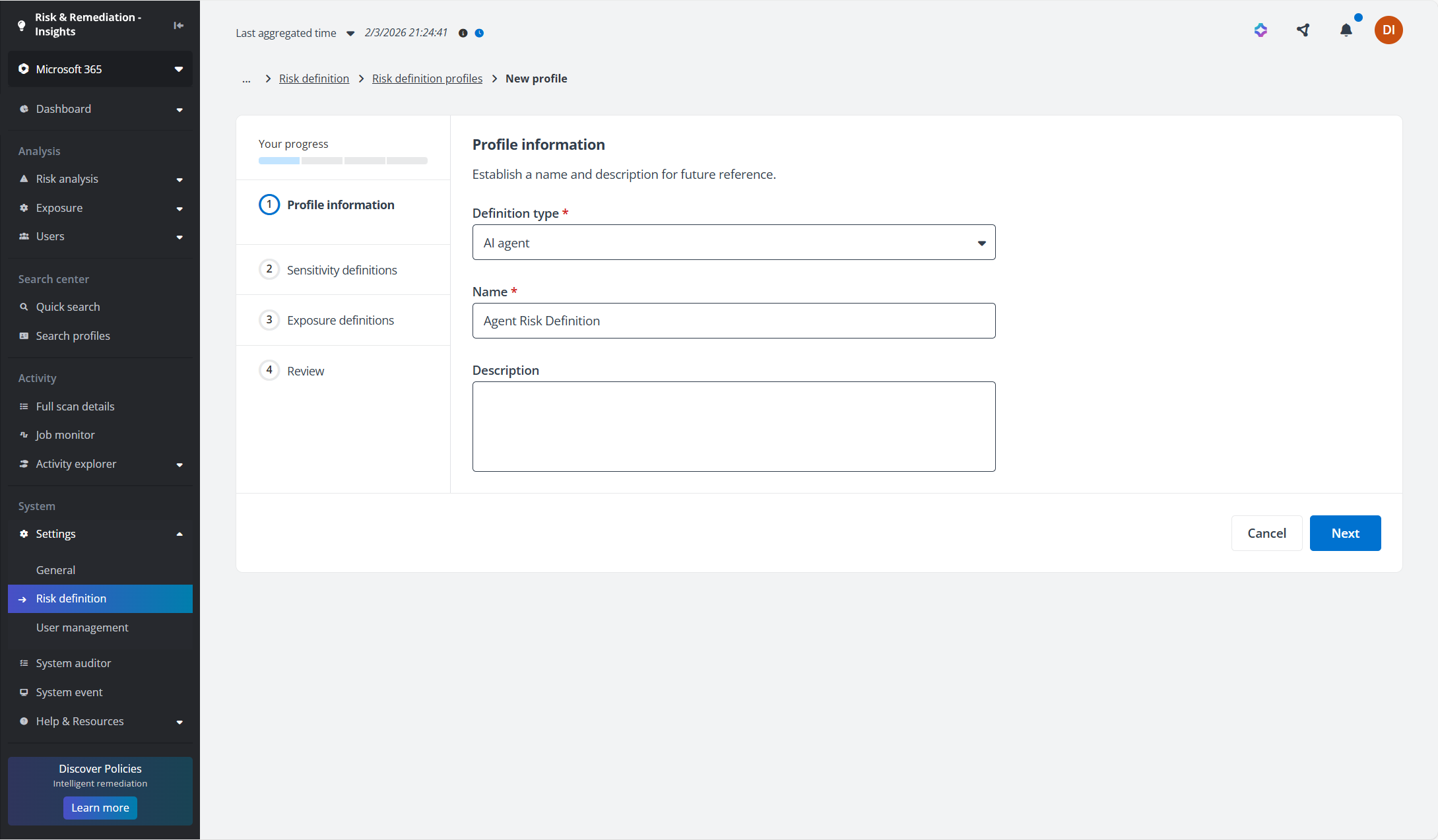
Calculate agent risk definitions by agent type to prioritize remediation
Insights now enhances Copilot agent permission and access review, giving security and governance teams clearer visibility into how agents interact with data and where access may require additional controls. Together, these capabilities help organizations treat AI agents as part of their overall security posture, not just productivity tools, turning AI governance into an automated, enforceable discipline rather than a manual review process.
Insights also strengthens actionable governance by integrating Microsoft 365 Retention Labels into Sensitivity Definitions, improving risk accuracy and aligning security scoring with records management policies. To support secure collaboration, export access can now be enabled for Visitor users on a per-user basis, maintaining audit visibility while expanding access responsibly. Teams can also create governance policies directly from Insights, transforming one-time fixes into continuous protection without leaving the reporting experience.
Cloud Cost Management
What’s New in AvePoint Cense?
AvePoint Cense delivers deeper license optimization through user-level activity insights, including Copilot engagement and application adoption. New AI license recommendations help organizations identify unused capacity, predict adoption likelihood, and align investments with real demand. One-click license adjustments make it easier to control spend, without slowing productivity.
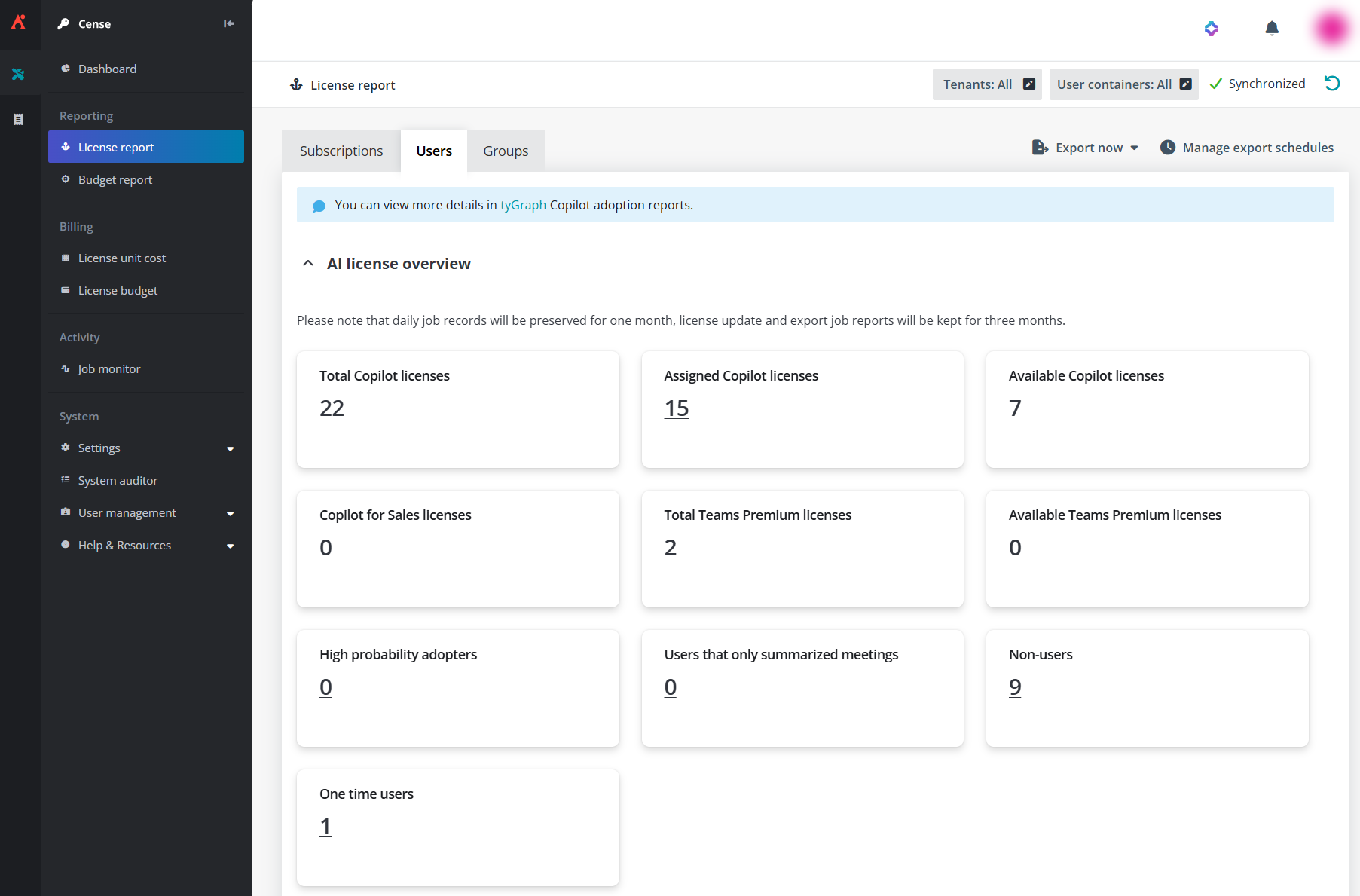
The Users view in the License report provides clearer visibility into user engagement
Learn more about these updates
Already signed up for the Account Portal? You will have access to user guides, release notes, how-to videos, free trials, and more! All the information you need for this release is just a click away in the Portal. Signing up is easy, and navigating is easier than ever.

Esther is AvePoint's Director of Technical Writing, with a specialization in communicating product updates and platform updates.