

AvePoint’s December Confidence Platform release delivers powerful new capabilities to help organizations govern data and scale AI responsibly across multi-cloud environments. This update simplifies automation, strengthens compliance, and delivers complete visibility and AI observability. By enhancing resilience, optimizing governance, and unlocking actionable insights, the Confidence Platform empowers you to work smarter, reduce risk, and accelerate innovation.
The AgentPulse Command Center, available in private preview, delivers centralized control over AI Agents with real-time risk monitoring, and lifecycle management. Eliminate shadow AI, enforce policies, and track usage trends to reduce risk and optimize ROI. With features like prompt monitoring, dynamic policy enforcement, and automated renewals, AgentPulse helps organizations scale AI safely without compromising security or compliance. To access the preview, visit our website.
Explore all the latest updates across the AvePoint Confidence Platform or jump to a specific business need by clicking on any of the links below.
- Adoption Analytics
- Backup and Recovery
- Data Governance
- Data Migration
- Information Lifecycle Management
- Access and Workflow Management
- Policies and Insights
Adoption Analytics
What’s new in AvePoint tyGraph?
AvePoint tyGraph delivers new capabilities to help organizations gain deeper insights into collaboration and adoption trends. Enhanced community overview reporting for Viva Engage introduces modern visuals and improved navigation, making it easier to identify top communities, analyze engagement, and drill down into specific groups with a single click. These updates empower leaders to understand influencer impact and optimize community strategies.
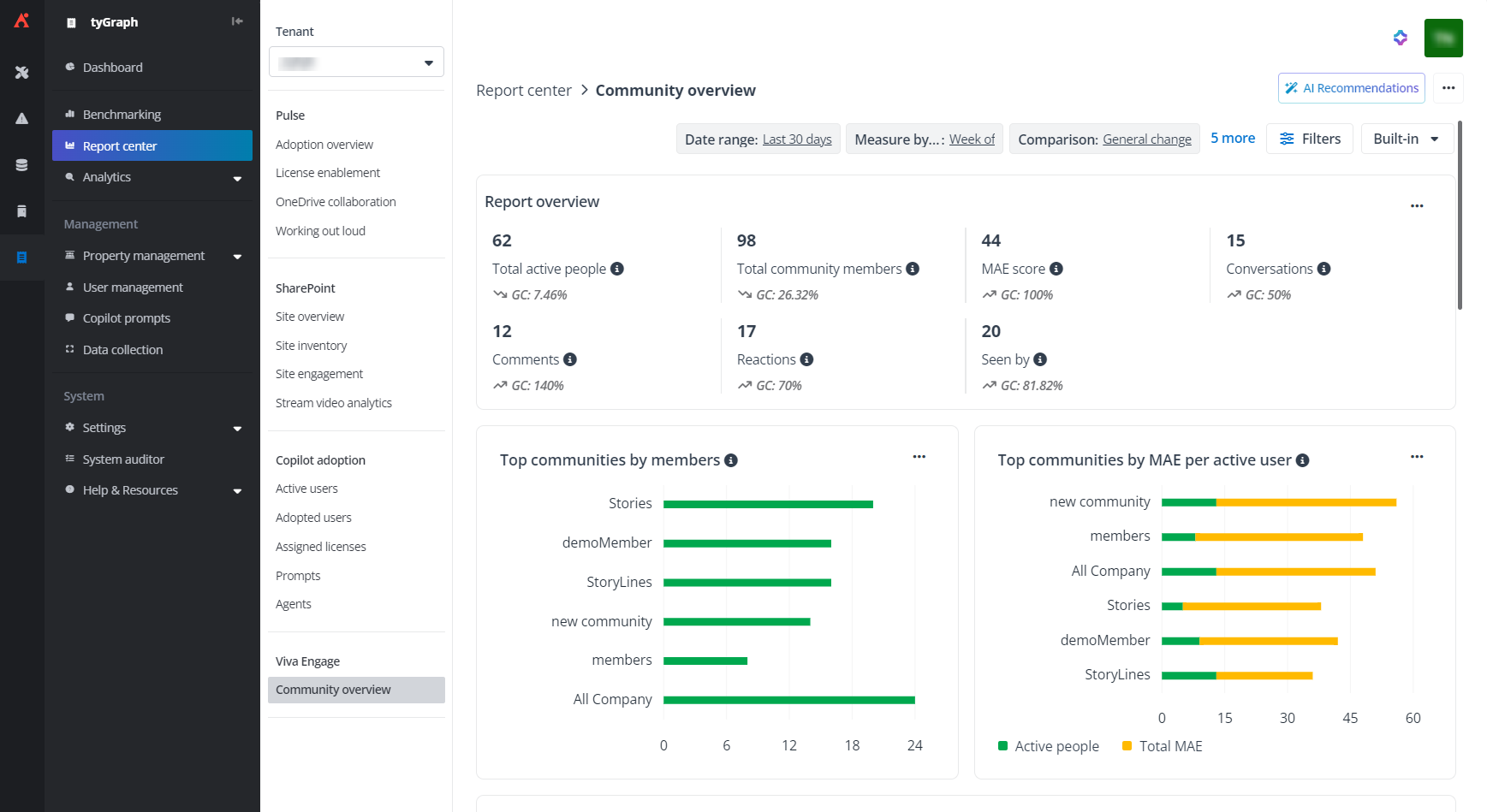
Community overview reporting for Viva Engage.
To support governance and cost management, the new Copilot agent report provides detailed visibility into user interactions with Copilot agents. Track activity trends and sensitive file access while maintaining personally identifiable information (PII) protection. Integrated reporting enables cost monitoring, adoption analysis, and compliance monitoring across organizational units, ensuring transparency and accountability.
The new site sponsor permission gives designated individuals access to site analytics and reports, even if they aren’t official site owners. This feature allows organizations to scale permissions across multiple sites and ensure insights remain focused on relevant content, improving collaboration oversight without compromising security.
Backup and Recovery
What’s new in Cloud Backup for Microsoft 365?
Enterprises managing multiple Microsoft 365 tenants can now streamline disaster recovery operations with automated cross-tenant SharePoint site restore. This enhancement eliminates manual steps by automating site creation and data transfer, enabling faster, more efficient restores for existing and deleted sites, including subsites.
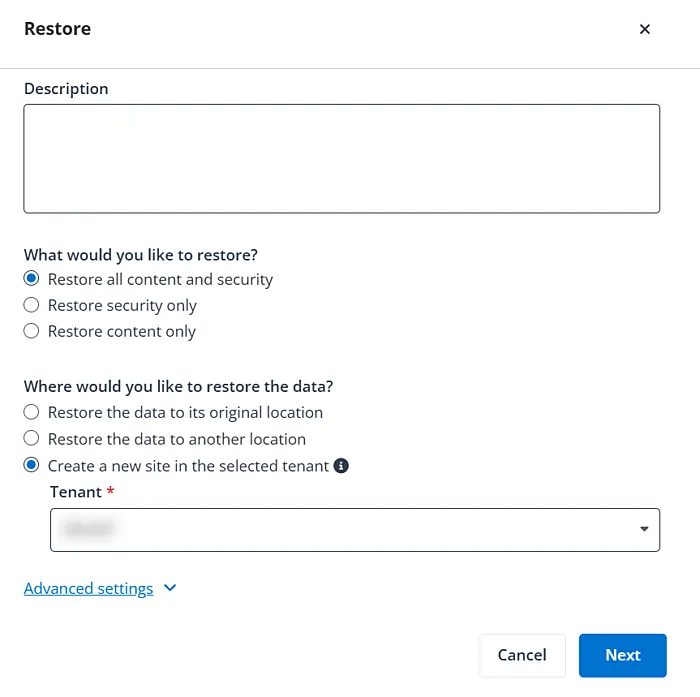
Automated cross-tenant SharePoint site restore enables faster, more efficient disaster recovery.
Improve operational agility and control your recovery sequence with bulk restore via CSV file and centralized queue management. This powerful capability, already established in Exchange Online, is now extended to simplify large-scale recovery across Teams, Microsoft 365 Groups, OneDrive, and SharePoint Online. This ensures rapid recovery of critical data during high-pressure scenarios, minimizing downtime and safeguarding productivity. For compliance, enhanced eDiscovery with full-text search and advanced filters will speed up the entire process and enable precise regulatory adherence. Plus, coverage report email notifications deliver proactive visibility into backup health, helping organizations maintain confidence in their data protection strategy."
What’s new in ReCenter?
AvePoint ReCenter makes recovery faster and easier with expanded file restore actions, allowing users to download or print files directly from the previewer before restoring. Admins can enable or disable this feature in the Cloud Backup for Microsoft 365 portal, giving end users quick access to verification tools. Additionally, folder-level restore for OneDrive now supports entire folders and OneNote notebooks, streamlining recovery for multi-file structures and reducing manual effort.
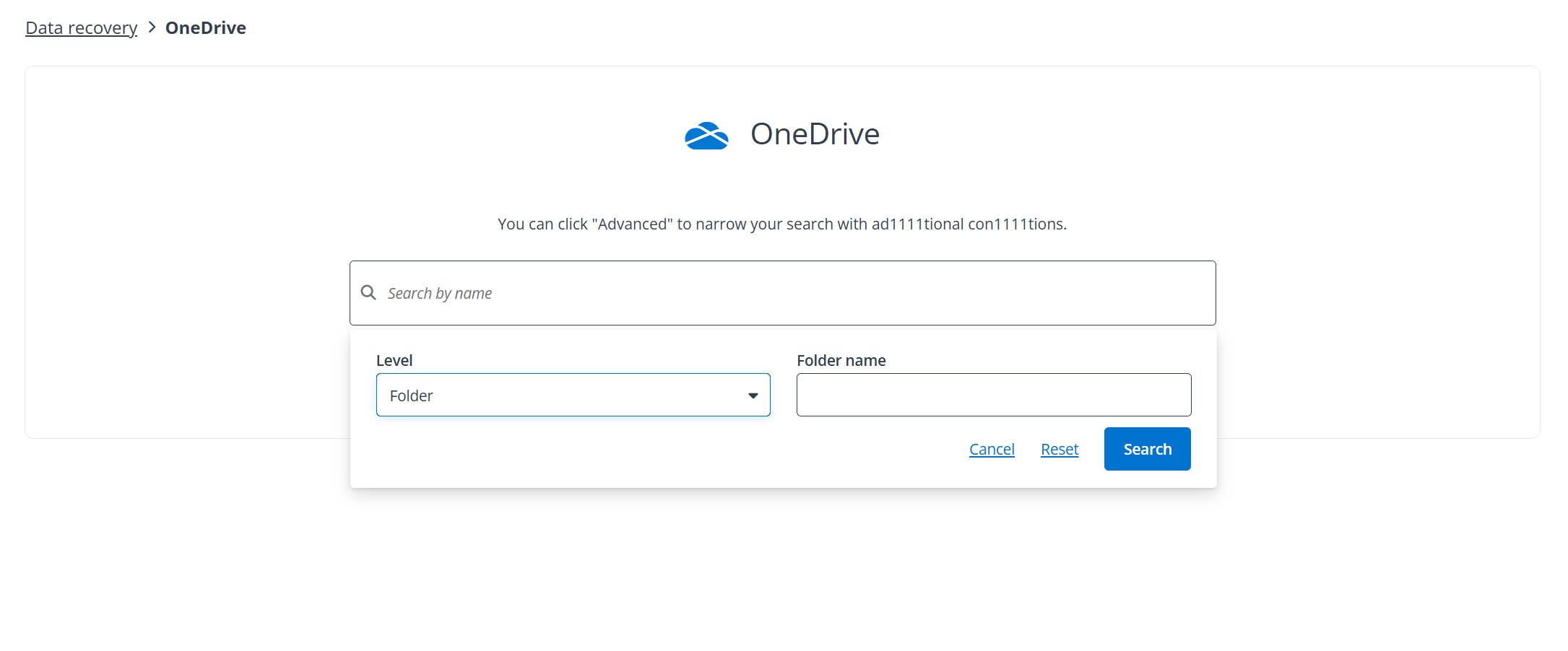
Easily implement folder level restore for OneDrive.
What’s new in Cloud Backup for Salesforce?
Enhanced filters for inactive data analysis reports now align with archive policies, allowing teams to apply common date filters or configure custom conditions by object type for granular insights. Pre-populated options simplify setup, making it easier to identify and manage inactive data efficiently.
To strengthen visibility and compliance, new public APIs for Salesforce monitoring enable seamless integration with tools like Splunk. These APIs provide actionable intelligence: the Unusual Activities API flags suspicious file changes, the Data Alert API tracks object-level modifications, and the Jobs API delivers detailed job status and metrics. All APIs support time range queries and organization-level filtering, ensuring streamlined monitoring and faster response to potential risks.
New advanced filtering options for Salesforce sandbox seeding support nested AND/OR logic across multiple objects and fields for precise data selection. This enables highly targeted sandboxes that accelerate development cycles, improve testing accuracy, and optimize resource usage. Additionally, flexible deactivation of automations during restore and sandbox seeding gives admins granular control over triggers, flows, workflow rules, and validation processes, ensuring smoother restores and greater flexibility for complex environments.
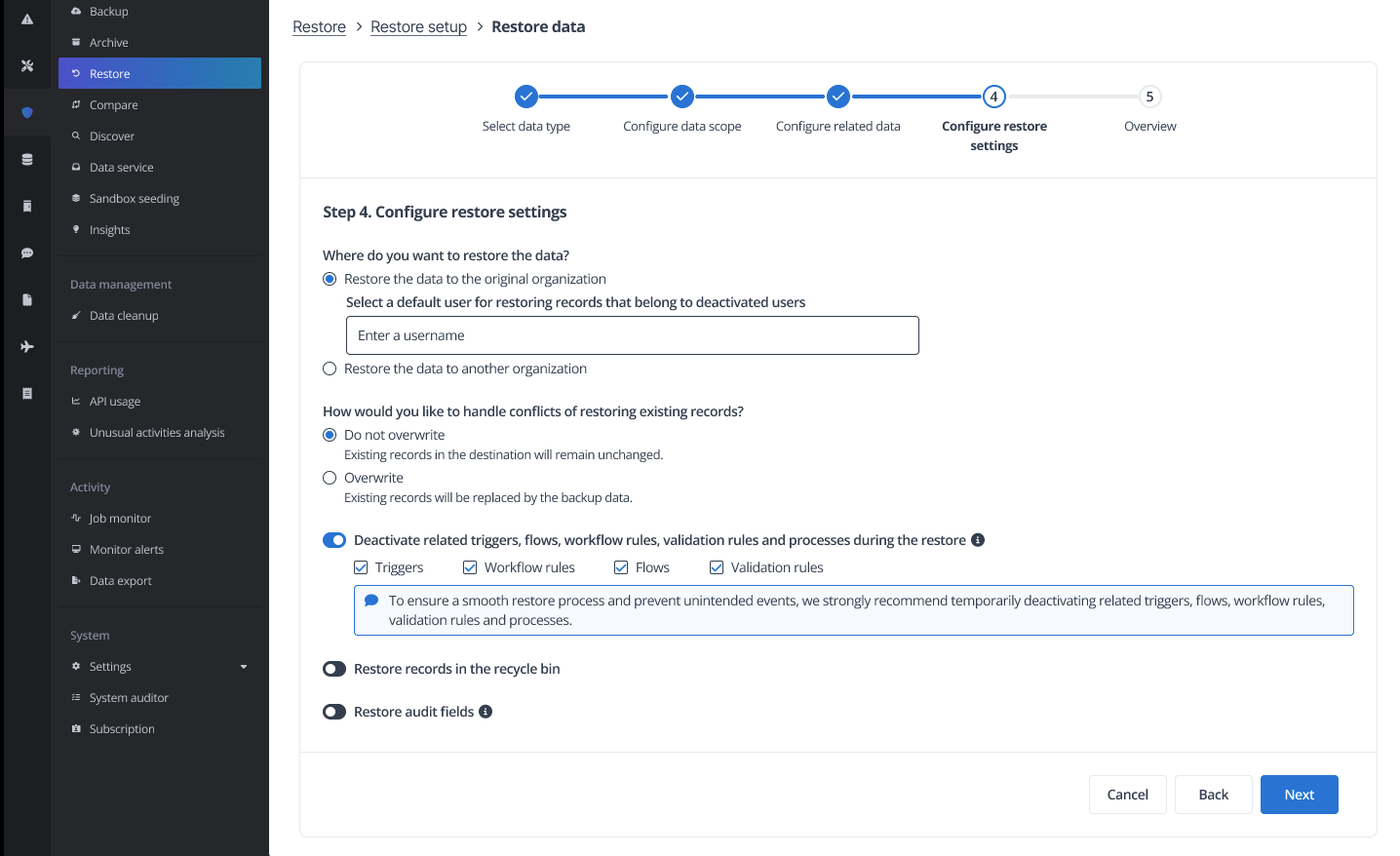
Flexible deactivation of automations during restore and sandbox seeding enable smoother restores and greater flexibility.
What’s new in Cloud Backup for IaaS + PaaS?
AvePoint Cloud Backup for IaaS + PaaS introduces advanced capabilities to strengthen protection across hybrid environments. With backup and restore for Microsoft SQL Server in Azure VMs, launching on December 29, organizations can safeguard critical databases both in the cloud and on-premises. This feature supports agent-based and agentless deployment, incremental backups, point-in-time recovery, encryption, and role-based access, delivering resilience and simplified management for complex workloads.
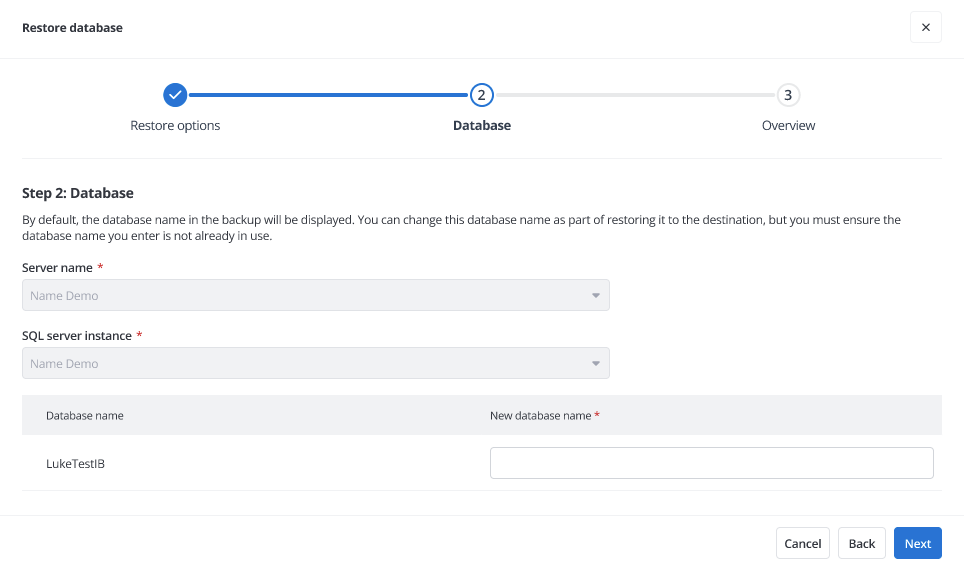
Microsoft SQL Server Backup safeguards critical databases both in the cloud and on-premises.
To meet demanding SLAs, Entra ID backup frequency now supports up to four incremental jobs per day, giving teams more recovery points without manual intervention. Bring your own storage (BYOS) for SFTP/FTP provides full control and compliance by allowing secure connections to local or hosted file shares for Entra ID backups. Plus, cloud access point (CAP) upgrades enhance protection with Azure SQL database backup support and fully automated installation for Amazon and Google platform resources, making setup faster and easier.
Data Governance
What’s new in AvePoint Cloud Governance?
Microsoft Loop shared workspaces governance is now supported. You can import and renew shared workspaces with lifecycle controls and compliance rules with the same flexibility as other sources. This ensures timely follow-up and consistent governance across your environment.
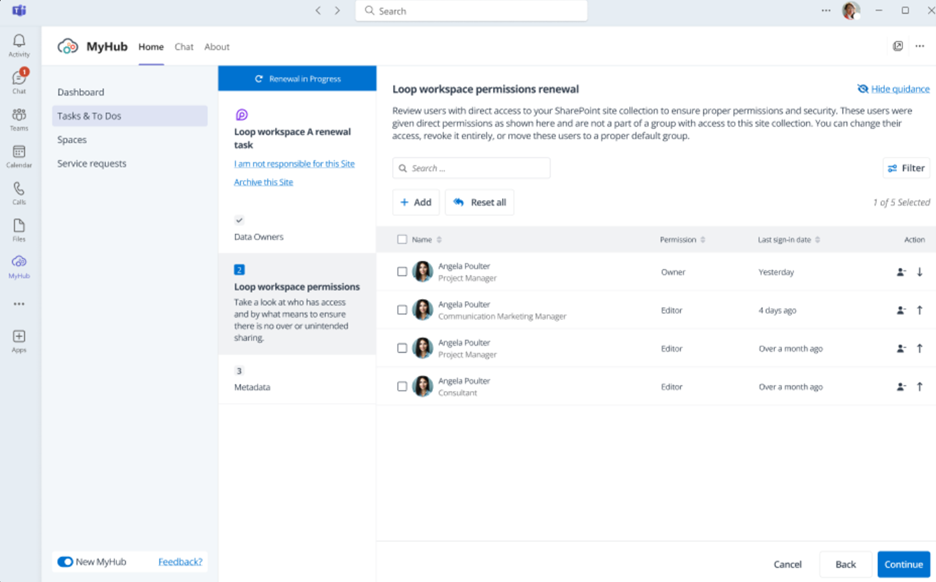
Loop workspace renewal task.
Enhancements for Viva Engage governance bring greater control to community management. The new community lifecycle service supports dynamic workflows for deletion or profile changes, while settings management allows administrators to configure community settings, including sensitivity labels, directly within dynamic services for streamlined control.
Sharing link renewal for Teams channels adds an extra layer of security to collaboration. As part of the existing Teams renewal process, designated users can now review and manage sharing links in shared and private channels through an intuitive interface. Renewal tasks, customizable notifications, and full change tracking ensure access remains appropriate and compliant. Plus, renewal workflows for SharePoint now include risk-based assessments. Administrators can require task assignees to review objects flagged with specific risk details before completing renewals, strengthening compliance and reducing exposure.
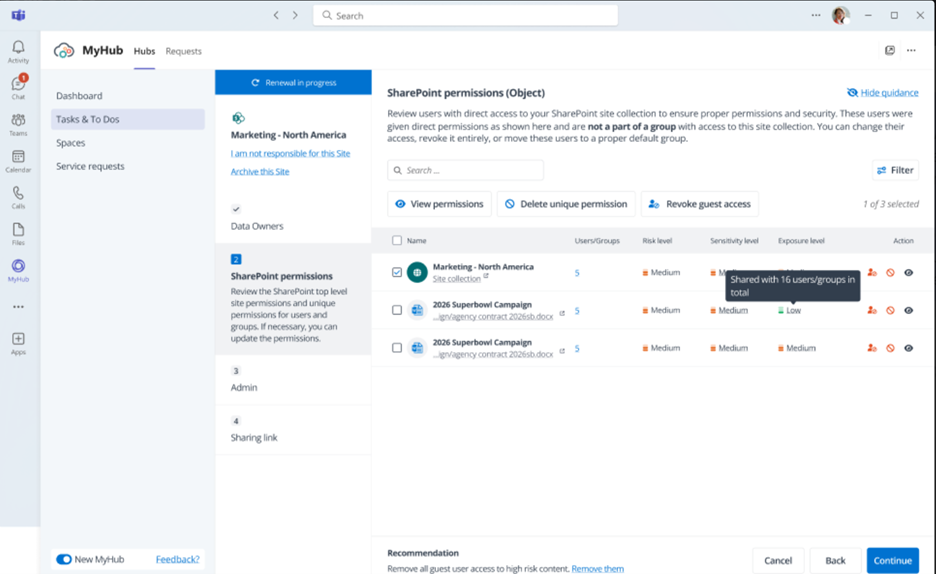
SharePoint Renewal Risk Assessment evaluates items using detailed risk information according to organizational policies.
What’s new in AvePoint MyHub?
AvePoint MyHub now offers greater flexibility and control for a more personalized, secure experience. With branding customization, organizations can tailor MyHub to reflect their identity by adding a company logo and applying custom color schemes.
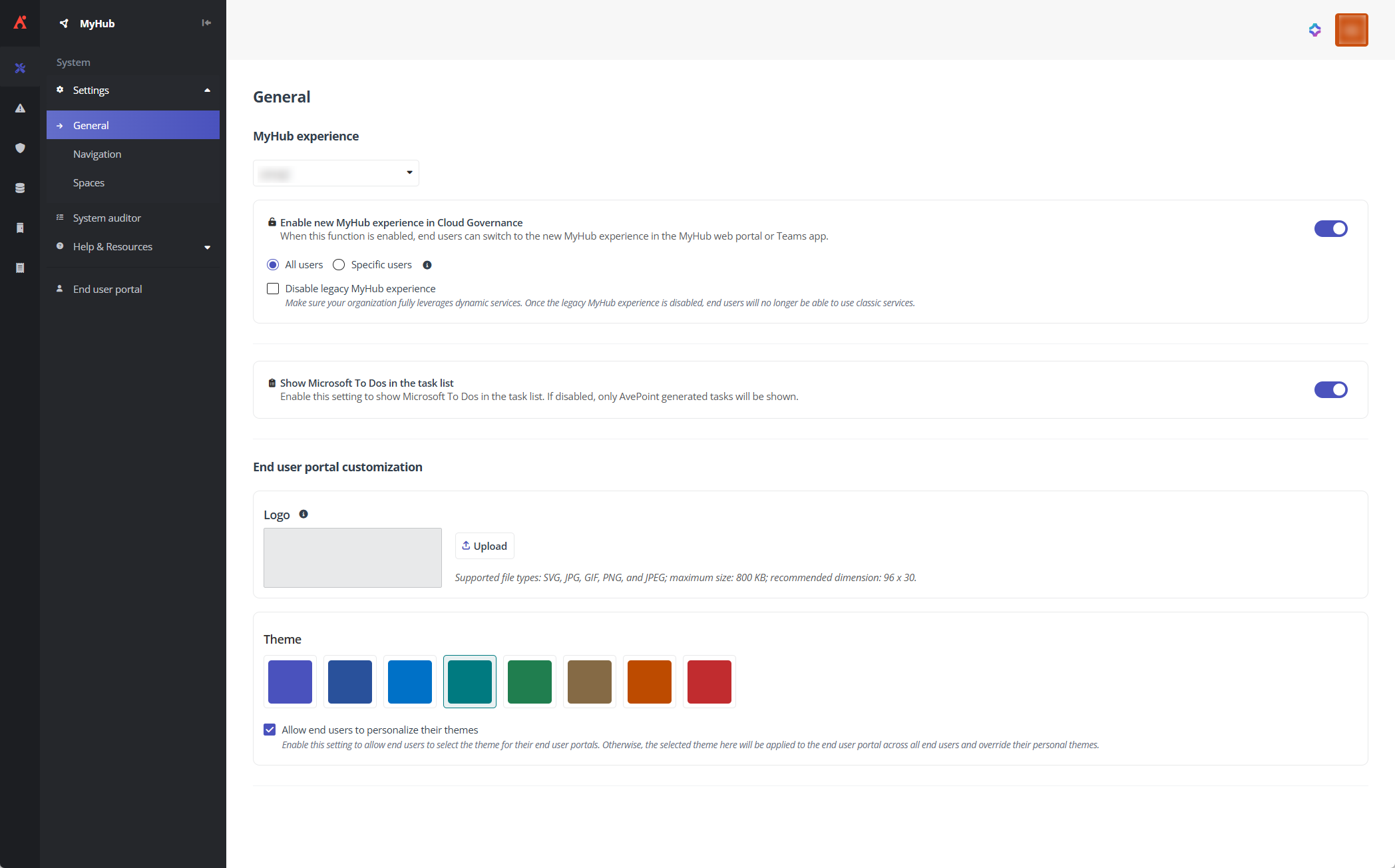
Customize MyHub with your company logo and color scheme for a more personalized, branded experience.
Additionally, shared mailbox access management in spaces simplifies permission control for shared and resource mailboxes. Administrators can assign or update roles, such as Full Access, Send As, Send on Behalf, and Read Only, directly from the MyHub space report. All changes are applied in real time and are tracked for auditing and compliance.
Data Migration
What’s new in AvePoint Fly?
AvePoint Fly continues to expand its migration capabilities with enhanced support for device migrations. Available in private preview, organizations can now migrate devices across local and hybrid environments with greater flexibility. With this release, we introduce capabilities for Entra ID-to-Entra ID device migrations.
To streamline migration management, SharePoint Online and OneDrive migrations now support synchronized deletion, which can be enabled directly in migration policies. Additionally, we have added more programmatic capabilities by allowing the creation of migration policies via PowerShell.
Information Lifecycle Management
What’s New in AvePoint Opus?
AvePoint Opus introduces new features to simplify compliance, auditing, and support for records management. With export storage optimization settings, administrators can now export all Teams and SharePoint workspace optimization configurations into a single CSV file for easy auditing and reporting. This ensures transparency and simplifies governance reviews.
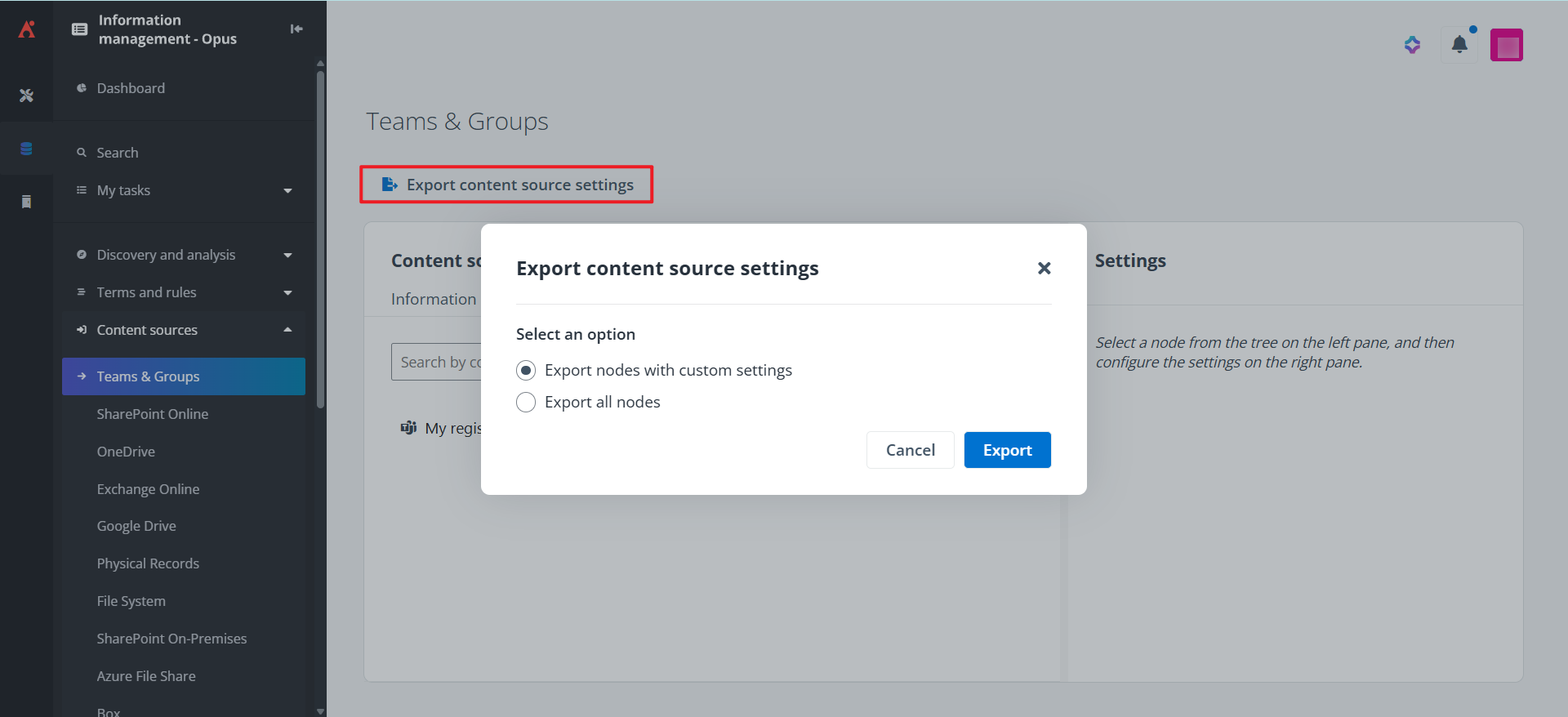
Export storage optimization settings for easier auditing and reporting.
The new compliant export wizard streamlines complex export processes with a guided, step-by-step experience. Users can select a format, map metadata, and link exports to business rules for automated, compliant data transfers, eliminating manual setup and reducing risk. Additionally, search by document ID in the Related Records app makes locating content faster and more precise, while still supporting traditional name-based searches.
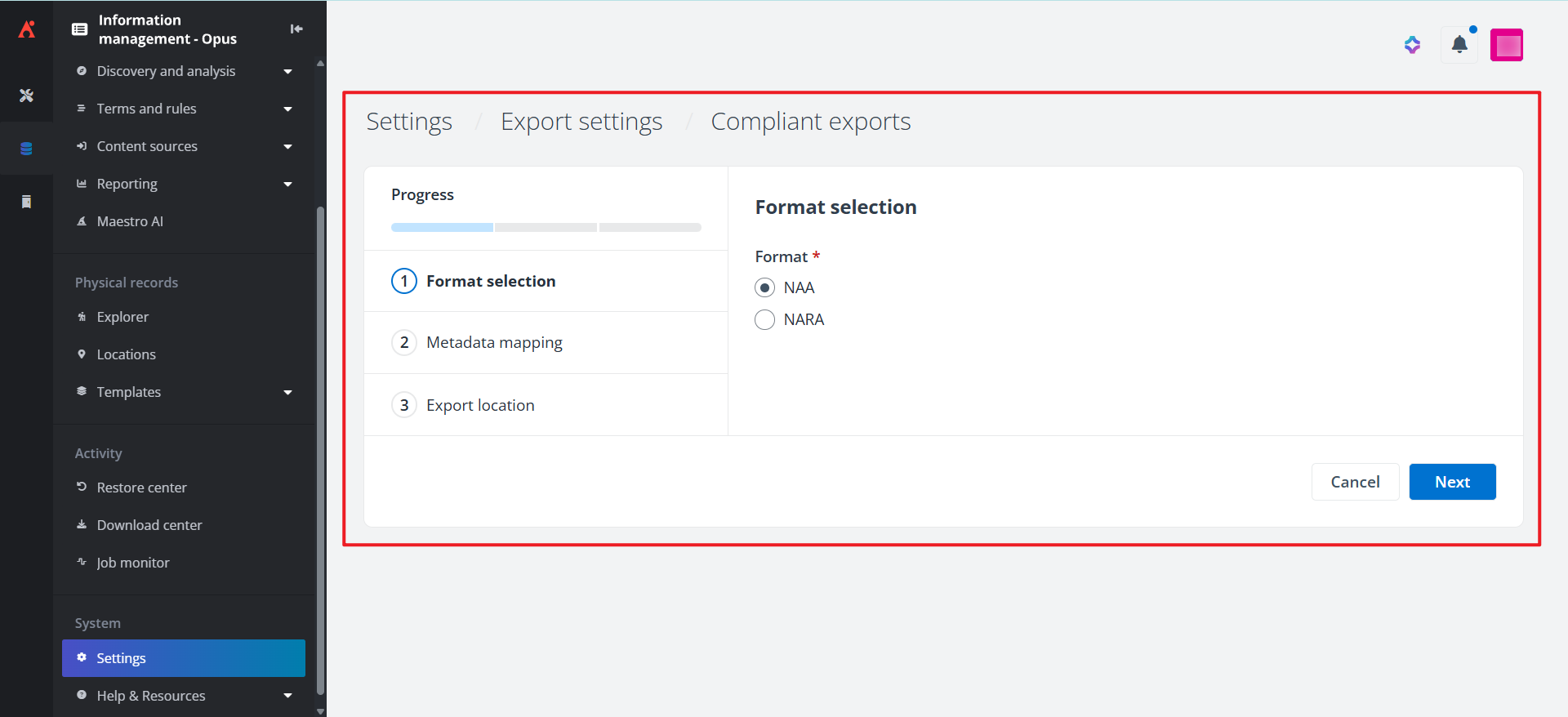
The Compliant Export Wizard provides a guided, step-by-step experience to streamline complex export processes.
The new Invite support option accelerates troubleshooting by allowing users to submit a support ticket and grant AvePoint secure access to their Opus environment in one step. This automated process reduces manual work and speeds up resolution, ensuring minimal disruption to business operations.
Access and Workflow Management
What’s new in AvePoint EnPower?
With new Loop workspace governance, organizations can now apply lifecycle controls and compliance rules to Microsoft Loop workspaces, ensuring consistent management and security across collaboration platforms. To reduce risk and optimize licensing costs, unlicensed OneDrive monitoring delivers automated notifications, detailed reporting, and bulk management options for tracking and addressing unlicensed accounts.
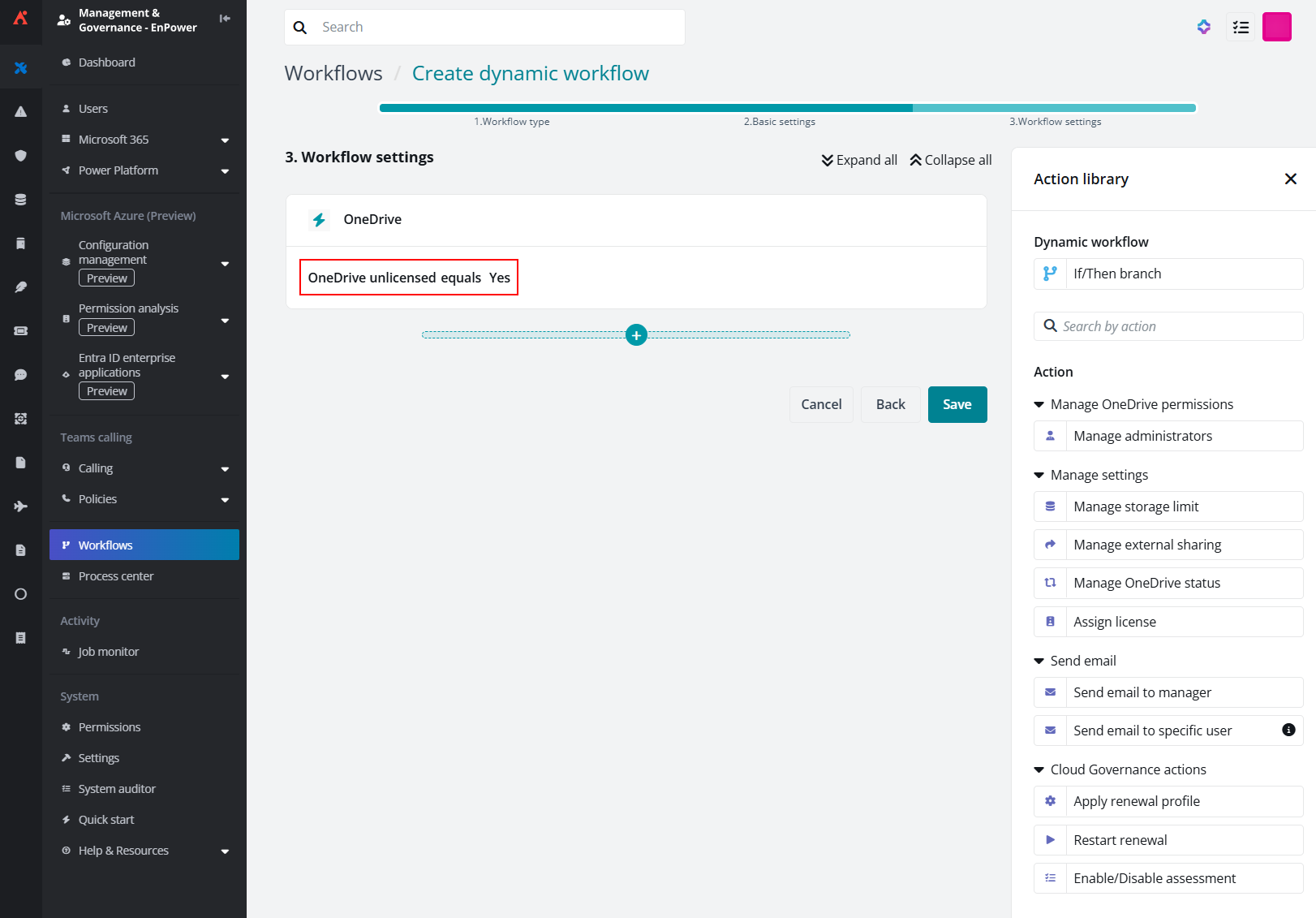
Unlicensed OneDrive monitoring enables tracking and addressing of unlicensed accounts.
Automated OneDrive assessment and renewal enables scheduled assessments and renewal tasks without manual intervention. All changes are tracked and updated automatically, helping maintain compliance with less effort. For hybrid environments, on-premises shared mailbox creation streamlines provisioning and governance of shared mailboxes in on-prem Exchange setups through unified workflows. Additionally, automated contact assignment leverages tyGraph activity data to identify the most active owners and assign them as primary and secondary contacts for SharePoint site collections.
Additional updates include object condition-based workflows for Exchange, which automate permissions and notifications for cloud, hybrid, and on-prem mailboxes, and dynamic role-based access control for Power Platform, allowing Makers, Owners, and Admins to manage only the content they own, without security group or container setup. Plus, mailbox settings and delegation details can now be exported in bulk to CSV, including exports of auto-reply configurations, folder permissions, and delegation details across all environments. Together, these updates deliver greater scalability, automation, and control for modern governance.
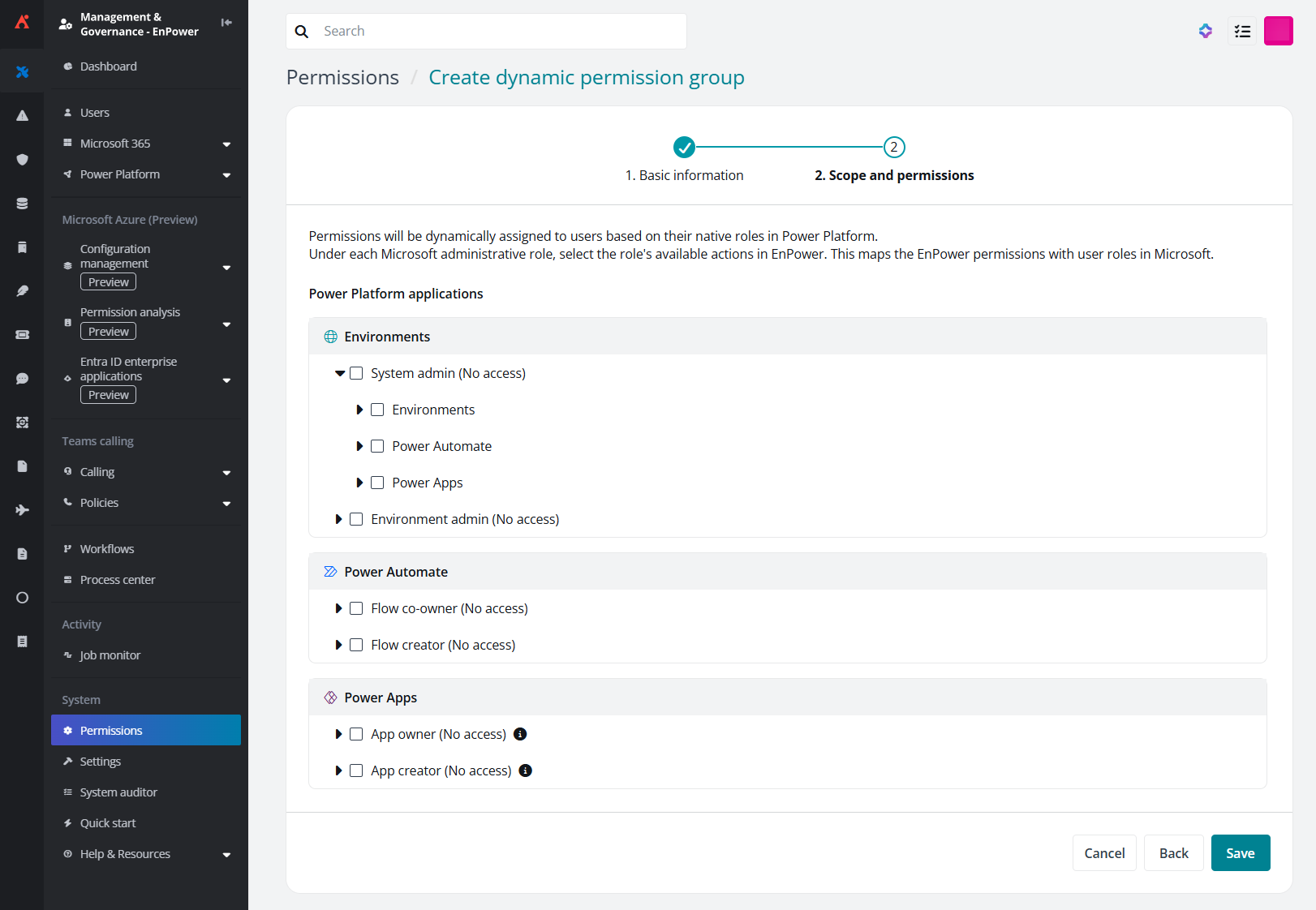
Dynamic role-based access control for Power Platform enables content management without security group setup.
Policies and Insights
What’s new in AvePoint Policies for Microsoft 365?
Consistent violation alerts now feature a clear, standardized email format, making it easier to scan key details and take action quickly with a single, prominent call to action. This improvement helps administrators respond faster and maintain compliance without confusion.
Managing ownership is also easier with centralized owner assignment, which allows you to configure “best owner” rules in one place and test them against live data before applying them to policies. This ensures accuracy and reduces the risk of misconfigured ownership settings. Additionally, the new member number restriction rule lets you set limits for members in Microsoft 365 Groups, Security and Distribution groups, and Teams. Alerts notify you when counts are too high or too low, helping prevent overexposure and ensuring proper coverage.
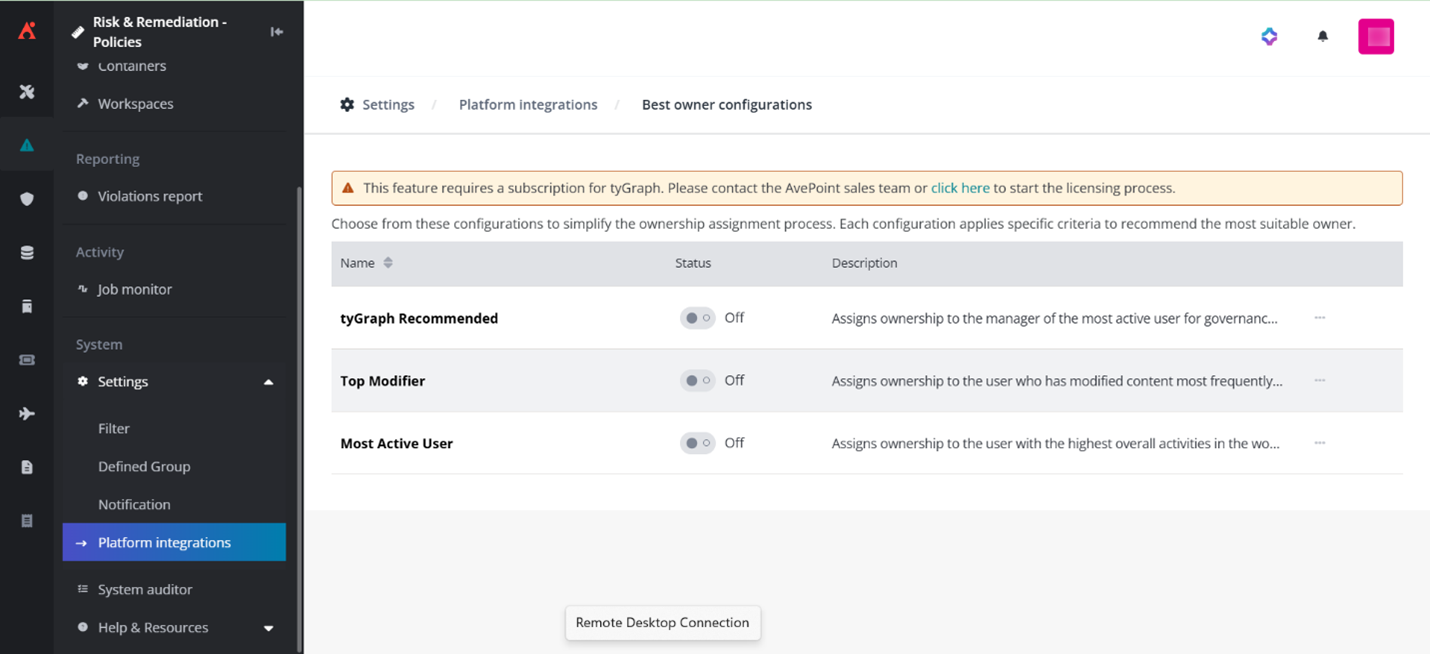
Configure best owner rules in one place and test them against live data before applying them to policies.
What’s new in AvePoint Insights for Microsoft 365?
AvePoint Insights continues to evolve with features that simplify risk management and improve visibility across your environment. Available in private preview in conjunction with the AgentPulse Command Center, Quick Search now includes agents as a searchable object type, allowing you to query by agent name and navigate directly to detailed records for faster, more efficient searches. Also in private preview, Insights now supports agents as an object type, including Copilot, Copilot Studio, SharePoint Embedded, and Azure AI Foundry. This enhancement provides full visibility into agent metadata, permissions, and knowledge sources as well as updated risk scoring to reflect agent exposure.
Interested in trying these features? Contact your AvePoint representative to join the AgentPulse preview and enable these capabilities.
To accelerate risk configuration, the new risk definition wizard offers a guided, step-by-step experience for creating risk definitions. Define sensitivity and exposure conditions, set exclusions, assign scopes, and review settings all in one place without navigating multiple pages.
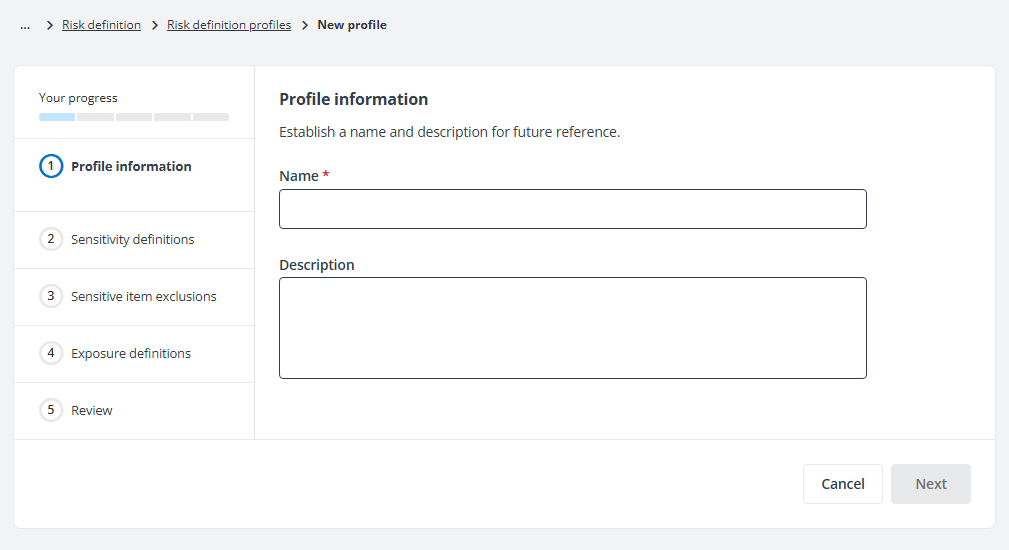
The Risk Definition wizard offers a guided, step-by-step experience for creating risk definitions.
Plus, centralized notification control simplifies communication by consolidating template management and delivery settings. From a single page, you can edit existing templates, create custom ones, and enable or disable notifications for specific users or groups, ensuring consistent and efficient risk alerts.
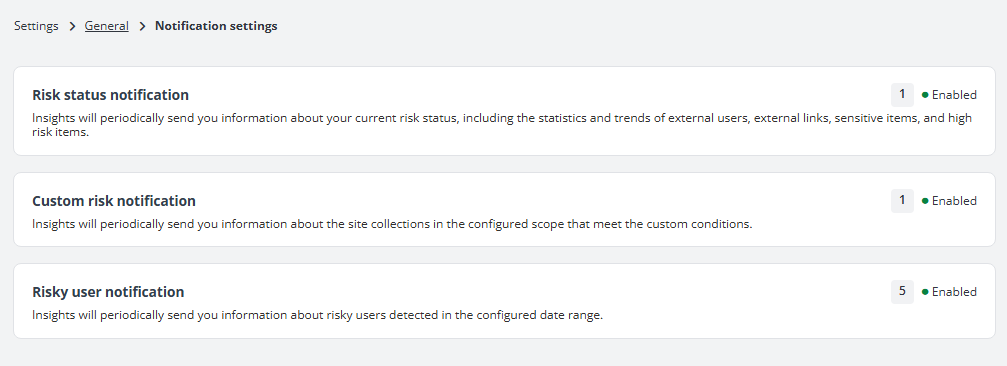
Centralized notification control enables consistent and efficient risk management.
Learn more about these updates
Already signed up for the Account Portal? You will have access to user guides, release notes, how-to videos, free trials, and more! All the information you need for this release is just a click away in the Portal. Signing up is easy, and navigating is easier than ever.


Esther is AvePoint's Director of Technical Writing, with a specialization in communicating product updates and platform updates.