

This August, the AvePoint Confidence Platform delivers new updates to help organizations govern smarter, migrate faster, and protect more across Microsoft 365, Google Workspace, Salesforce, and hybrid environments. From analytics and automation to backup and lifecycle management, these enhancements give teams greater clarity, control, and confidence.
AvePoint tyGraph: Empower your teams with faster, AI-powered insights and recommendations in every report, shareable dashboards, and industry benchmarking for Copilot and Intranet metrics.
AvePoint EnPower: Automate governance with SharePoint workspace archiving, flexible “Or” logic workflows, bulk timeline reporting across M365 and Power Platform objects, and delegated management for hybrid Exchange environments.
AvePoint Policies: Get smarter alerts and automated protection with dynamic email templates, risk-based sensitivity labeling, and precision policy targeting using Insights data.
AvePoint Insights: Enhance visibility and control with refreshed dashboards, one-click policy enforcement, and expanded support for Microsoft 365, Salesforce, and Google.
Cloud Governance: Simplify provisioning and lifecycle management with Confide integration, hybrid Exchange renewals in MyHub, Power BI access control, and new dynamic service APIs.
AvePoint Cloud Backup: Expand protection with full-text OneDrive eDiscovery, Copilot agent file recovery, continuous Salesforce backup, Google Directory support, and hybrid cloud coverage with CAP Gateway and customizable retention.
AvePoint Fly: Streamline migration planning with a timeline forecasting calculator, full metadata migration from Microsoft 365 to Google Workspace, and modernize classic SharePoint sites post-migration for long-term usability.
- AvePoint Opus: Optimize retention and search with exportable reports, full-text archive search, and sensitivity-based storage rules for SharePoint and OneDrive.
Explore all the latest updates across the AvePoint Confidence Platform or jump to a specific business need product by clicking on any of the links below.
- Adoption Analytics
- Backup and Recovery
- Data Governance
- Data Migration
- Information Lifecycle Management
- Access and Workflow Management
- Policies and Insights
Adoption Analytics
What’s new in AvePoint tyGraph?
The latest tyGraph updates unlock new ways to deliver tailored insights, streamline reporting, and empower data-driven decisions. With Filtered Report Sharing, users can now apply filters to tyGraph web reports and share secure, locked-down views, ideal for recurring requests and accessible without a Power BI license. This makes it easier than ever to deliver tailored insights to stakeholders without compromising data integrity.
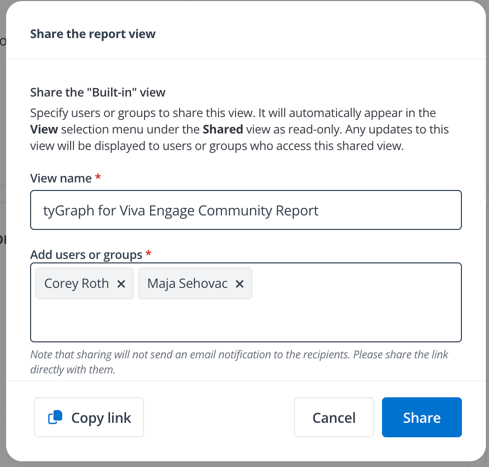
Apply a set of filters to reports and share with anyone in your organization.
Custom Dashboards with Sharing allow users to pin visuals from multiple reports into personalized dashboards, which can be shared across teams to support focused storytelling and collaborative analysis. For more targeted reporting, Role-Based Power BI Reports leverage Row-Level Security to deliver scoped insights, such as sites or communities a user owns, directly from the Confidence Platform, ensuring users see only the data relevant to their role.
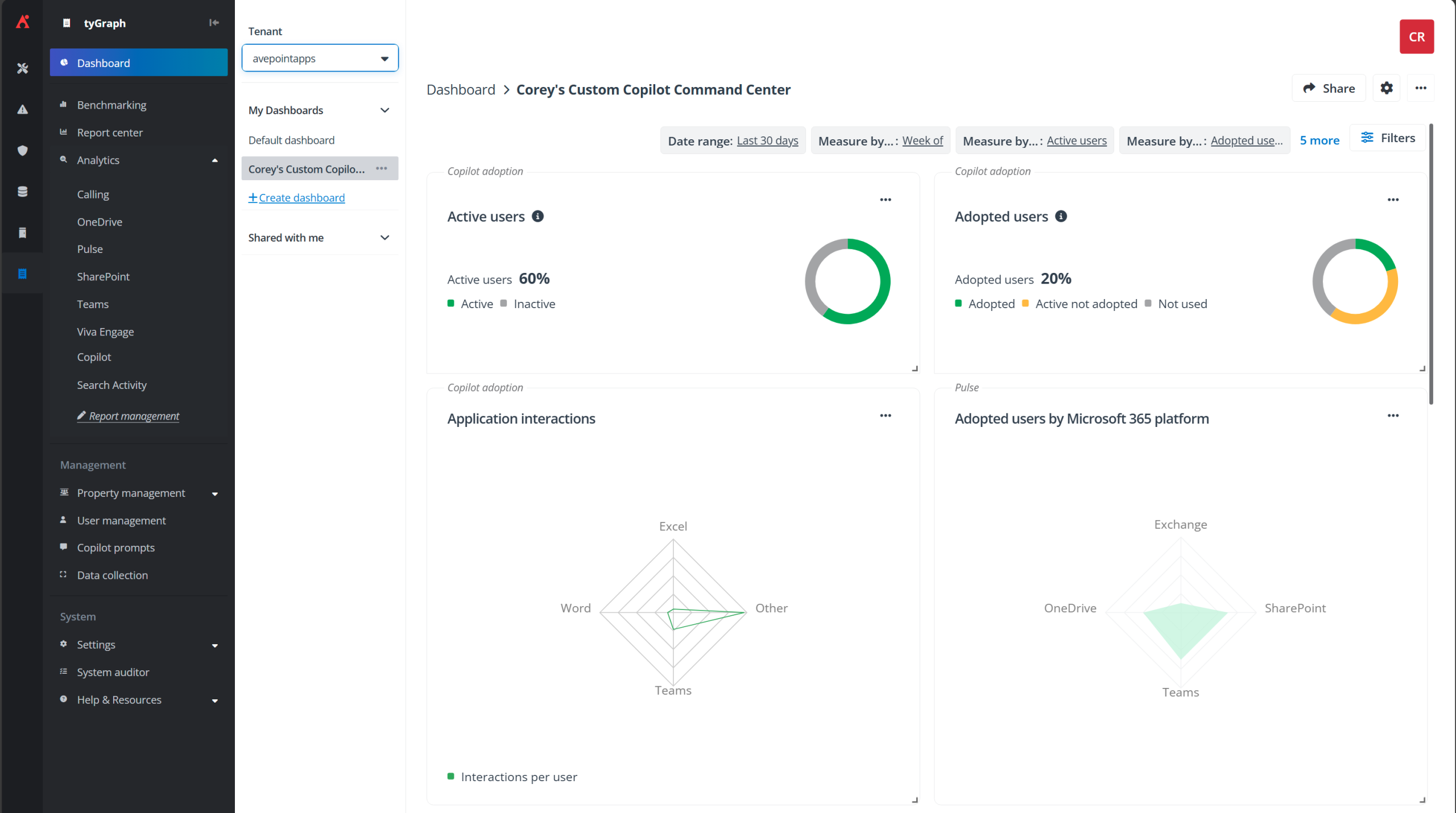
Easily share custom dashboards with colleagues to make faster decisions and take action.
Organizations can now enrich their reporting with Custom apps for user properties, pulling in Entra ID attributes and using them as standard fields in tyGraph reports. This enables deeper segmentation and more meaningful analysis across departments and roles. Additionally, CSV Export for SharePoint Reports simplifies data reuse by allowing users to export table data directly to CSV, making it easy to incorporate insights into Excel, PowerPoint, or other offline formats.
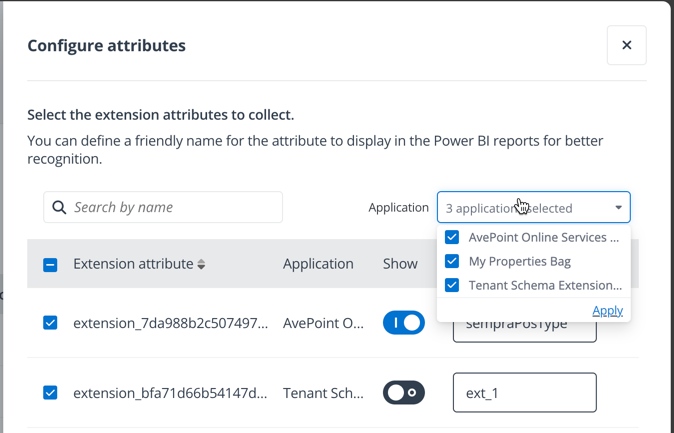
Configure custom user data from your Entra ID apps.
AI Recommendations now provide actionable takeaways for all reports, helping teams surface trends and suggested actions instantly. Industry-based benchmarking introduces International Organization for Standardization (ISO) based sector comparisons across Copilot Adoption, Intranet Engagement, and Intranet Publishing reports. This feature enables organizations to evaluate their performance against peers in their industry, offering a strategic edge in refining their digital transformation initiatives.
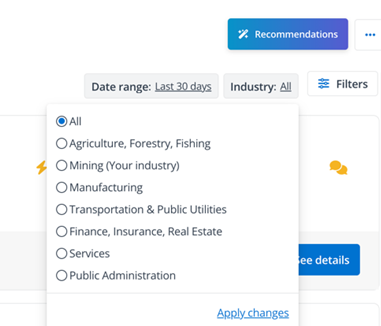
Align your metrics with industry standards to refine your digital transformation initiatives.
Plus, experience faster performance with parallel staging, which accelerates data refresh cycles for large tenants and offers enhanced visibility into scan progress.
Backup and Recovery
What’s new in Cloud Backup for Microsoft 365?
Cloud Backup for Microsoft offers more precise control with advanced search, restore, and export features. Full-text search for OneDrive eDiscovery (available as an add-on) allows keyword-based content search within documents, improving accuracy in investigations and restores. Folder-level deletion for OneDrive enables bulk cleanup without item-by-item deletion, streamlining compliance workflows.
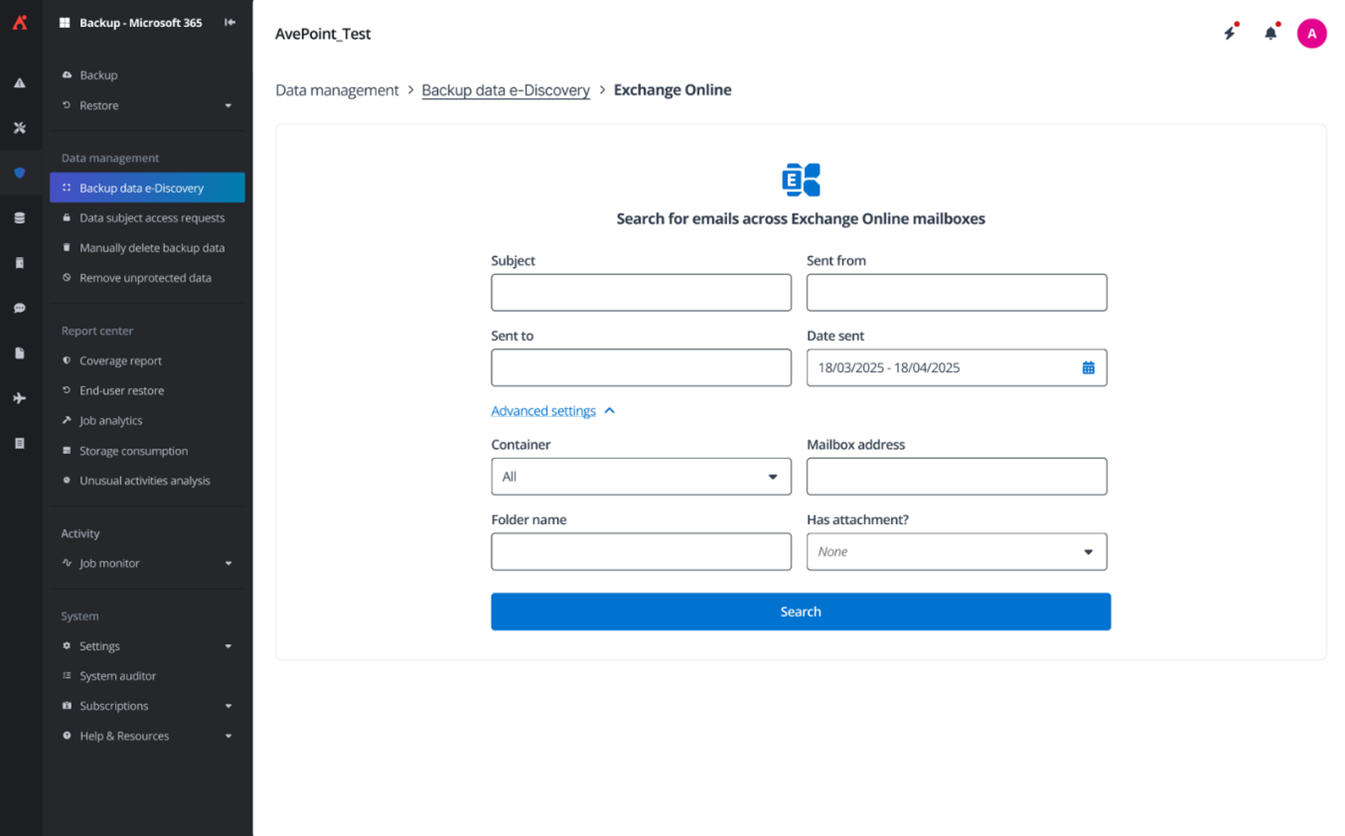
Full-Text Search for OneDrive eDiscovery
Support for Copilot agent files stored within SharePoint Online document libraries ensures agent files generated by Copilot Studio can be backed up and restored, both in and out of place.
What’s new in Cloud Backup for Salesforce?
Cloud Backup for Salesforce now offers continuous data protection, available as an optional add-on, enabling near real-time protection for Salesforce objects. By leveraging Salesforce’s native Change Data Capture functionality, recovery points can now be created the moment a record changes — this eliminates the need to manually initiate backup jobs and dramatically reduces Recovery Point Objectives (RPO).

Enable continuous data protection and reduce RPO for Salesforce objects.
Targeted monitoring for Salesforce insights now allows filtering by user or field to reduce alert noise and focus on high-impact changes. New controls also allow stopping in-progress compare jobs, with options to confirm and rerun. A new capacity-based licensing model offers scalable pricing based on protected GBs, alongside traditional per-user plans.
What’s new in Cloud Backup for Google Workspace?
Cloud Backup for Google Workspace expands coverage with support for Google Directory, enabling backup and restore for Google groups, roles, and memberships, with a custom app profile setup. This new capability ensures broader protection and business continuity across the Google ecosystem.
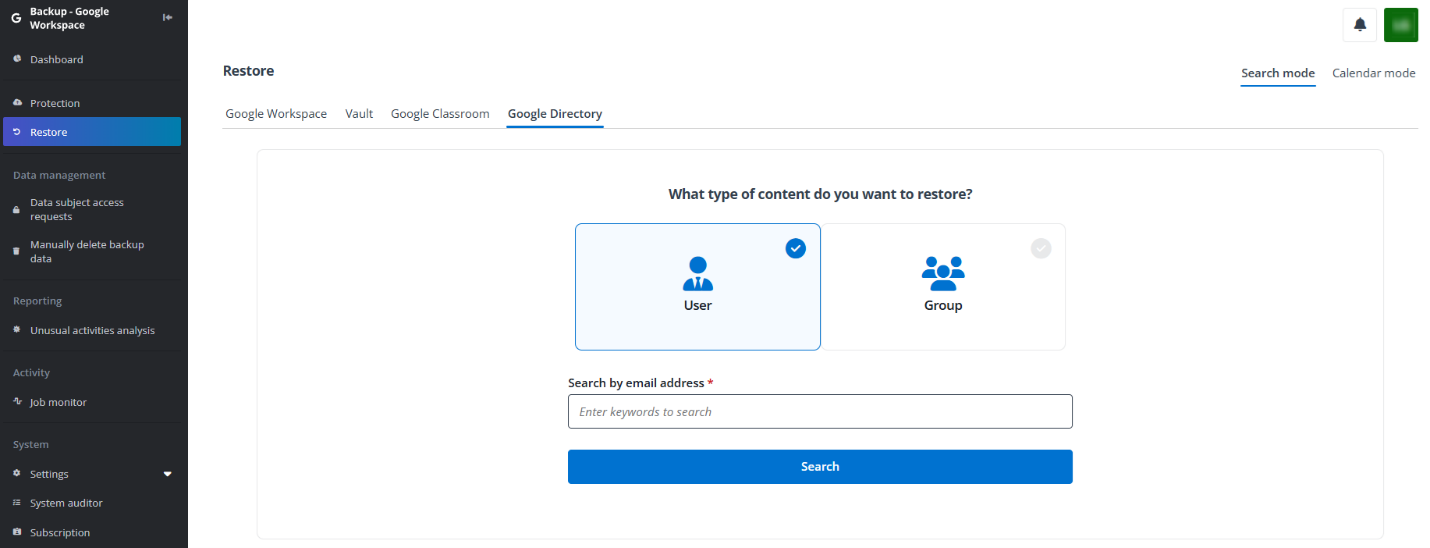
New support for Google Directory protection further enhances business continuity.
What’s new in Cloud Backup for IaaS + PaaS?
Cloud Backup for IaaS + PaaS introduces AvePoint Cloud Access Point (CAP) Gateway, enabling secure, private access to Virtual Machine (VM) and storage (files and BLOBs), even when public internet access is disabled. This is especially valuable for organizations operating in restricted or high-compliance environments. We can now protect VMs within Google Cloud Platform through our new CAP Gateway.
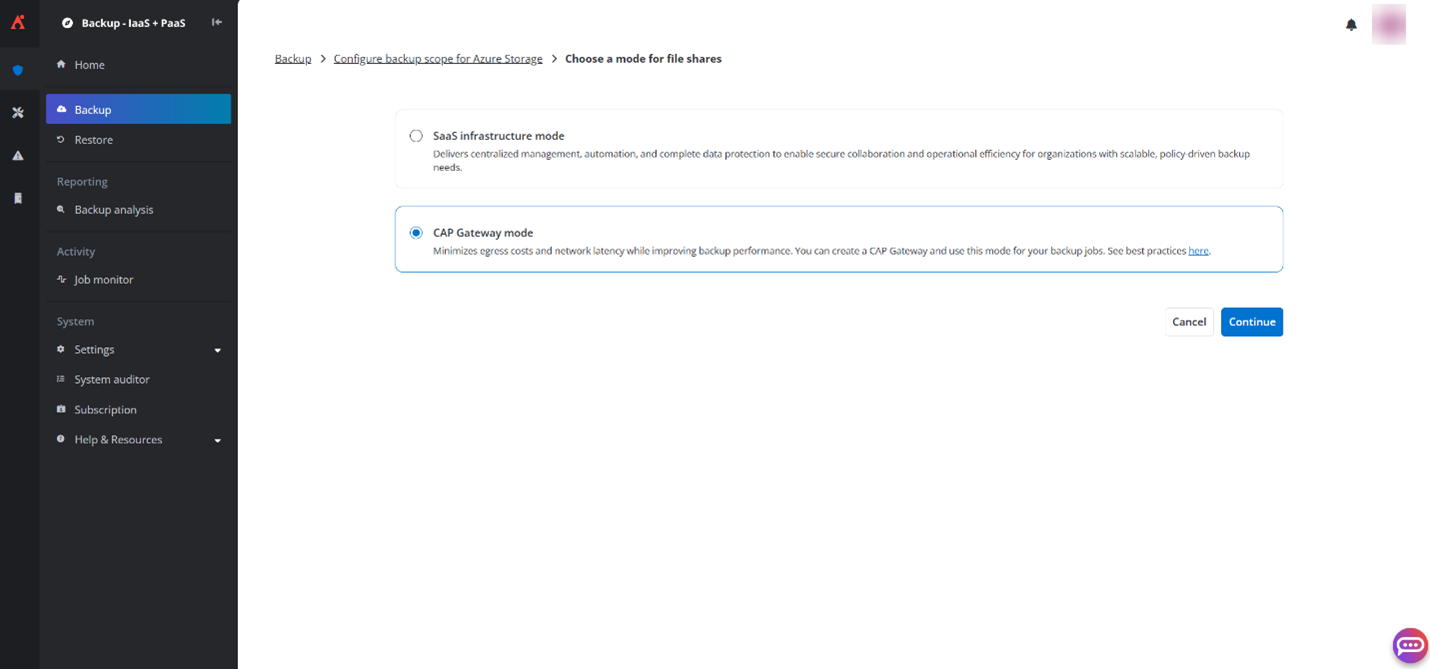
Enable the CAP Gateway for comprehensive data protection.
Retention policies are now more flexible, with granular retention settings for Azure and Google Cloud Storage VMs and Azure SQL. Organizations can configure hourly, daily, weekly, monthly, and yearly retention schedules to meet compliance, regulatory, and archival needs.
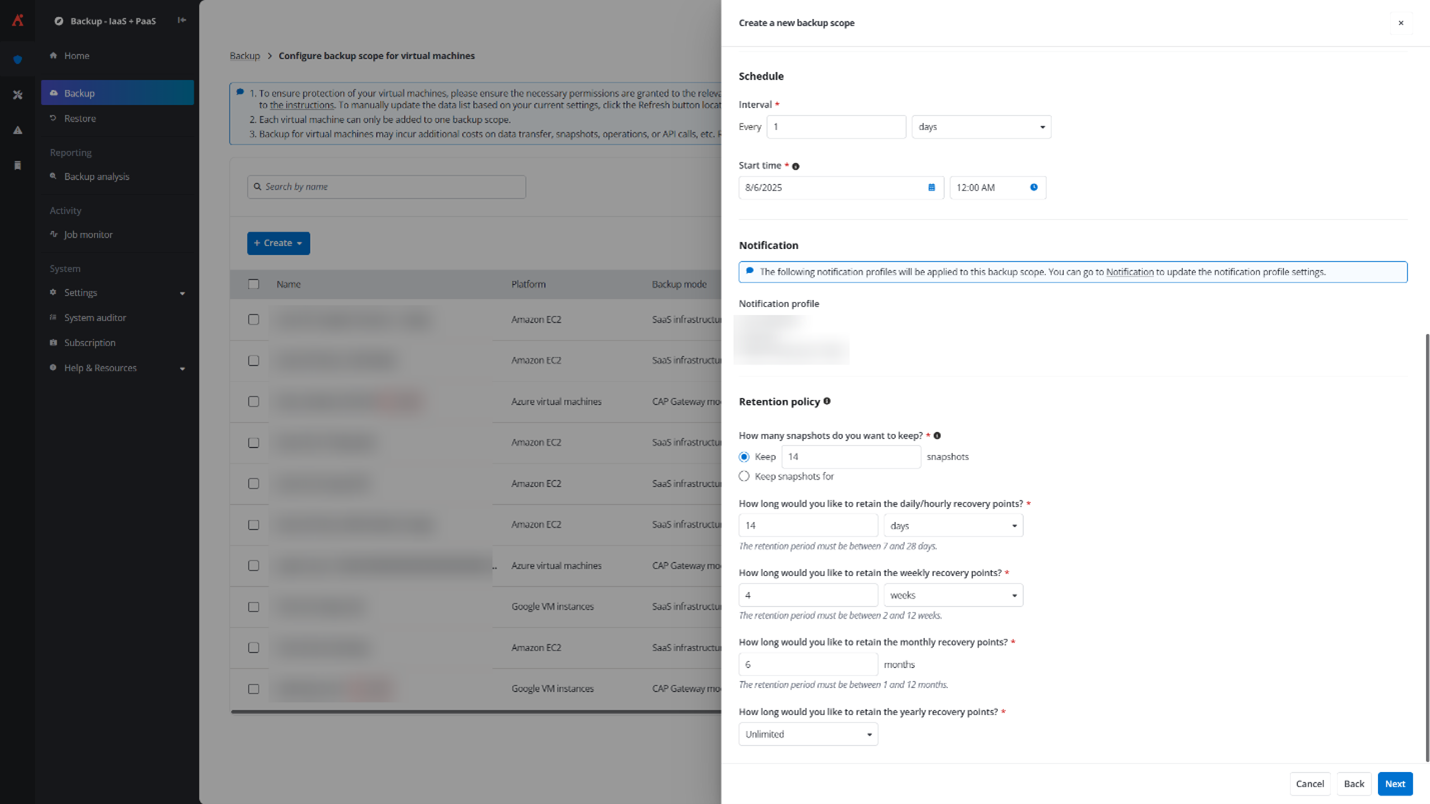
Configure enhanced, granular data retention settings to satisfy compliance and regulatory requirements.
Plus, Google Cloud Storage is now available as a default managed storage option, enhancing versatility across hybrid and multi-cloud environments.
Data Governance
What’s new in AvePoint Cloud Governance and MyHub?
August updates enable smarter provisioning, deeper lifecycle management, and expanded access control designed to streamline collaboration and ensure compliance from the start.
Library provisioning is now more intuitive, using parent site metadata to guide setup options and streamline the process. Admins can now define built-in actions for folders, columns, and views, allowing libraries to adapt to evolving usage scenarios without manual rework. Support for SharePoint list creation in dynamic services means users can request fully equipped collaboration spaces, such as Teams with prebuilt lists, right from the start. Admins also gain more flexibility with permanent or temporary site admin assignments, complete with automated welcome emails to streamline onboarding. New provisioning for Confide projects simplifies workspace requests and ensures consistent governance from day one.
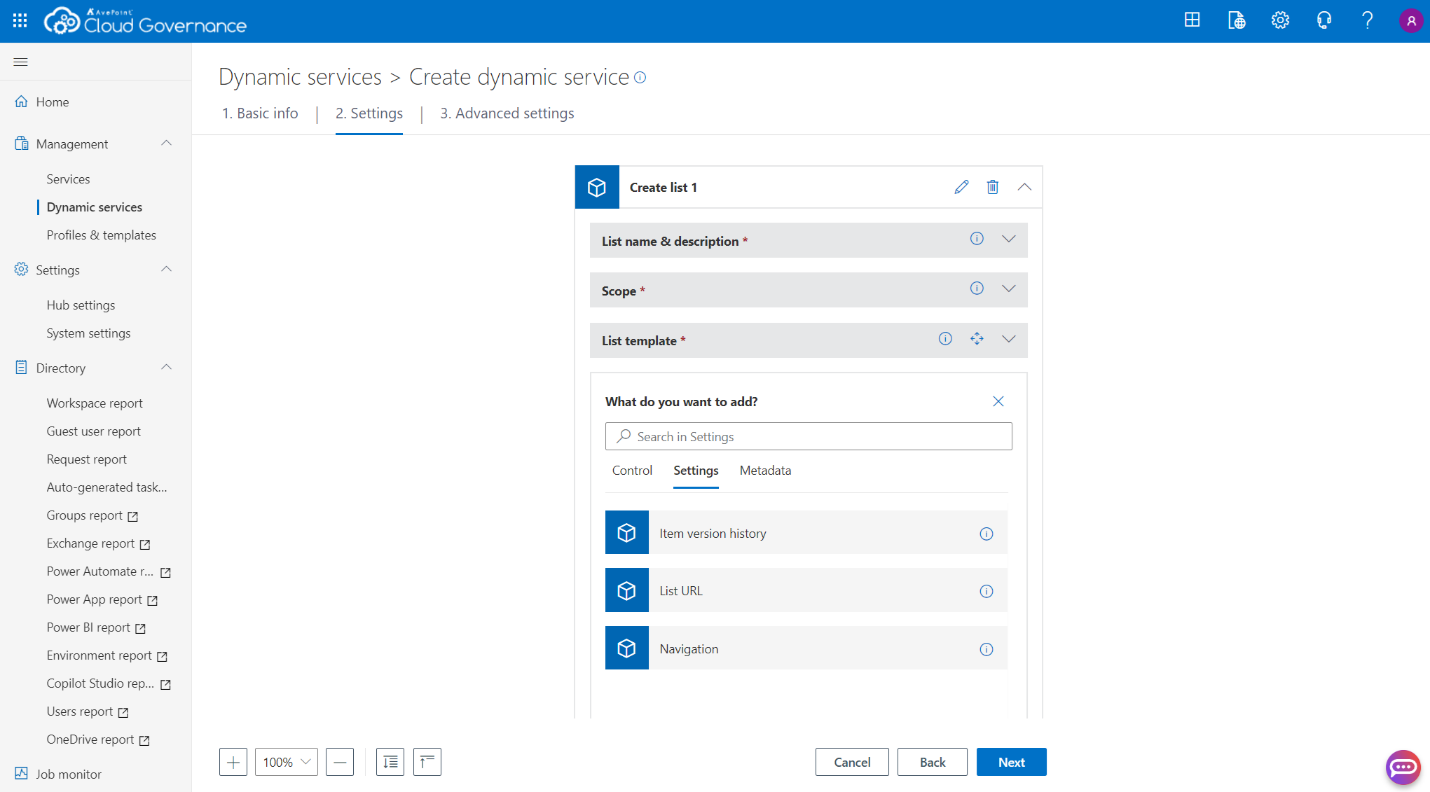
Configure SharePoint list creation in dynamic services in order to enable faster collaboration.
Lifecycle management is more robust with Confide project renewals and support for hybrid mailbox and group renewals, all accessible through the new MyHub interface. Governance continuity is preserved during workspace transitions, such as converting Microsoft 365 Groups to Teams or SharePoint Sites to Groups, minimizing disruption and maintaining policy enforcement.
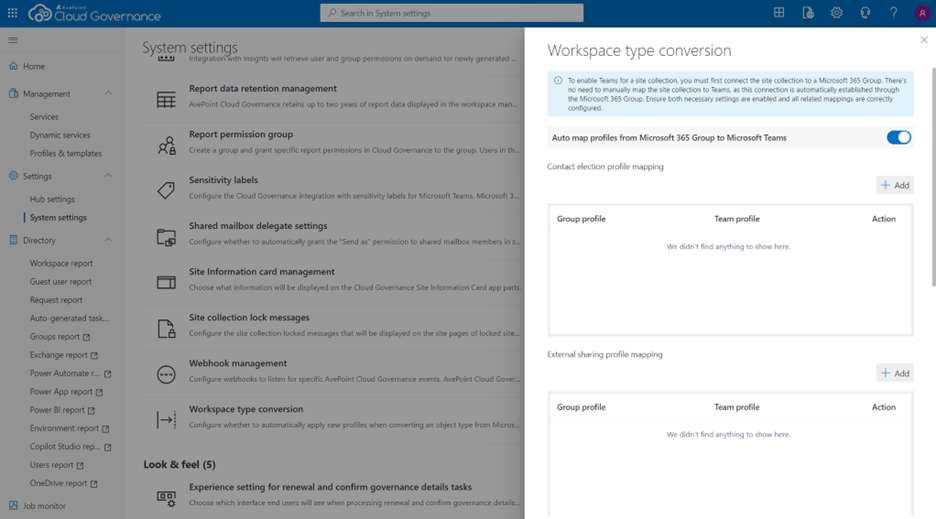
Maintain policy enforcement and minimize disruption during workspace conversions.
Access management improvements include a new Power BI role management service, guest user filtering by AD group, and a unified view in MyHub Spaces for managing governance objects like security groups, mailboxes, and guest users.
User experience enhancements include simplified Group and Team selection and the ability to publish curated workspace directories to specific user groups, helping users find what they need faster. Finally, new API endpoints and modern webhook configuration make Cloud Governance more extensible, enabling seamless integration with external systems and faster deployment of automated workflows.

Webhook configuration enables integration with external systems for faster workflow deployment.
Data Migration
What’s new in AvePoint Fly?
With our new migration forecasting calculator, you’ll know exactly whether you’re on track to hit your cutover date — no more guesswork, just clear, data-driven confidence. By calculating timelines based on your actual throughput speeds, you’ll turn complex migrations into well-orchestrated successes. You can now confidently answer if your migration will finish on time.
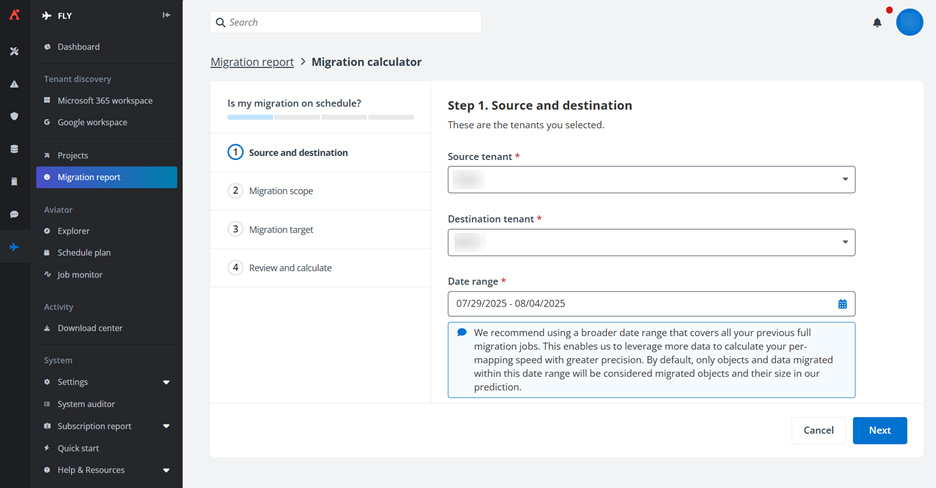
Get up-to-the-moment updates on your migration status instantly.
Microsoft 365 to Google Workspace Migrations are now available, supporting major workloads including:
- Exchange Online → Gmail
- SharePoint Online → Google Drive
- OneDrive → Google Drive
- Microsoft Teams → Google Drive/Google Groups/Google Chat Spaces
Information Lifecycle Management
What’s New in AvePoint Opus?
Opus continues to deliver smarter, context-rich tools for information lifecycle and data management. The new metadata-enhanced Records for Review page allows users to view classification, due dates, and custom properties at a glance, making disposal decisions faster and more informed. Detailed retention reporting now includes document and version-level insights for SharePoint and OneDrive, giving teams full visibility into what’s coming up for deletion and supporting audit readiness.
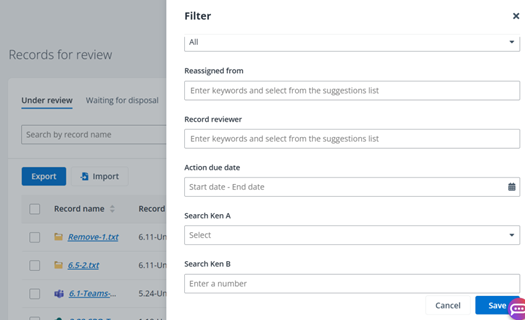
Embed critical business and retention context in the Records for Review page.
Storage Optimization now supports rules based on sensitivity label hierarchy, aligning data lifecycle actions with compliance policies. The new Retention & Destruction dashboard forecasts which archived items are scheduled for deletion based on retention rules. Updated job logic pre-calculates item-level details and projected savings, giving admins a clear view of upcoming pruning actions. Exportable reports help prevent accidental data loss and build trust in retention policies.
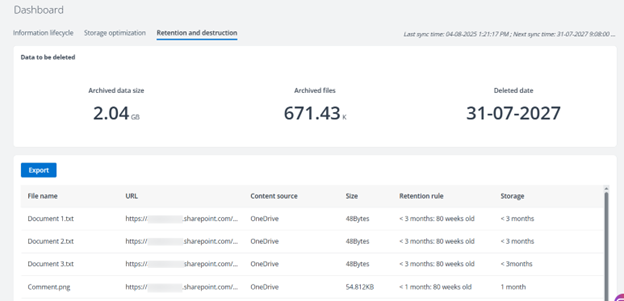
The Retention & Destruction dashboard forecasts which archived items are scheduled for deletion based on retention rules.
To help organizations manage version bloat, Opus now includes automated version destruction rules, allowing admins to safely and selectively delete outdated file versions without relying on risky scripts. For physical records, the new Return History tab completes the audit trail by logging every return action, improving accountability and simplifying reporting.
Opus also expands into hybrid environments with file share discovery, available in preview, enabling organizations to analyze on-premises file shares for redundant, obsolete, and trivial (ROT) data using the same interface and governance logic as their cloud content. This unlocks significant cost savings and reduces compliance risk across legacy systems.
Plus, users can locate relevant records faster using keywords or advanced filters. With support for indexing up to ten SharePoint Online metadata columns, these fields are now searchable, sortable, and visible in both the Records for Review and search pages, bringing business context directly into the Opus interface for accurate and efficient decision making.
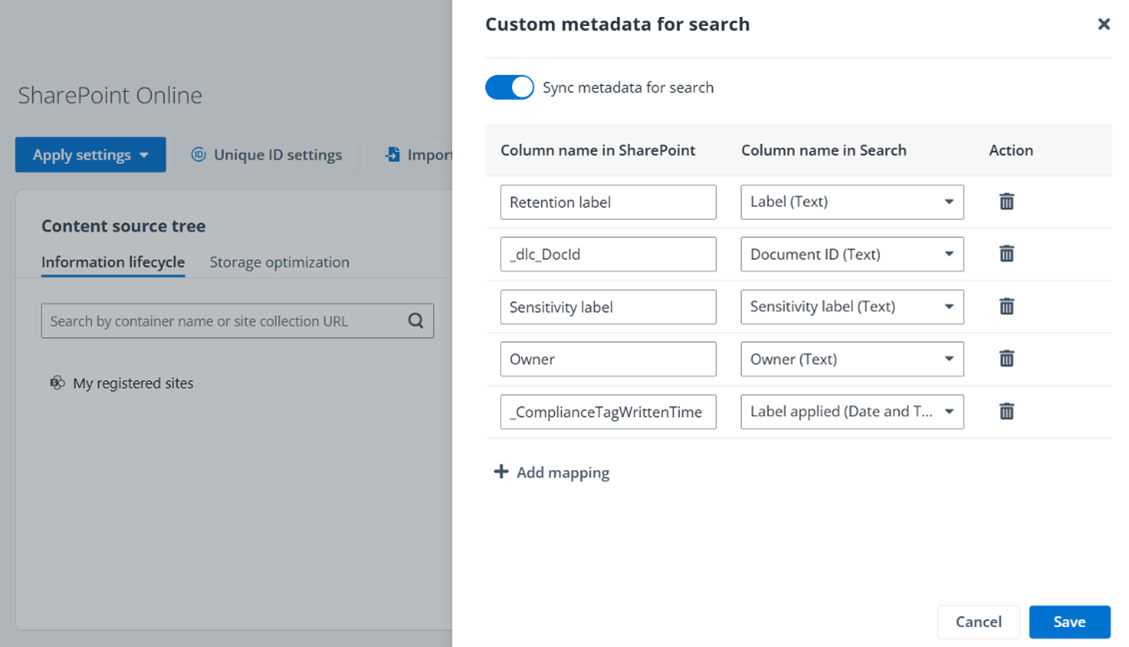
Index SharePoint Online metadata columns into Opus for faster decision making.
Access and Workflow Management
What’s new in AvePoint EnPower?
EnPower introduces powerful new capabilities to help IT teams streamline governance, improve audit readiness, and manage hybrid environments with greater control.
A new bulk timeline export feature allows admins to extract workspace lifecycle data – including provisioning, renewal history, metadata changes, and permission updates – into a centralized CSV report. This simplifies audits by consolidating key admin actions into a single, exportable view. Admins now have full timeline visibility for Power Apps and Flows, making it easier to track changes, identify who made them, and ensure compliance across Power Platform.
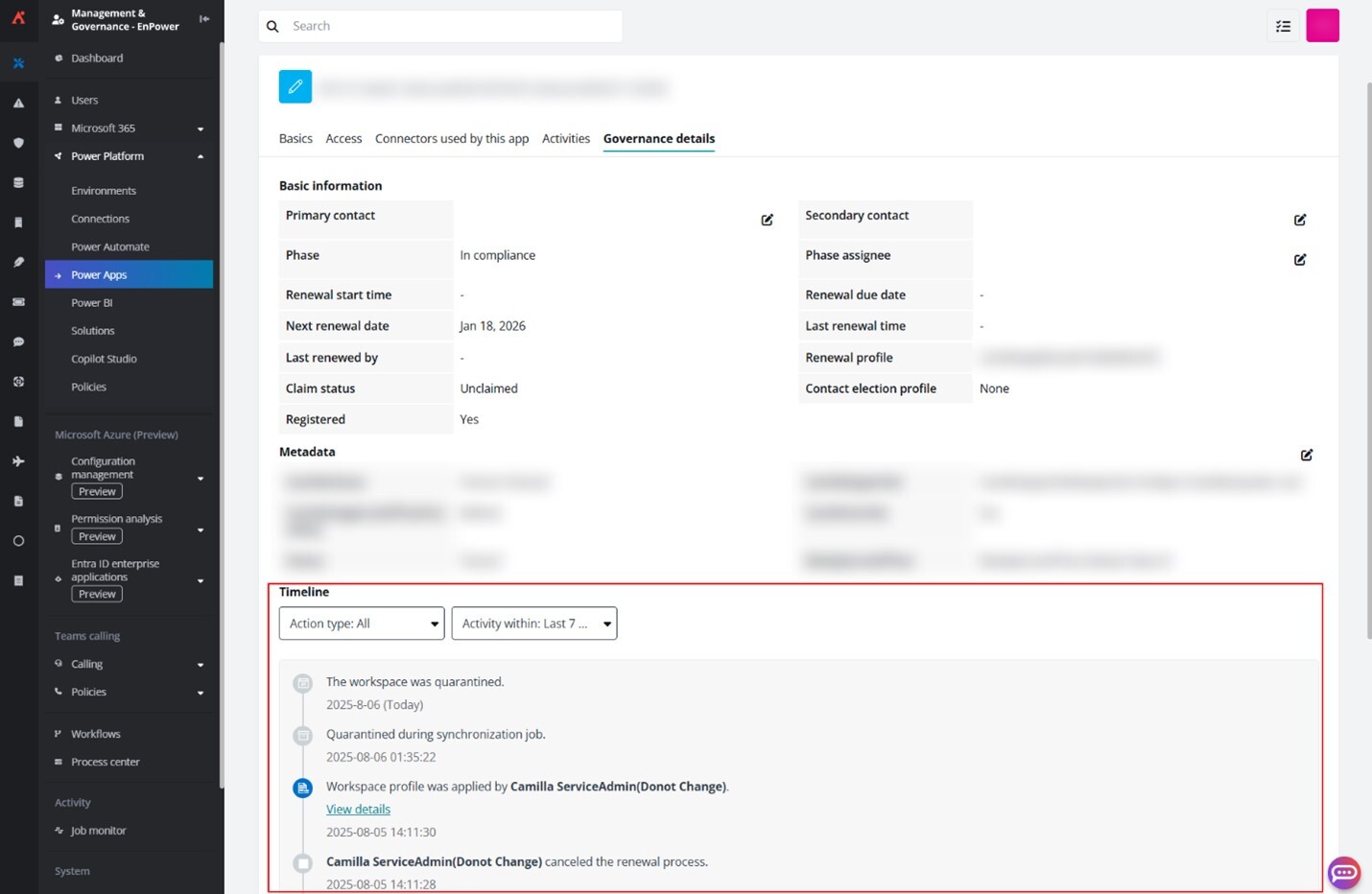
Bulk timeline export feature allows you to extract workspace lifecycle data to simplify audits.
Governance workflows are more flexible than ever with standardized actions across dynamic workflows and workspace modules. Admins can automate metadata tagging, trigger contact elections, and apply governance policies across all object types using consistent logic. The addition of “or” logic in dynamic condition groups further expands automation flexibility for Power Platform triggers, reducing complexity and the need for multiple workflows.
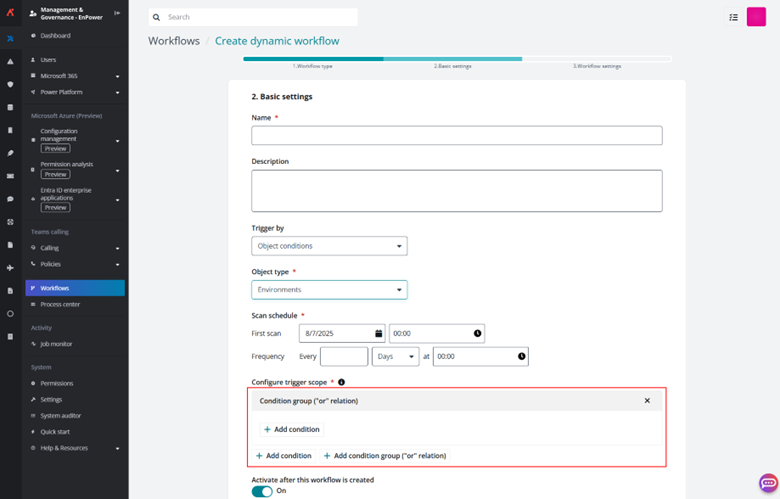
Expanded dynamic condition groups reduce complexity for Power Platform triggers.
EnPower now integrates directly with Microsoft 365 archive, allowing IT admins to archive SharePoint sites natively through permission-trimmed workflows. Admins can also bulk archive workspaces from static reports or embed archive actions into automated processes.
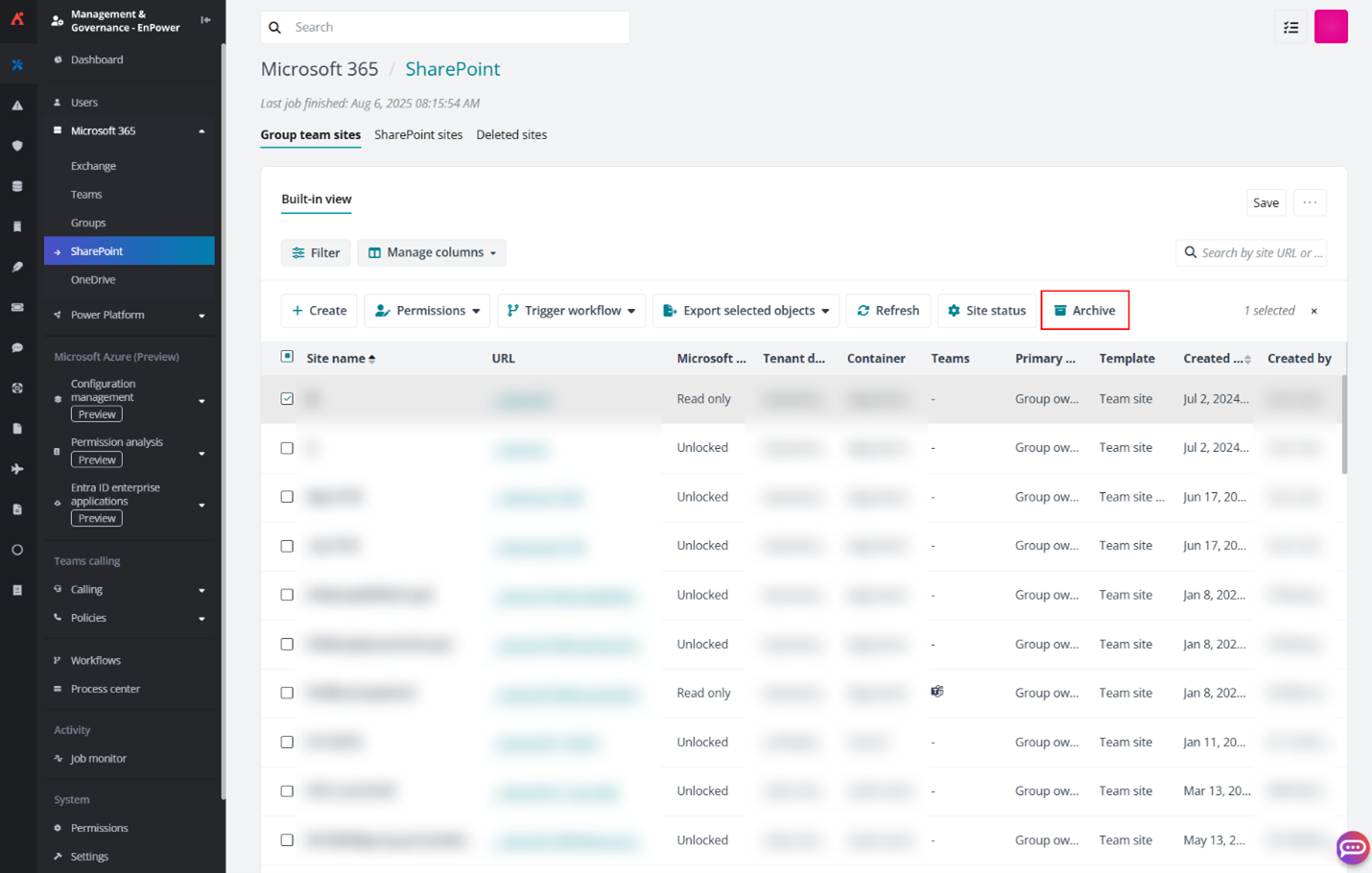
Archive SharePoint sites natively through permission-trimmed workflows
Support for hybrid Exchange enables governance actions on shared mailboxes, distribution lists, and security groups. Admins can trigger renewal tasks for owners to confirm contacts, metadata, and permissions — all within MyHub. Plus, additional role-based access controls (RBAC) have been refined to support partial tenant management, giving organizations more granular control over Exchange, site permissions, and DLP policies.
Policies and Insights
What’s new in AvePoint Policies for Microsoft 365?
AvePoint Policies bring smarter, data-driven enforcement as well as clearer, more actionable notifications to help organizations align governance with real-world risk.
Policy rules can now be configured using risk level, sensitivity level, and exposure level attributes discovered in Insights. These filters allow admins to apply controls, such as sharing restrictions or auto-expiration, based on actual content risk profiles, rather than static rules.
The new Content Sensitivity Label Enforcement rule takes this a step further by automatically applying sensitivity labels to content based on its Insights-derived attributes. Admins can define up to five configuration scenarios to apply different labels depending on the content’s risk, sensitivity, or exposure, protecting sensitive data at scale without manual tagging.
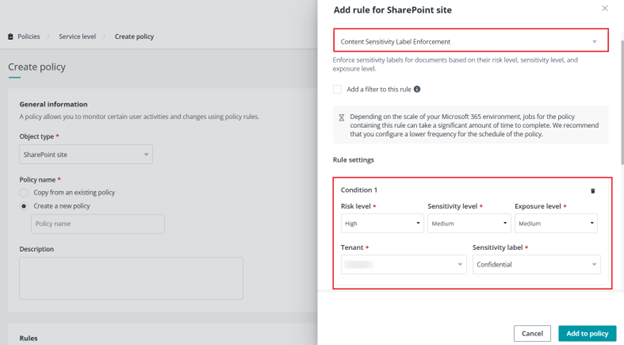
Create rules that target content based on its risk, sensitivity, and exposure level.
Integration between Policies and Cloud Governance now supports more precise violation reporting with the Library Creation Restriction policy. Admins can exclude authorized libraries created via Cloud Governance from triggering violations. This reduces false positives and helps teams focus on true governance gaps. Additionally, actions performed by app profiles and service accounts can now be excluded from violation alerts within this rule, improving enforcement accuracy.
Notification improvements include updated violation emails with dynamic object name references, making messages more relevant and easier to understand. Expanded support for file types such as PDF, TXT, and HTML ensures consistent enforcement across content formats. A built-in preview tool lets admins test notification templates with sample data before sending, reducing errors and improving communication.
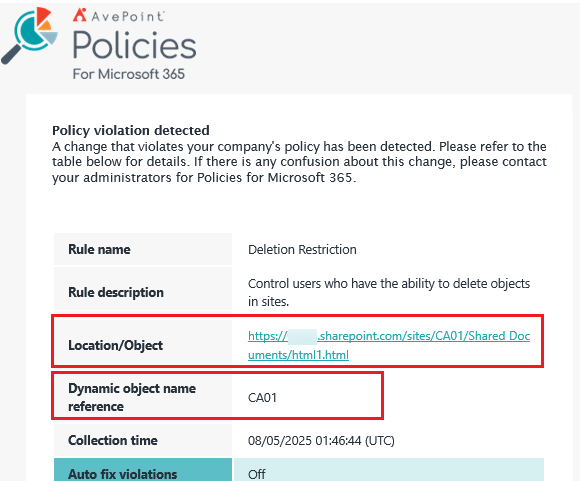
Dynamic object name references in notification templates make messages more relevant and easier to understand.
Plus, improved logic and messaging for tenant-level policy rule configuration now alert admins when unsupported group conditions are used, providing clearer guidance and helping teams resolve issues quickly and confidently.
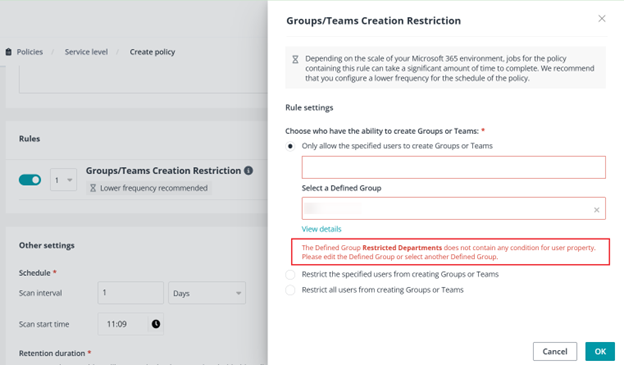
Smarter error messaging when unsupported group conditions are used in tenant-level rules make issue resolution easier.
What’s new in AvePoint Insights for Microsoft 365?
AvePoint Insights continues to evolve as a central hub for risk visibility, policy enforcement, and multi-cloud governance, offering new ways to take action directly from your data.
This release introduces bulk remediation capabilities, allowing admins to run one-time policy rules directly from within Insights. Whether removing shadow users from SharePoint Online sites or enforcing sharing link expiration, these actions come with full reporting and audit logging, streamlining remediation and reducing manual effort.
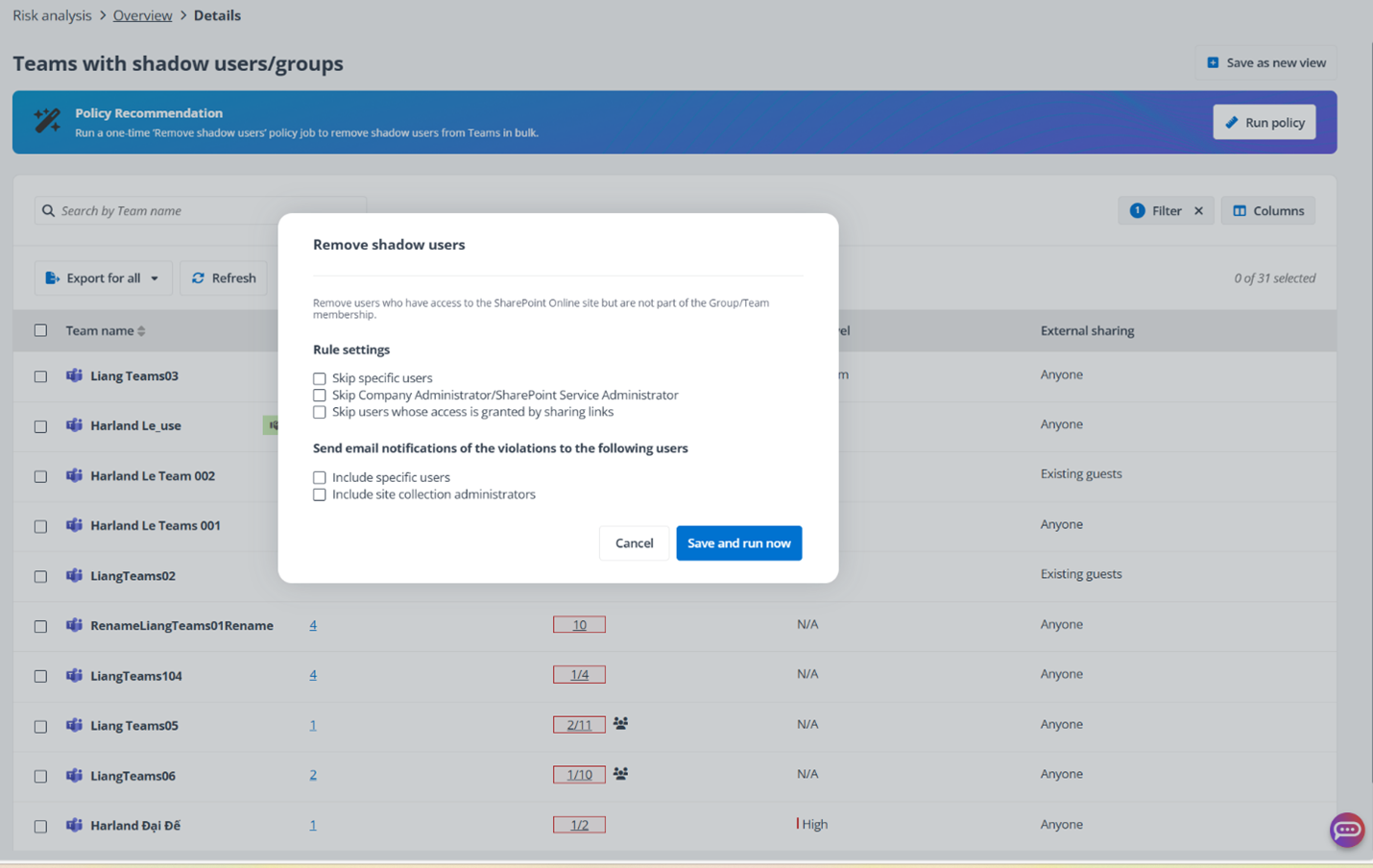
Configure settings for policy recommendations on shadow user reporting.
Insights now powers policy rule filtering using risk level, sensitivity level, and exposure level, enabling organizations to target high-risk content with precision. These attributes can automatically trigger controls like link expiration or sharing restrictions, helping organizations strengthen their security posture with targeted, data-driven governance.
The new Content Sensitivity Label Enforcement rule allows admins to automatically apply sensitivity labels to files based on their Insights profile. With support for multiple configuration scenarios, organizations can protect sensitive content at scale, without manual tagging.
Multi-cloud support expands with a new Google Cloud Platform (GCP) dashboard module, giving licensed users visibility into GCP environments through configurable sync settings. For Salesforce, admins can now define container scope using Data Sensitivity or Compliance categorization, and view record-level permissions directly from the Detailed Records report, making access governance more transparent and actionable.
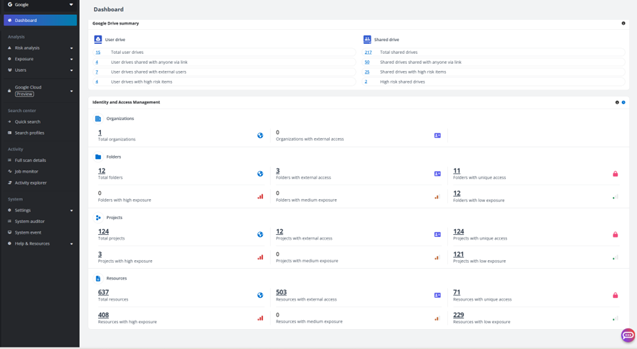
Insights for Google Cloud Platform dashboard module now available.
Dashboards for Microsoft 365, Google Workspace, and Salesforce have been refreshed for better usability. Cloud Governance data points now include site status and admin contact details, simplifying remediation workflows. The Risk Overview Export has been rebranded as the DSPM report, now structured around Data Discovery & Classification, Risk Assessment, and Policy Configuration & Management. This new format provides clearer context and sets the stage for future integrations, starting with the Intelligent Remediation page.
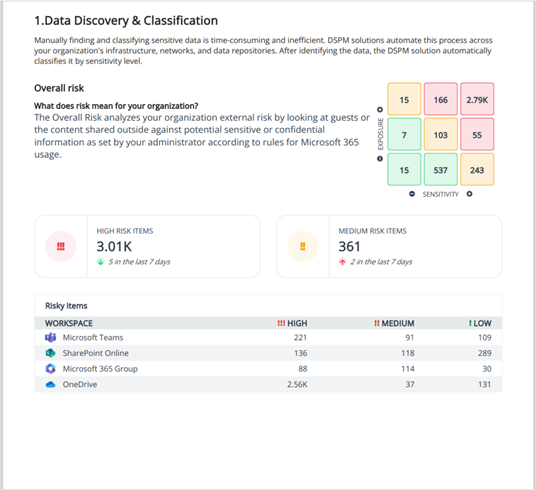
Data Discovery & Classification Reporting offers a single-pane view of organizational risks.
Learn More About These Updates
Have you signed up for the Account Portal? It’s where you go to access user guides, release notes, how-to videos, free trials, and more! The info you need for this release can be found by simply clicking around the portal. Signing up is easy, and navigating is easier than ever.

Esther is AvePoint's Director of Technical Writing, with a specialization in communicating product updates and platform updates.