

Microsoft has recently communicated that, beginning in March 2026, it will more consistently enforce its longstanding Microsoft 365 throttling guidance. You may have seen similar messaging from other vendors across the ecosystem. We want to be clear and direct about what this means for you — and what it does not.
The Short Answer
For customers and partners using AvePoint’s recommended configurations, you should not expect disruption or negative impact. This is an enforcement update, not a policy change, and it reinforces guidance Microsoft has published and communicated for years.
Why Most Customers Will See No Impact
Microsoft applies throttling at the application level and has always expected applications to be:
- Scoped one application per workload
- Clearly identified by purpose
- Properly decorated so Microsoft can recognize and manage traffic correctly
This is not new guidance — and it is exactly why our platform was architected this way from the beginning.
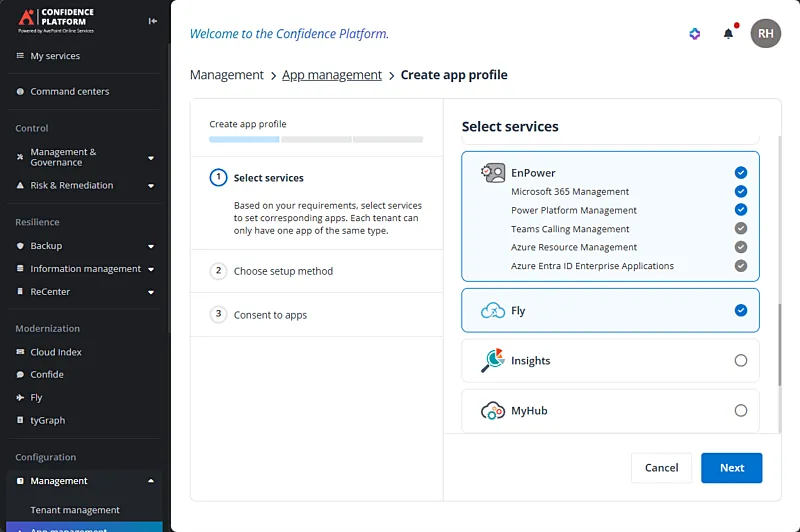
Example: Connecting your AvePoint Tenant to Microsoft 365 by selecting the appropriate workload and application from our list of services.
Our onboarding experience, app registration model, and workload separation were deliberately designed to align with Microsoft’s published best practices in mind. Each workload, such a migration, backup, archiving, etc., is isolated behind its own app identity, allowing Microsoft to understand what the traffic is doing and prioritize it appropriately. In this model, your migration, backup, archiving, and other workloads in the Confidence Platform will each get a full complement of API call allocation. Because of this, customers running supported setups are already operating within the boundaries Microsoft is now enforcing more consistently.
In short: if you followed our guidance when you deployed, you are already aligned.
What Is Changing Under the Covers
Microsoft is tightening enforcement against patterns that attempted to bypass limits — such as “work arounds” that involved pooling multiple app registrations to perform the same workload (e.g. establishing multiple app registrations all used for a backup application) in the hope these would be seen as different “apps” by Microsoft’s service and thereby each get their own API call allocation to gain more throughput. These approaches are no longer viable, as Microsoft will now be more effectively recognizing these work-around attempts and applying their stated limits across the collection of app registrations doing the job.
If you have questions about your specific configuration or want to run a quick check against our best practices, feel free to reach out to our AvePoint Support Team.
Need More Throughput? There Is a Supported Path
For very large environments or time-sensitive operations (for example: urgent restores, large migrations, or high-volume backups), Microsoft offers SharePoint Service Prioritization. This allows you to prioritize specific application traffic and scale throughput beyond standard limits using a pay-as-you-go model.
This configuration is managed entirely by you with Microsoft:
- You select the app(s) to prioritize by App ID
- You define the time window and capacity
- You are only charged for usage above standard limits
If enabled, our platform will simply operate at the fastest speed your tenant supports — no product changes required.
Bottom Line
This enforcement reinforces longstanding Microsoft guidance. Our Confidence Platform, onboarding model, and architecture already align with it. You can move forward with confidence — and when additional throughput is needed, Microsoft provides a supported, transparent path to get there.

As AvePoint's Chief Product Officer, John Hodges guides the Company's product strategy and product experience teams to accelerate innovation and expand the offerings of the AvePoint Confidence Platform. John is instrumental in generating, evaluating, and implementing product innovations that make AvePoint an industry-leading product organization. He leads with deep product expertise and an unmatched ability to translate complex technical concepts into actionable insights for customers, partners and internal teams.